-
iTop Easy Desktop - No.1 Desktop Organizer for Windows
-
Automatically organize and customize Windows desktop. Make your messy desktop look clean and professional within seconds.

4 Best Weather Widget for Desktop for Real-Time Information
Looking for the best weather widget for desktop? Check out the top 4 options that provide real-time forecasts so you can stay informed with the latest info.
What is a weather widget for desktop? It’s a handy tool that allows users to access weather information quickly. The feature displays current conditions, hourly forecasts, and alerts directly on your screen, which can help you easily plan outfits or outdoor activities. In this article, we will dive into the benefits of using a weather widget for desktop, introduce the best 4 weather widgets for Windows, and provide a step-by-step guide on how to add a weather widget for desktop for more convenience.
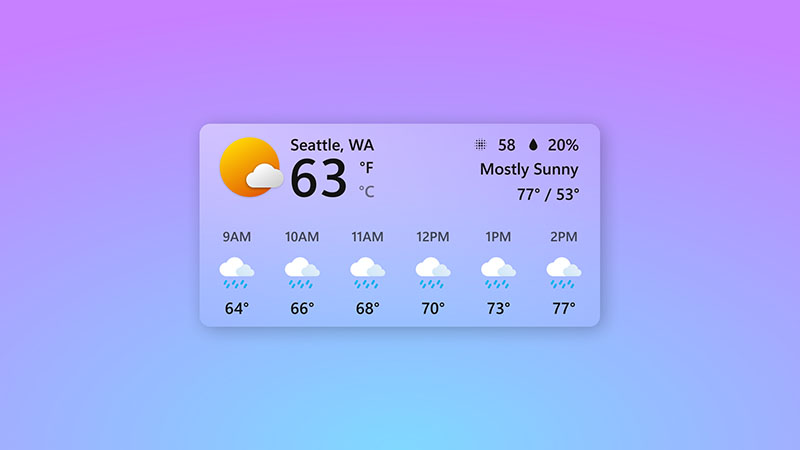
A weather widget for desktop offers numerous advantages that enhance productivity and daily life. Here are the major ones:
View current temperature, humidity, wind speed, and conditions at a glance. All the information is provided in real-time.
Stay informed with timely weather updates and severe weather alerts. You can adjust schedules, routes, or activities in advance and avoid unexpected disruptions.
Personalize the widget’s layout, themes, and displayed metrics, such as UV index or air quality, to focus on what matters most to you.
There is no need to open a browser or a separate app; it can keep your desktop organized and help you stay focused.
Looking for the best weather widget for desktop? You are in luck! In this part, we will introduce the top 4 options for Windows users. Just make sure to follow along.
1. iTop Easy Desktop – Real-time Weather Widget for Windows 11/10
When it comes to the best weather widget for Windows, iTop Easy Desktop stands out as a top choice. This free Windows desktop organizer offers a range of powerful built-in widgets, including Weather, Calendar, Clock, Schedule, and more. You can easily add these widgets to your desktop to boost productivity and keep essential information visible at a glance.
In addition, iTop Easy Desktop is lightweight and user-friendly, making it easy to navigate even for beginners. Best of all, it doesn’t require a subscription to access its core features. This makes it an excellent option for users who want to organize desktop files and use a weather widget for Windows without unnecessary complexity or extra costs.

- iTop Easy Desktop - Keep Your Desktop Organized
-
- Box desktop icons to declutter your workspace
- Manage documents, games, media files, etc., at 1 click
- Add calendar, clock and other widgets to desktop
- Locate any file you want instantly with search box
Benefits of Using iTop Easy Desktop
Accurate real-time weather data: The weather widget for Windows 10/11 pulls precise information in real time. You can stay informed with up-to-date weather conditions, forecasts, and alerts for more reliable planning.
Customize the weather widget as you like: Users can adjust themes, colors, and layouts to blend seamlessly with their desktop. It’s the best weather widget for Windows 10/11 desktop to create a personalized experience with enhanced aesthetics.
Lightweight and intuitive weather view: As a lightweight weather widget for Windows, it runs smoothly without consuming excessive system resources. Its clean interface allows quick weather checks at a glance, making it ideal for everyday use.
More effective desktop organization features: More than just a weather widget for Windows 10/11, iTop Easy Desktop also works as a smart desktop organizer. It automatically arranges icons, files, and folders into organized boxes, which can turn your desktop into a clean and efficient workspace instantly.
2. Microsoft Widget – Default Weather Widget on Windows
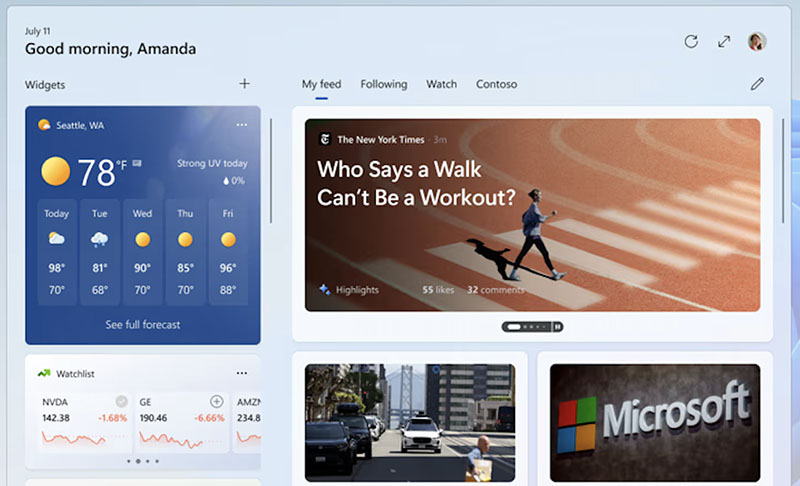
Microsoft’s built-in weather widget comes pre-installed on Windows and is seamlessly integrated into the Widgets panel. It provides a clean overview of daily and hourly forecasts, along with detailed weather conditions such as temperature, precipitation chance, and wind information. The weather widget Windows 11/10 allows you to add multiple locations and switch between them quickly.
Pros:
Convenient taskbar integration for quick information
Customizable weather widget for desktop
Completely free Windows 11 widgets on the desktop
Support notifications for urgent weather events
Cons:
Lack details compared to full weather apps
Need a Microsoft account for full personalization
3. Myforecast Desktop Widget – Best Weather Widget for PC
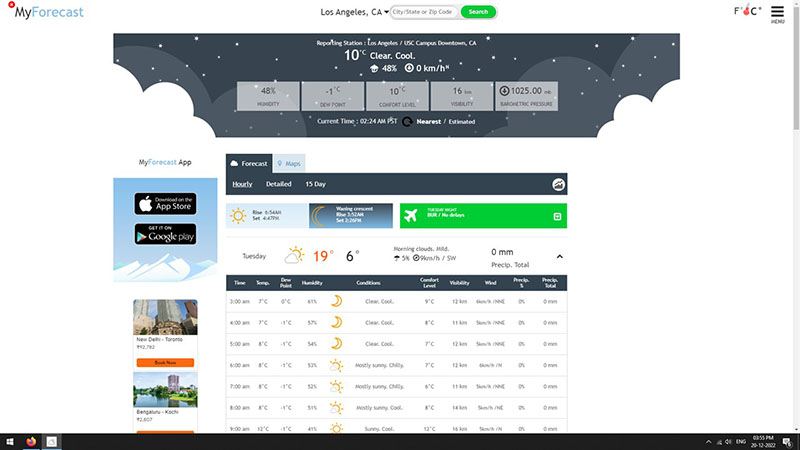
Supported by CustomWeather, the MyForecast Desktop Widget is a solid choice that offers hyperlocal weather worldwide. This powerful weather widget for desktop offers in-depth information. For instance, severe alerts, live radar, satellite maps, hourly forecasts, long-term outlooks, hurricane tracking, and marine weather. Myforecast Desktop Widget is straightforward to use with clean displays and intuitive navigation.
Pros:
Hyperlocal accuracy with global coverage
Comprehensive data for forecasts, alerts, radar, and extreme weather tracking
Well-integrated and stable weather widget for Windows
Cons:
Limited customization options for appearance
Require a constant internet connection for real-time updates
Basic design may feel slightly outdated compared to modern widgets
4. Lively Weather – Animated Weather Widget for Windows
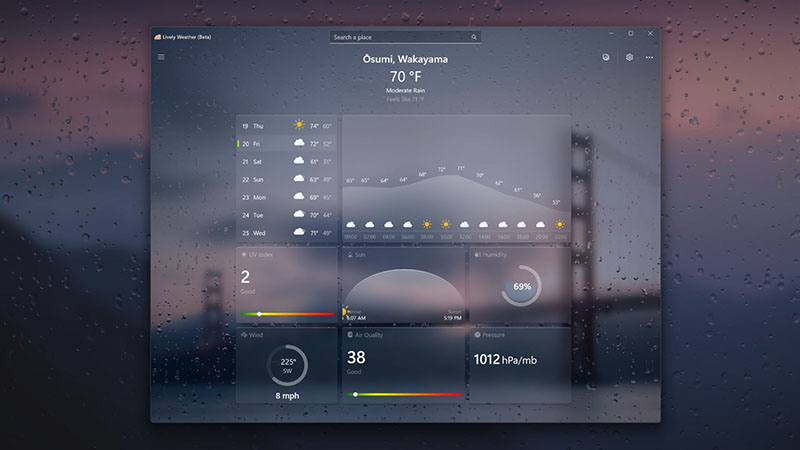
Lively Weather, an open-source project on GitHub and available for free on the Microsoft Store. It provides weekly forecasts, air quality data, support for multiple weather sources, and the ability to pin up to five locations. The Fun Mode supports custom scenes with AI-generated depth backgrounds. You can relax with its weather white noise sound effects, or select custom sound in screen saver mode to use it as a white noise app.
Pros:
Free weather widget for Windows 10/11
Interactive animations and a built-in white noise feature
Appealing UI & customizable screensaver modes
Cons:
No radar or deep meteorological features
No push notifications for weather alerts
Animations may increase system resource usage
If you are looking for the best weather widget for Windows 10/11 free download, iTop Easy Desktop is an excellent choice. Its simple and intuitive interface makes it easy to use, even for beginners. Here’s how to add a weather widget to your desktop.
Step 1. Free download the desktop software for your Windows PC.
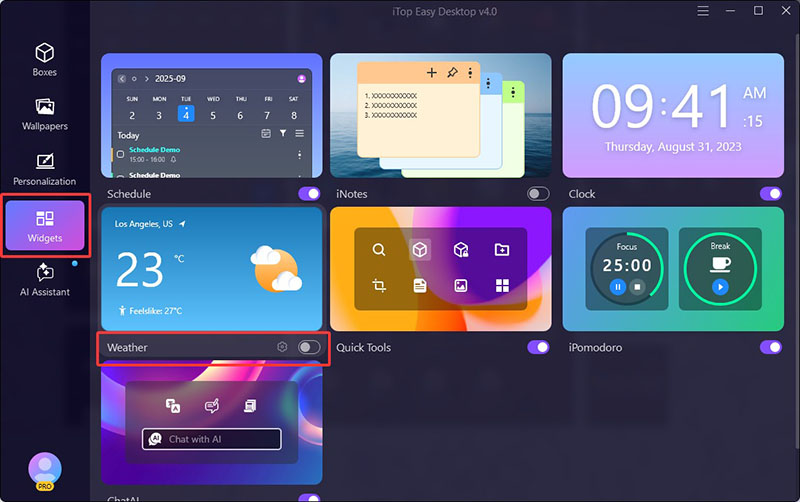
Step 2. Go to Widgets > Weather. Enable the weather widget for Windows.
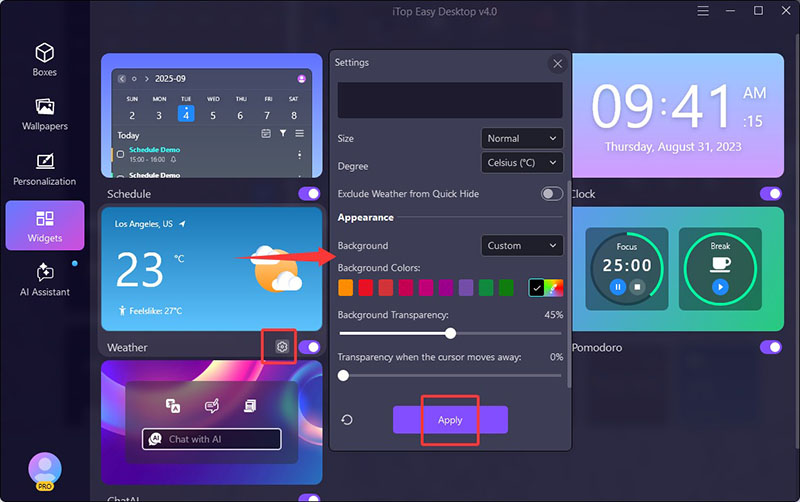
Step 3. Click on the Settings icon to adjust appearance, like background color and transparency, as you like.
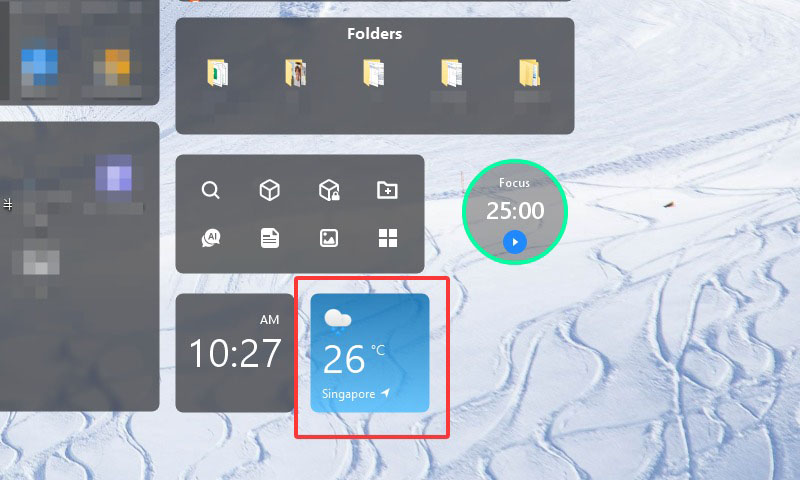
Step 4. Now the weather widget will appear on your desktop, giving you quick access to real-time weather information.
That’s how to add widgets to desktop with iTop Easy Desktop. Additionally, the software offers a variety of other useful widgets, such as Calendar, Clock, Schedule, and more. Let’s take a closer look at these additional widgets below.
iTop Easy Desktop isn’t just about weather. It’s the best desktop organizer for Windows that is packed with rich features. Here are other powerful widgets that can improve your productivity effectively.
Schedule: One of the best Windows desktop calendar widgets. Display upcoming tasks and reminders in a clear calendar view to help you manage deadlines efficiently.
iNotes: You can add customizable sticky notes directly to your desktop. A practical feature for quick ideas, to-do lists, and reminders.
Clock: The clock widget for Windows provides world time zones in a sleek widget, which is great for remote workers to track times for global synchronization.
Fancy Taskbar: Adjust the Windows taskbar transparency for faster navigation and enhanced desktop aesthetics.
Quick Tools: Offer instant access to frequently used apps, folders, and system functions through desktop portals.
iPomodoro: Use Pomodoro timers with focus and break intervals. Good for freelancers to improve concentration and promote a healthy work-rest balance.
The Bottom Line
A weather widget for desktop delivers real-time weather information at a glance. With the top four options outlined above, you can stay informed about current conditions, forecasts, and alerts now. Among them, iTop Easy Desktop stands out because it does more than just provide weather updates; it also helps keep your workspace clean and well organized with powerful desktop management tools and multiple productivity widgets. Just try it and organize your desktop and boost productivity with ease for free now!
- iTop Easy Desktop - Keep Your Desktop Organized
-
- Box desktop icons to declutter your workspace
- Manage documents, games, media files, etc., at 1 click
- Add calendar, clock and other widgets to desktop
- Locate any file you want instantly with search box