-
iTop Easy Desktop - No.1 Desktop Organizer for Windows
-
Automatically organize and customize Windows desktop. Make your messy desktop look clean and professional within seconds.

Best Fortnite wallpaper (4K, GIF & Live) for Windows – Free HD Sources
Get the best Fortnite wallpaper options, including 4K, GIF, and live wallpapers. Learn the top platforms and how to set live Fortnite wallpapers on PC easily.
Fortnite remains one of the most visually distinctive games in the world, which is why demand for Fortnite wallpaper, especially Fortnite wallpaper 4k, continues to grow among players. From iconic skins to vibrant battle scenes, these Fortnite wallpapers let fans bring the game’s energy directly onto their desktop screens. Whether you prefer static images or animated backgrounds, there are countless styles to explore.

At the same time, modern customization tools make it easier than ever to turn a simple Fortnite wallpaper into a fully interactive desktop experience. From high-resolution images to motion-based designs like Fortnite wallpaper gif files, users now expect more than just a background - they want immersion. In this guide, you’ll discover where to find the cool Fortnite wallpapers and how to use them effectively on Windows.
Fortnite’s art style is bold, colorful, and constantly evolving. Each new season introduces skins, collaborations, and environments that naturally translate into visually appealing Fortnite wallpapers. This steady stream of fresh content keeps wallpapers relevant and highly shareable.
Another reason for their popularity is personalization. Players enjoy showcasing their favorite characters or moments through a cool Fortnite wallpaper or even a collection of cool Fortnite wallpapers. With customization tools improving, wallpapers are no longer static—they’ve become part of a dynamic desktop identity.
Before choosing the right Fortnite wallpaper, it helps to understand the different formats available. Each type serves a different purpose depending on your device performance and visual preference.
Here are the most common types:
●Standard HD Wallpapers – Basic background Fortnite wallpaper images for everyday use
●4K Wallpapers – Ultra-clear visuals ideal for large or high-resolution monitors
●Fortnite wallpaper GIF – Lightweight animated loops with simple motion
●Live Wallpapers – Fully animated backgrounds with smooth transitions
●Video Wallpapers (MP4) – High-quality motion backgrounds converted from gameplay or trailers
●Minimalist Wallpapers – Clean designs focused on characters or logos

After understanding different wallpaper types, the next step is choosing reliable platforms. A good source should offer high-quality Fortnite wallpaper options, multiple formats, and easy downloads. Below are six platforms that balance quality, variety, and usability for both static and dynamic needs.
1. Wallpaper Engine – Best for Live Fortnite wallpaper
Wallpaper Engine is one of the most powerful tools for creating and downloading live Fortnite wallpaper content. Available on Steam, it provides thousands of animated wallpapers, including interactive and audio-reactive designs inspired by Fortnite.

Users can also import their own videos or customize existing wallpapers, making it ideal for advanced personalization. However, since it runs real-time animations, it may consume more system resources compared to static options.
Pros: Rich live wallpapers, customization options
Cons: Paid, higher system usage
2. Wallhaven – High-Quality Fortnite wallpaper 4K Library
Wallhaven is a go-to platform for clean, high-resolution Fortnite wallpapers, especially if you’re searching for Fortnite wallpaper 4k content. Its powerful filtering system makes it easy to find wallpapers by resolution, color, and style.
It’s completely free and frequently updated, making it a reliable source for both casual users and enthusiasts. You can find massive 4K wallpaper for PC easily.

Pros: Free, high-quality 4K images
Cons: No animated wallpapers
3. iTop Easy Desktop – Best All-in-One Fortnite Wallpaper Solution
iTop Easy Desktop is an all-in-one solution designed for users who want more than just a static Fortnite wallpaper. It allows you to turn videos into live wallpapers, making it perfect for Fortnite gameplay clips, trailers, or even Fortnite wallpaper GIF conversions into smoother formats.
Beyond wallpapers, this desktop organizer for Windows enhances your desktop experience with built-in tools like a smart desktop organizer, helping keep icons tidy while showcasing dynamic backgrounds. When you double-click your computer screen, all icons on your desktop will immediately disappear and hide. This allows you to enjoy your Fortnite wallpapers more immersively.
Besides, it offers a rich widget tool, such as a desktop Calendar widget, Weather widget, Notes widget, Clock widget, etc., and integrates well with its desktop organizer for Windows.

Compared to heavier tools, it runs efficiently and is beginner-friendly, making it ideal for users who want both performance and customization.
Pros: Video-to-wallpaper, lightweight, multi-functional
Cons: Smaller wallpaper library currently
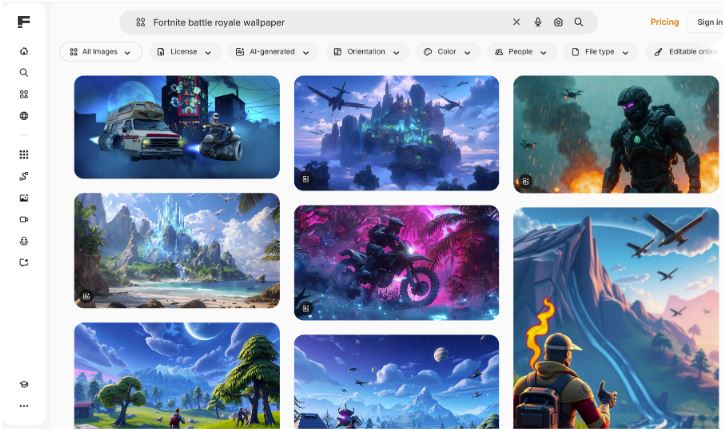
4. Freepik – Creative Fortnite wallpaper Designs
Freepik is a strong option for users looking for creative and stylized Fortnite wallpaper content. Instead of focusing only on ready-made wallpapers, it offers editable design assets, illustrations, and templates.
This makes it ideal for creating a unique or cool Fortnite wallpaper tailored to your preferences. While many resources are free, some premium assets require a subscription or attribution.
Pros: Unique designs, customizable assets
Cons: Limited ready-to-use wallpapers
5. Reddit – Community-Shared Fortnite wallpapers
Reddit hosts a wide range of user-generated Fortnite wallpapers across various communities. It’s a great place to discover rare, trending, or seasonal designs that aren’t available on traditional platforms.
You’ll often find cool Fortnite wallpapers, fan edits, and even animated previews shared by other players. The downside is that content quality can vary, and searching isn’t always structured.

Pros: Unique content, active community
Cons: Inconsistent quality, harder navigation
6. Pinterest – Endless Fortnite Wallpaper Inspiration
Pinterest is perfect for browsing and discovering new Fortnite wallpaper ideas across different styles. It offers curated boards filled with everything from aesthetic layouts to background Fortnite wallpaper collections and themed designs.

However, most images link to external sources, so download quality may vary.
Pros: Huge variety, strong inspiration
Cons: No direct downloads, external links required
After exploring each platform, it’s easier to choose the right Fortnite wallpaper source when you compare them side by side.
| Platform | Best For | Wallpaper Type | Ease of Use |
| Wallpaper Engine | Advanced users | Live / Animated | Medium |
| Wallhaven | Image quality lovers | Static / 4K | Easy |
| iTop Easy Desktop | All-in-one users | Live / Video / GIF | Very Easy |
| Freepik | Designers | Static / Editable | Medium |
| Community content | Static / GIF | Medium | |
| Inspiration seekers | Mixed | Easy |
From this comparison, it’s clear that if you want simple downloads, platforms like Wallhaven work best. But if your goal is to upgrade from a basic Fortnite wallpaper to a fully dynamic desktop, tools like iTop Easy Desktop provide a more complete solution.
After exploring different platforms, you may want a simple way to apply your favorite Fortnite wallpaper dynamically. This is where iTop Easy Desktop becomes especially useful due to its simplicity and flexibility.
Step 1. Download and install iTop Easy Desktop from the official site
Step 2. Upload a Fortnite video or select a built-in wallpaper

Step 3. Click “Set as Wallpaper” and adjust playback settings
Within minutes, you can transform any Fortnite wallpaper into a smooth live background.
Choosing the right Fortnite wallpaper depends on both aesthetics and performance. With so many formats available, it’s important to balance visuals with usability.
Here are some practical tips:
Match your resolution – Use 4K wallpapers for large monitors
Optimize performance – Avoid heavy live wallpapers on low-end PCs
Choose loop-friendly animations – Smooth transitions improve experience
Pick your style – From minimal to action-packed scenes
Test different formats – Try static, GIF, and video wallpapers
The Bottom Line
A great Fortnite wallpaper can completely transform your desktop, whether you prefer static images or dynamic visuals. With so many platforms and tools available, it’s easier than ever to find and customize the perfect look. Choose your preferred platform or tool and set your favorite Fortnite wallpaper now.