-
iTop Easy Desktop - No.1 Desktop Organizer for Windows
-
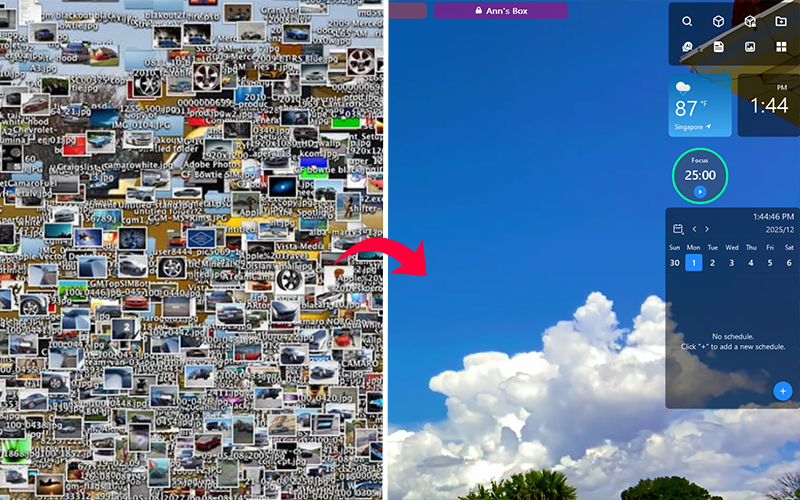
Automatically organize and customize Windows desktop. Make your messy desktop look clean and professional within seconds.

Top Desktop Icon Organizer Tools for Windows: Organize Icons Faster and Smarter
Discover the best desktop icon organizer software for Windows. Compare the top desktop icon managers to organize icons and keep your desktop clutter-free.
A cluttered desktop can become a productivity problem. When files, folders, and shortcuts pile up on your screen, it becomes harder to locate what you need. That’s why many users start searching for a reliable desktop icon organizer to automatically arrange icons and keep the workspace tidy.
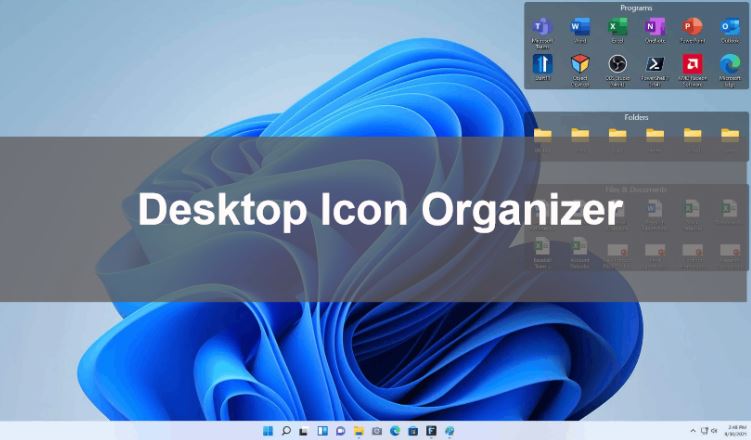
For Windows users, especially, using a dedicated Windows desktop icon organizer can save time and reduce frustration. Instead of manually rearranging files every day, modern desktop icon organizer software provides smart sorting, visual grouping, and customization features that help transform a chaotic desktop into an organized and efficient workspace.
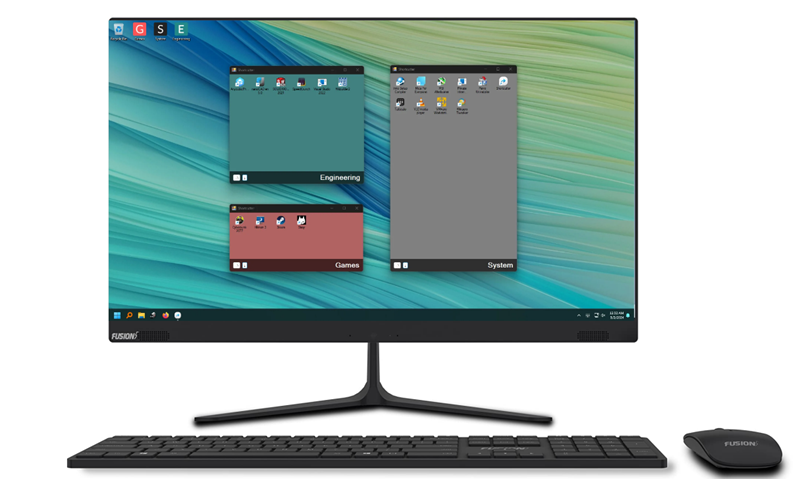
A desktop icon organizer is a tool that automatically arranges and groups icons on your computer desktop. Instead of manually sorting files and shortcuts, these tools create visual containers or sections that keep your desktop clean and easy to navigate.
A good Windows desktop icon organizer can automatically group icons, improve desktop icon organization, and help users quickly find files. Many modern desktop icon organizer Windows 11 or 10 software tools also include extra features such as widgets, layout backup, and customization options.
As more files and shortcuts accumulate on the desktop, it becomes harder to keep everything organized and harder to find what you want quickly. While Windows provides basic sorting options, these tools are often not enough for effective desktop icon organization. This is why many users start looking for a reliable desktop icon organizer.
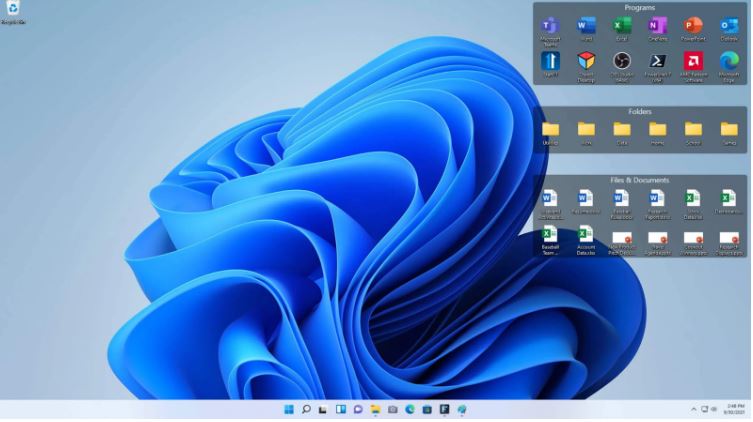
Several common reasons explain how a desktop icon organizer software helps:
Too many icons create clutter – A desktop icon organizer helps group files and reduce visual chaos.
Limited Windows sorting tools – A dedicated Windows desktop icon organizer offers smarter grouping and automation.
Faster file access – Organized icons make it easier to locate important files quickly.
Better desktop layout – Visual grouping improves overall desktop icon organization and productivity.
Choosing the right desktop icon organizer can make a significant difference in how efficiently you use your computer. Some tools focus on automation, while others emphasize customization or minimal resource usage. Below are five of the best desktop icon organizer software options available today for Windows users.
1. iTop Easy Desktop (Recommended)
Among the many options available, iTop Easy Desktop stands out as one of the most powerful and user-friendly tools for desktop icon organization. It allows users to automatically group icons into visual boxes, making it easier to separate files, folders, and shortcuts. Instead of manually arranging icons, the software intelligently categorizes items to maintain a clean and structured desktop.

- iTop Easy Desktop - Keep Your Desktop Organized
-
- Box desktop icons to declutter your workspace
- Manage documents, games, media files, etc., at 1 click
- Add calendar, clock and other widgets to desktop
- Locate any file you want instantly with search box
Its Boxes categorization management functionality certainly doesn't stop there. Besides automating icon sorting and organizing, it offers extremely high customization. One of the most popular features is its double-click hide option. With a simple double click on the desktop, all icons disappear instantly, allowing users to focus on their wallpaper or workspace without distractions. This makes it a favorite among professionals who prefer a minimal desktop environment.

Plus, this desktop icon organization tool itself has a default categorization rule, which you can freely change and customize to your liking. Your categorization display is entirely up to you. Besides, it even allows you to create a private Box category.
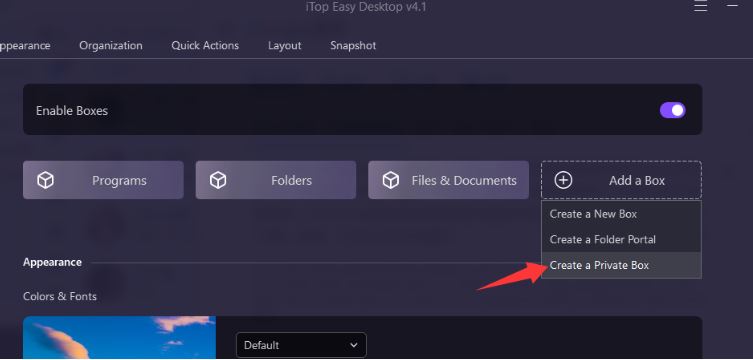
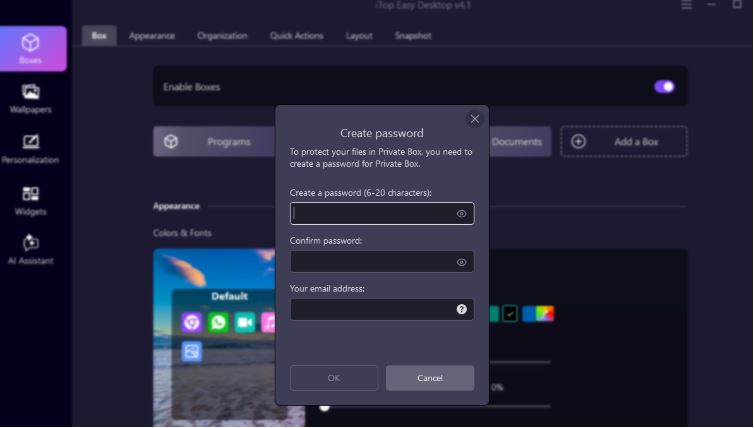
You can create a password to protect files organized in this Box; no one can access it except you. That is good for private content and privacy protection.
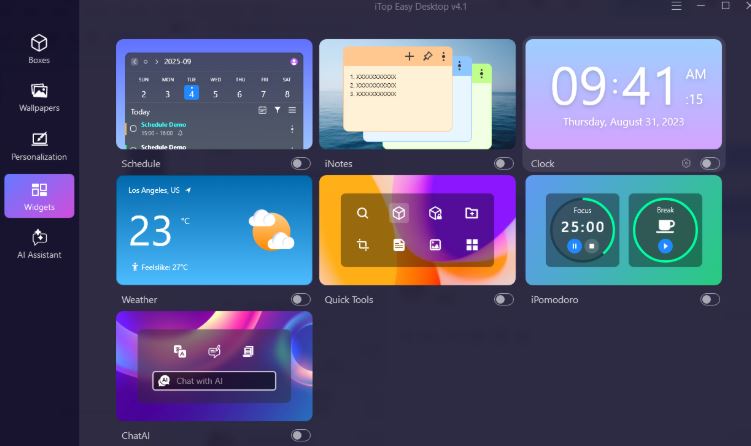
Another advantage is that the tool combines organization with personalization features. In addition to acting as a desktop icon organizer, it also supports useful widgets and customization tools. For example, users can add a desktop calendar widget to keep track of schedules or display time easily using a clock widget in Windows.
Besides, it brings you more. If you want to improve the overall appearance of your desktop, you can also apply high-quality 4k wallpaper for a more modern workspace. It offers a large selection of high-definition static wallpapers, live wallpapers, and even supports uploading videos to convert into live wallpapers.
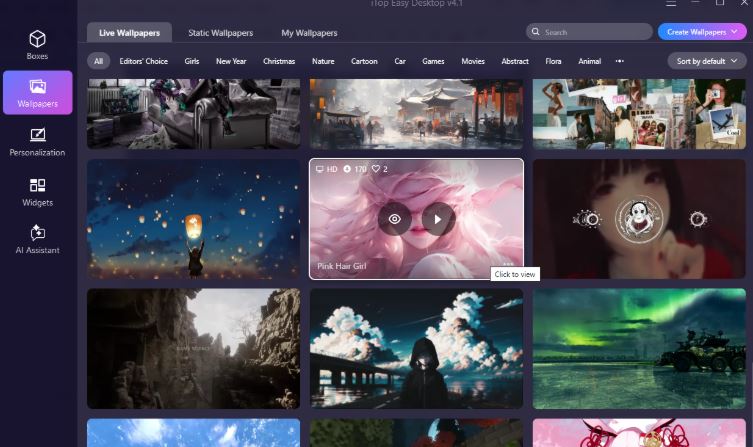
Such a powerful desktop organizer; you can rest assured to try it. It is designed specifically to simplify desktop icon management for all Windows users.
Core Reasons to Recommend:
Automatic desktop icon organization with Boxes
Visual grouping boxes for icons
Built-in search for quick file access
Desktop widgets and customization features
Lightweight and beginner-friendly
2. Fences by Stardock
Fences by Stardock is one of the most widely known desktop icon organizer software tools available. It works by creating shaded areas called “fences,” where icons can be grouped into specific categories such as work files, apps, or media. It also supports the double-click hide option.
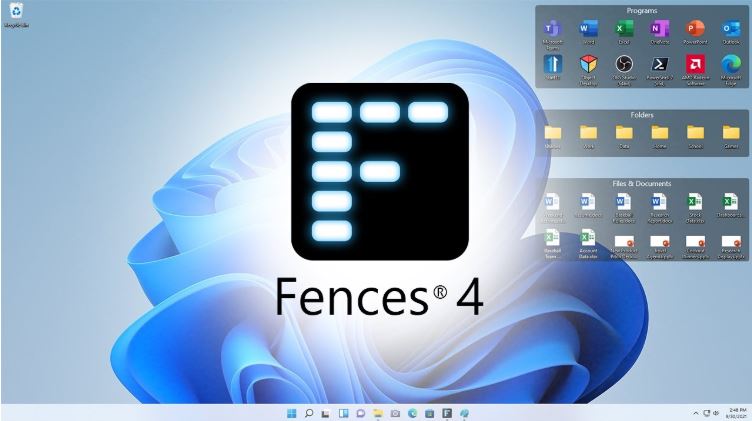
However, Stardock Fences is not free software. The basic version usually starts at around $9.99, while more advanced editions offer additional customization and automation features. That’s why users may consider some Stardock Fences alternatives.
Core Reasons to Recommend:
Clean icon grouping areas
Easy drag-and-drop organization
Minimalist interface
Reliable performance
3. Nimi Places
Nimi Places provides a different approach to desktop icon organization by introducing customizable containers. These containers can hold files, folders, and shortcuts, creating a structured layout that helps users manage large numbers of icons more effectively.
One of the strengths of Nimi Places is its flexibility. Users can customize container sizes, transparency levels, and backgrounds to match their desktop style. This makes it attractive for users who want both functionality and visual customization.
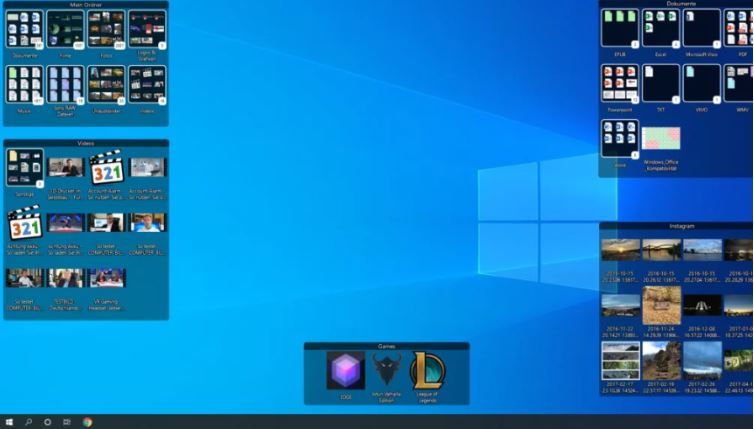
Although the interface may require a short learning period, Nimi Places remains a powerful desktop icon organizer for users who want a highly customizable desktop icon manager.
Core Reasons to Recommend:
Flexible container system
Customizable layouts and transparency
Supports multiple desktop panels
Free desktop icon organizer software
4. DesktopOK
DesktopOK is a lightweight utility designed mainly for saving and restoring desktop icon layouts. While it may not offer visual grouping like some other tools, it still plays an important role in desktop icon organization.
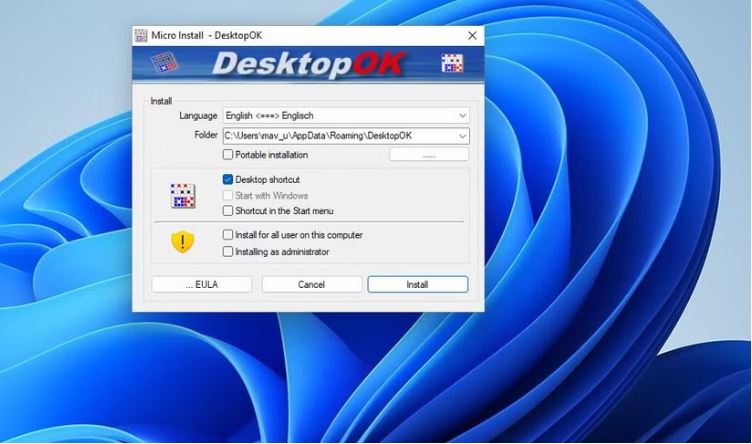
Many users encounter situations where icons move automatically after changing screen resolution or connecting to a different monitor. DesktopOK solves this problem by allowing users to save multiple icon layouts and restore them instantly whenever needed.
Because of its extremely small size and minimal system impact, DesktopOK remains a useful desktop icon organizer for users who only need basic layout control.
Core Reasons to Recommend:
Extremely lightweight software
Saves multiple desktop layouts
Portable version available
Completely free to use
5. TAGO Fences
TAGO Fences is another tool designed to improve desktop icon organization by grouping icons into sections. Similar to other desktop icon organizer software, it allows users to create visual containers for applications, documents, and other files.
The main advantage of TAGO Fences is its simplicity. It focuses primarily on organizing icons without adding too many advanced features. This makes it suitable for users who want quick and easy desktop organization without complicated settings.
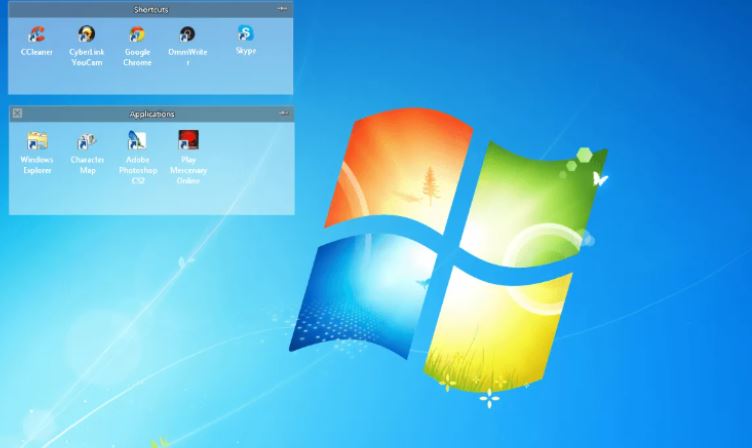
Although customization options are more limited compared with some competitors, it still works well as a basic desktop icon organizer for everyday desktop management.
Core Reasons to Recommend:
Simple icon grouping interface
Lightweight performance
Easy to set up and use
Before choosing a desktop icon organizer, it’s helpful to compare the core features of the most popular tools. Each desktop icon organizer software offers different strengths - some focus on automation, while others emphasize customization or lightweight performance.
Below is a quick comparison of the five tools discussed in this article.
| Software | Price | Auto Organization | Visual Grouping | Widgets / Extra Tools |
| iTop Easy Desktop | Free / Pro | Yes | Box grouping | Widgets & customization |
| Fences by Stardock | From $9.99+ | Yes | Fence containers | Advanced customization |
| Nimi Places | Free | Partial | Custom containers | Visual layout tools |
| DesktopOK | Free | No | No | Layout backup |
| TAGO Fences | Free | Yes | Fence-style grouping | Basic tools |
Most users start with a free desktop icon organizer, which usually provides essential features like icon grouping and basic desktop icon organization.
Paid desktop icon organizer software often adds advanced automation, more visual customization, and additional productivity tools.
For everyday users, a free desktop icon organizer is usually enough, like iTop Easy Desktop. Paid tools are mainly useful for professionals who want deeper desktop control and customization.
The Bottom Line
Keeping your desktop clean and organized can greatly improve productivity and reduce daily frustration. By using the right desktop icon organizer, Windows users can automate file grouping, simplify navigation, and maintain a visually tidy workspace that supports both work and personal tasks. Select one and try now.

- iTop Easy Desktop
Next-Gen Desktop Customizer -
- 1-click organize 100+ icons
- 5000+ 4K and live wallpapers
- Interact with AI desktop pet