-
iTop Easy Desktop - No.1 Desktop Organizer for Windows
-
Automatically organize and customize Windows desktop. Make your messy desktop look clean and professional within seconds.

5 Best AI File Organizer Tools for Effortless Management: Simply Your Digital Life
This blog will introduce the top 5 AI file organizer tools for Windows & Mac. You can effortlessly sort your files for a cleaner and more productive workspace.
Digital clutter can be pretty overwhelming today. Imagine the annoyance when you find disorganized files scattered across your desktop and folders. In this case, you have to waste your valuable time searching for documents, sifting through duplicates, and navigating tons of files.
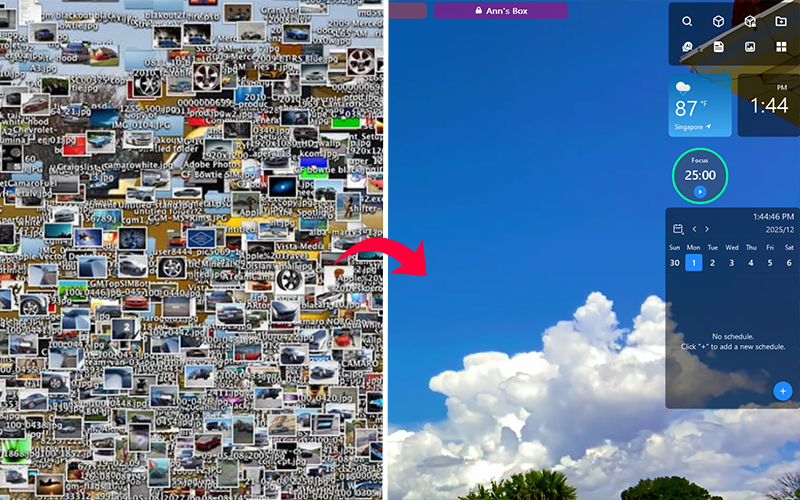
That’s where an AI file organizer changes everything. Powered by machine learning, an AI file organizer automates the entire process, such as sorting, tagging, renaming, and grouping; it magically turns a whole mess into a structured system. Looking for one for your workspace as well? Let’s explore the best AI file organizer tools in 2025!
When you are dealing with piles of messy documents, the manual process of dragging, dropping, renaming, and creating new folders is exhausting. What’s worse, clutter often builds up again. Files get buried in deep folder structures, duplicates accumulate without notice, and your workspace becomes increasingly difficult to navigate. This constant cycle makes manual sorting inefficient and unsustainable.
But with an AI file organizer, you can successfully eliminate these headaches. It can analyze file names, types, etc., and place everything where it belongs. An AI automatic file organizer is helpful for students, professionals, or creatives struggling to stay organized.
Unlike traditional/manual methods, AI solutions can smartly learn your patterns and automatically adjust the structure as your file collection grows. Here’s how AI compares with manual organization:
AI File Organizer |
Manual File Organization |
|
Sort and Search |
Instant AI sorting & smart search |
Slow manual dragging and keyword searching |
Classify Rule |
Adaptive AI rules and pattern-based |
Manual and chaotic, it depends on users |
Scalable Organization |
Handles thousands of files easily |
Large volumes that take too much effort |
Time Consumption |
Minimal with automation |
Overwhelming for large volumes |
Privacy Protection |
Many tools protect private data |
Depends on the user’s own system setup |
As you can see, AI file organizers offer intelligent convenience that manual sorting simply can’t match. Today, many users also rely on an AI note organizer or AI photo organizer to speed up organization and streamline workflows.
With the advantages outlined above, an easy file organizer is your best help to turn messy files into a clean system. Here, we have handpicked the top 5 AI file manager tools to help you achieve the goal.
1. Sparkle
Available on: Mac
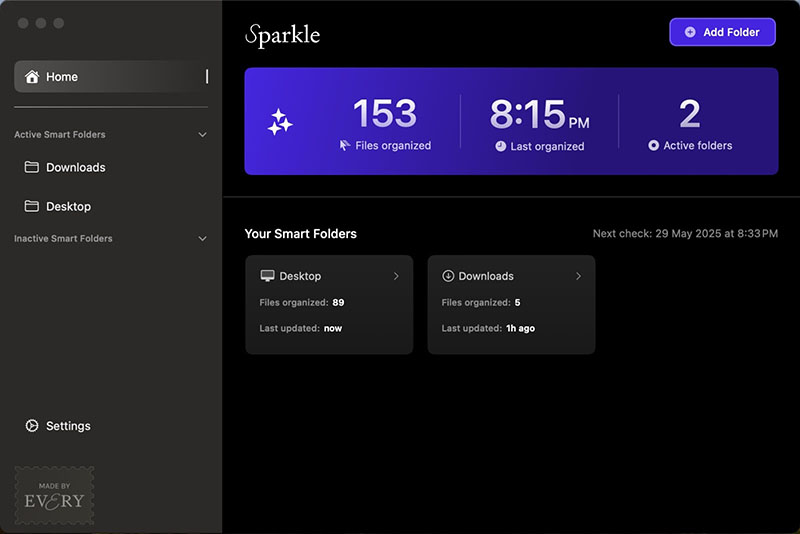
Sparkle is a Mac-only AI-powered application that automatically organizes your digital files into a customized, intelligent folder system. Sparkle AI file organizer offers a 15-day free trial and flexible pricing options. You can choose from $10/month, $99/year, or $179 lifetime based on your needs.
Key Features as an AI File Organizer:
AI automatically organizes files with its custom folder system, with sections like Recents and AI Library for loose files.
Detect, find, and remove duplicate files fast in seconds, even if filenames differ.
Works with cloud storage like Dropbox, Google Drive, and Box to structure all your files.
Sparkle analyzes filenames to organize your system only. It deletes stored name data automatically every 30 days.
However, it organizes files with its own rules, which may make it hard for users to search for and find their files initially.
2. Get Sorted
Available on: Mac
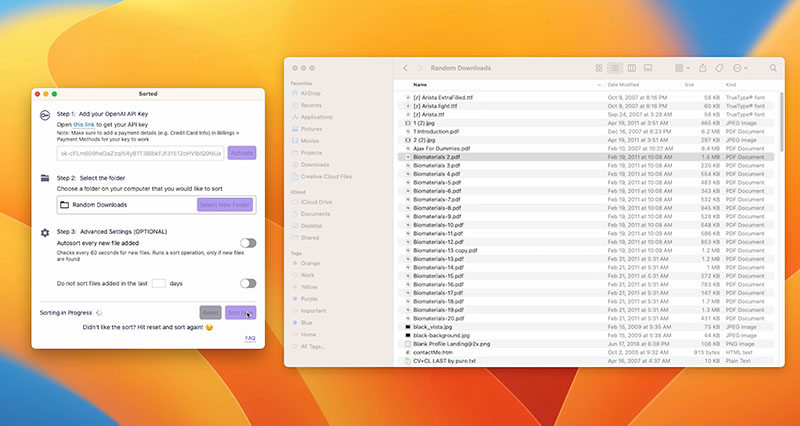
Get Sorted is a useful automatic file organizer powered by OpenAI, which focuses on sorting files by names and extensions. With a one-time purchase at $9.99, users can enjoy lifetime access for hassle-free file sorting.
Key Features as an Automatic File Organizer:
Scan and analyze file names and content for intelligent organization into subfolders.
AI sorts files with customization for specific needs and supports grouping for name, extension, etc.
Reset and retry to start over if the organization is not perfect, with the original structures preserved.
Auto Sort feature to monitor new files every 60 seconds for continuous management.
The disadvantages of Get Sorted include that it has no AI file organizer for Windows, and an OpenAI API key is required for installation.
3. iTop Easy Desktop
Available on: Windows 11/10/8/7
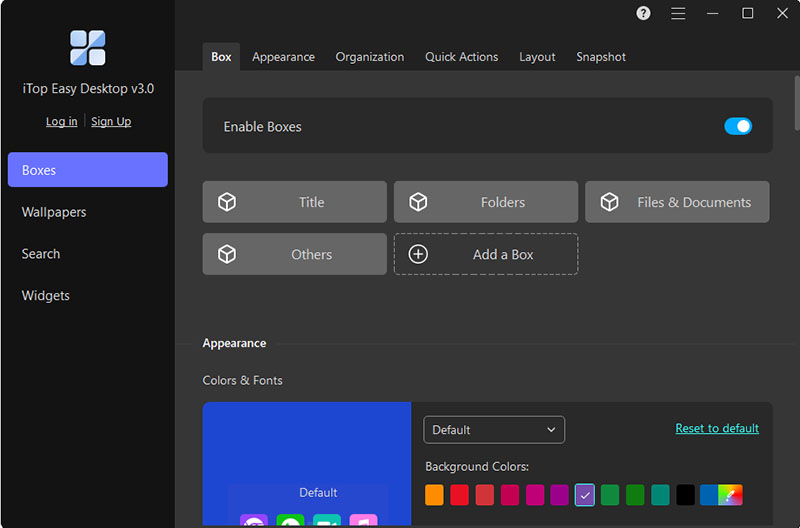
How to organize your file for free? iTop Easy Desktop is a great one! This all-in-one AI file organizer for Windows can automatically sort your files, folders, and desktop icons into customizable boxes for a cleaner and more structured workspace. Additionally, the software includes a suite of productivity tools to boost efficiency and streamline your daily workflow. It’s truly the best AI file organizer that’s free to use. You can unlock additional features with a Pro plan at $11.99/year.
Key Features as an AI File Organizer for Windows:
The desktop organizer can create customizable desktop boxes that automatically group files based on rules you set. So everything is visually structured and easy to navigate.
It smartly categorizes files by type, name, date, or usage frequency. It’s the best AI file organizer for Windows to streamline file management and maintain an orderly desktop.
No more digging through piles of files. Its Folder Portal feature functions like a mini File Explorer, allowing you to quickly access any folder from your desktop.
The quick search feature lets you access files directly on the desktop. You can locate items rapidly and largely reduce the time spent hunting for documents.
It can lock your files into private boxes with passwords for unauthorized viewing or modification. Your sensitive data and confidential documents can stay secure from prying eyes.
It allows various customizations of box layouts, for instance, auto-alignment and roll-up features for a clean, tidy desktop. You can use it to eliminate visual clutter and maintain an organized desktop effortlessly.
The integrated AI assistant supports translations, content creation, and workflow assistance. You can also use productivity widgets like Schedule, Weather, Clock, iNotes, and iPomodoro for time management.

- iTop Easy Desktop - Explore Aesthetic Wallpapers for PC
-
- Free download wallpapers across a wide range of styles
- Animate your desktop with free HD/4K live wallpapers
- Create custom wallpapers from images/videos with ease
- Apply and change desktop backgrounds in one click
4. Rename AI
Available on: Online, Windows, Mac.
Rename AI is a versatile content-based AI file organizer and renamer that can intelligently read file contents. It can bulk rename and organize documents, images, PDFs, and more. The AI file organizer starts free (15 files/month), with paid plans at $9.95/mo, $29.95/mo, and $99.95/mo for higher volumes and priority support.
Key Features as an Automatic File Organizer:
Reads file content and renames it automatically for better organization.
“Quick Rename” templates to set up the naming configuration for all the bulk.
Fast to search specific files across large collections or platforms.
Support multiple file formats like docs, images, PDFs, etc.
Yet, heavy usage can become expensive, and very large files may face performance limits during renaming or content analysis.

5. Riffo
Available on: Mac
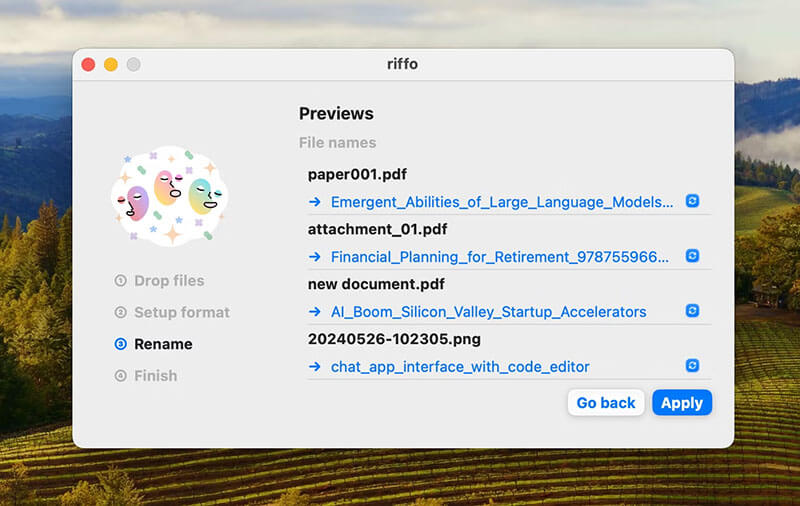
Riffo is a free AI-driven file organizer that intelligently renames files based on content and sorts them into auto-generated subfolders. It supports bulk operations, personalized naming habits, and quick drag-and-drop workflows for efficient management. According to its website, the AI file organizer is free to use.
Key Features as an Automatic File Organizer:
Advanced AI to analyze file content and metadata to generate descriptive and informative names.
Automatically categorize mixed files into logical subfolders for a tidy workspace.
Allows users to define their own specific naming conventions and habits for the AI to follow.
One downside of Riffo is that its customization for naming patterns is limited, and it works best mainly with screenshots and documents rather than diverse file types.
If you are looking for the best automatic file organizer Windows, iTop Easy Desktop is the right one. It’s free, easy to use, and designed to help you quickly declutter your desktop for an organized workspace. Now, let’s check out how to organize files easily with it.
Step 1. Download iTop Easy Desktop from the official website, install it, and launch the software.
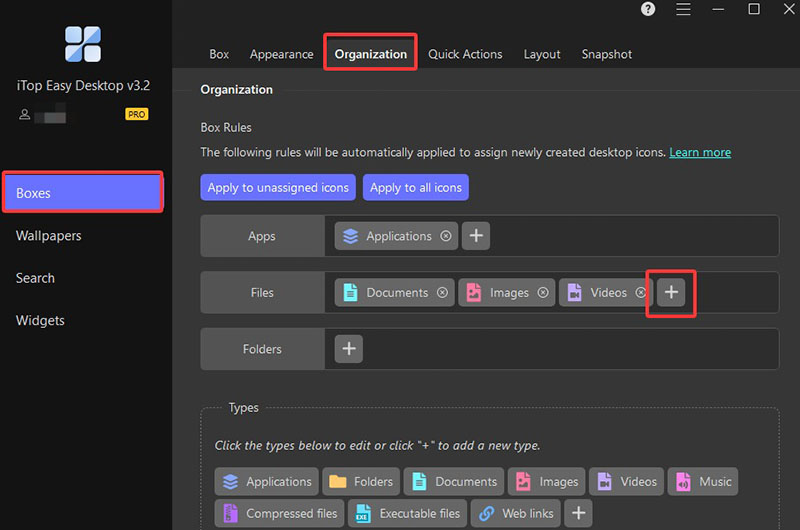
Step 2. Navigate to the Boxes tab and select Organization. Click on the plus icon next to the file to add a new rule for auto grouping.
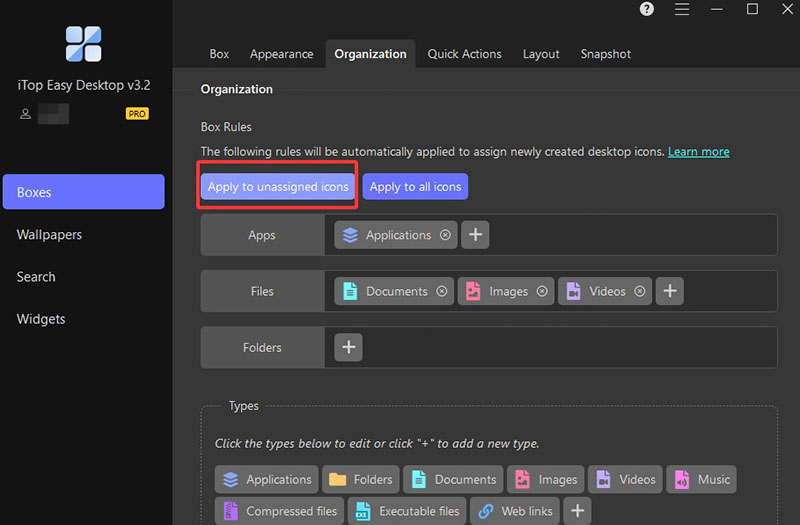
Step 3. You can choose to assign the rule to apply to unassigned icons (organize only items that aren’t yet grouped) or apply to all icons (refresh the entire desktop based on your new rules).
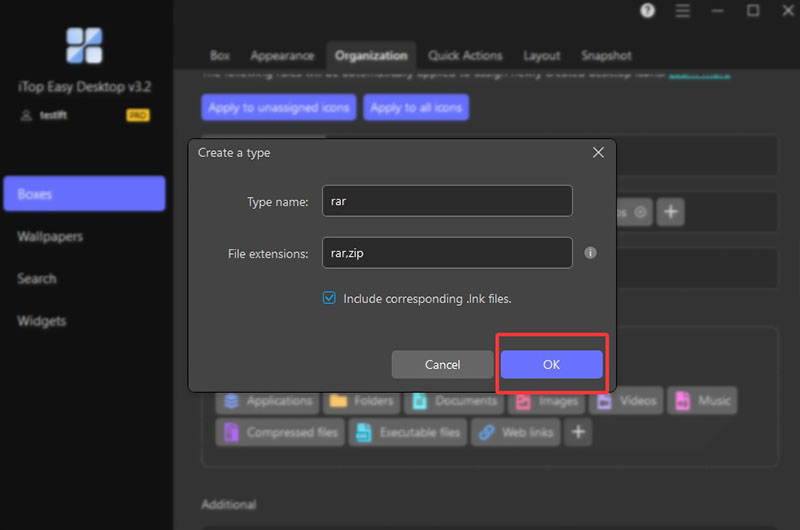
Step 4. If the file type is not available, you can click on the plus icon at the bottom to add a new one.
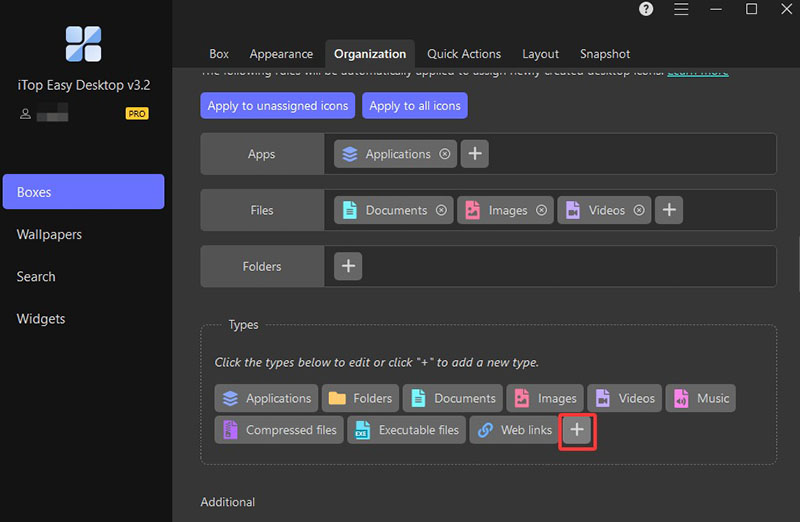
Step 5. Click OK to save the new file type for auto grouping.
Q: Will the OpenAI API collect and use my data, including sensitive info?
A: Tools like Get Sorted might share only filenames with OpenAI. Generally, most AI file organizer options process data locally. However, always review each tool’s privacy settings before use.
Q: Will AI File Organizer lose or delete my files because of a crash or program error?
A: Trusted tools do not delete files without your confirmation. Most offer undo functions, backup options, or reset features to prevent unintended loss.
Q: How to organize the already existing files on the desktop via iTop Easy Desktop?
A: You can simply drag and drop files into boxes or use the one-click Folder Portal box for instant sorting.
Conclusion
What is an AI file organizer, and which one should you use? This guide has introduced the mechanism and the top 5 productivity choices. Among them, iTop Easy Desktop stands out for Windows users with its smart boxing feature, customizable rules, Folder Portal, privacy protection, and built-in productivity tools. Try it to say goodbye to clutter and enjoy a more productive digital experience for free now!
- iTop Easy Desktop - Explore Aesthetic Wallpapers for PC
-
- Free download wallpapers across a wide range of styles
- Animate your desktop with free HD/4K live wallpapers
- Create custom wallpapers from images/videos with ease
- Apply and change desktop backgrounds in one click