-
iTop Easy Desktop - No.1 Desktop Organizer for Windows
-
Automatically organize and customize Windows desktop. Make your messy desktop look clean and professional within seconds.

Best 6 Live Clock with Seconds Apps [Online & Desktop]
Looking for the best live clock with seconds? Explore the 6 top desktop and online tools that offer accurate time displays and ultimate precision now!
Imagine you are hosting a live stream, timing a presentation, or coordinating a precise countdown; every second matters. However, most system clocks, regardless of Windows or Mac, show hours and minutes only. This is the time you need a live clock with seconds, which displays real-time updates with precision. Still don’t know which one to use? This guide will introduce the top 6 options. Just read on to find the right one for enhanced productivity and accuracy!
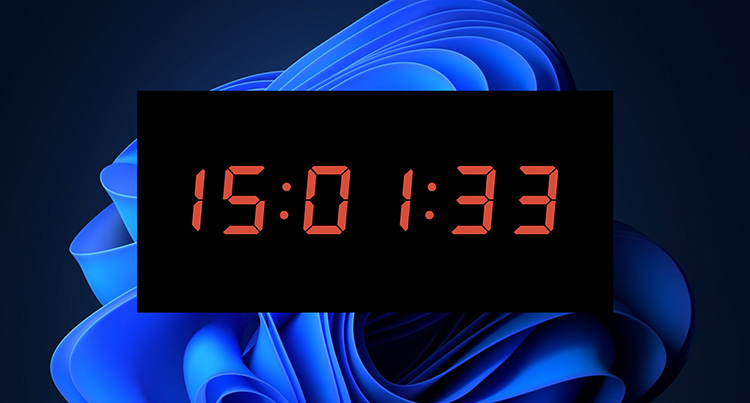
A live clock with seconds is a real-time display tool that updates every second (and sometimes even centiseconds). It can appear as a desktop clock widget, web-based tool, standalone app, or browser extension. You need a live clock with seconds for these good reasons:
Manage time & productivity: Track tasks, avoid missing deadlines, and maintain focus during work sessions.
Streaming & broadcasting: Ensure perfect timing for live events, countdowns, or synchronized activities where milliseconds matter.
Scheduling across time zones: Coordinate international calls or travel with accurate global times and synchronization info.
Personal organization: Pair with a calendar widget for reminders to create a seamless workflow hub.
Compared to standard system clocks, tools offering live clock seconds provide higher precision and better visibility. For those who mainly work on a PC, here are the best options to keep precise time visible anytime!
#1 Live Clock with Seconds Widget & Organized Desktop
If you want more than just a clock, iTop Easy Desktop is a powerful desktop organizer that provides a precise live clock with seconds and full desktop management features. There is no need to make a Windows 11 clock show seconds, because this tool places a fully functional clock directly on your desktop. You can monitor live clock seconds in real time and keep your desktop organized all in one place!

- iTop Easy Desktop - Keep Your Desktop Organized
-
- Box desktop icons to declutter your workspace
- Manage documents, games, media files, etc., at 1 click
- Add calendar, clock and other widgets to desktop
- Locate any file you want instantly with search box
Key Features:
• Accurate Live Clock with Seconds on Desktop
iTop Easy Desktop displays a real-time, highly precise digital clock with detailed dates and seconds directly on your desktop. You can have a quick time check at a glance, which is useful for time-sensitive work and boosting productivity.
• Customize Live Clock Seconds Styles & More
iTop Easy Desktop lets you customize the live clock with seconds in many aspects, for instance, style, time format, size, and appearance, etc. You can tweak the settings and personalize it effortlessly for a tailored experience.
• More Widgets for Productivity Boost
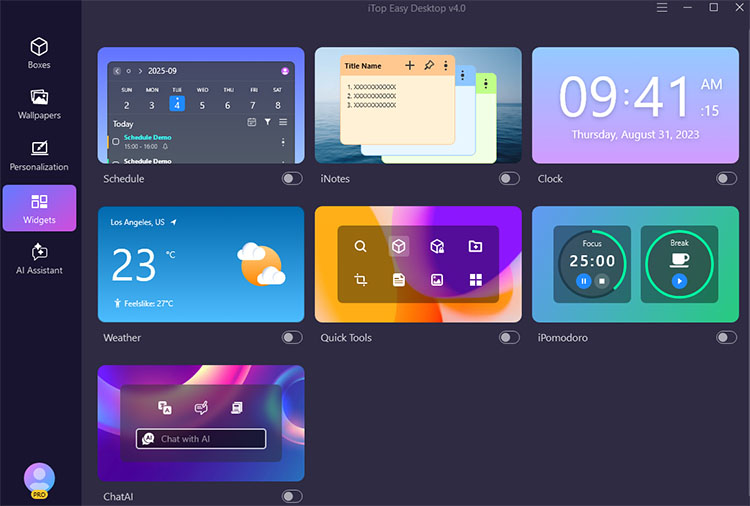
Aside from the live clock feature, it offers a diverse range of customizable widgets like Calendar Widget, Schedule, iNotes, iPomodoro, and weather. You can easily manage tasks, take quick notes, track focus sessions, and more for an efficient workflow.
• 1 Click Auto Desktop Organization
As the best desktop organizer for Windows, it automatically sorts files, folders, and icons into smart groups. You can also create personalized boxes and even private ones for added privacy and security.
#2 Built-In Windows 11 Clock Show Seconds on Taskbar
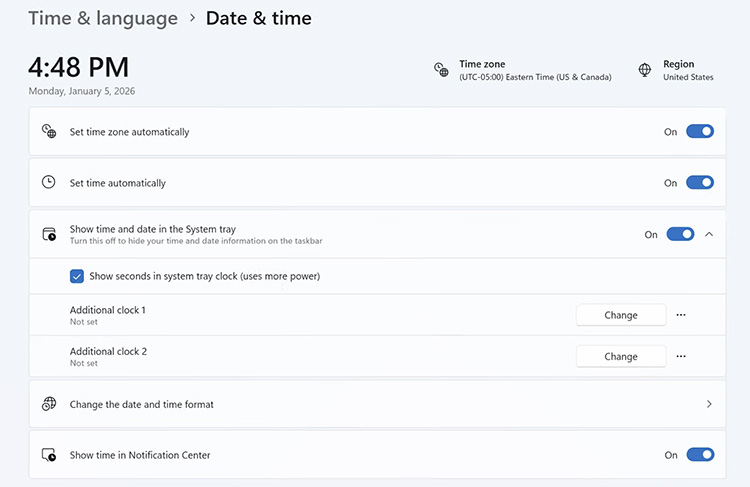
So, is it possible to make Windows 11 show seconds on time? The answer is positive. You can adjust via Windows 11's built-in settings. The solution is super simple and perfect for users who do not want to install third-party software. What’s more, it’s completely free. So, how to see clock with seconds on Windows 11? Just head to Settings > Time & Language > Date & time > Show time and date in the system tray, enable the option for seconds.
Key Features:
Seamless system integration as an official Microsoft feature ensures stability and no compatibility issues.
Easy setup through Settings to make Windows 11 show seconds on time in a few clicks.
Uses Windows built-in components to keep your system lightweight.
Drawbacks:
Limited customization, no advanced styling.
Windows 11 clock with seconds available at the system tray only; less visibility.
#3 Digital Live Timer with Seconds from Microsoft Store
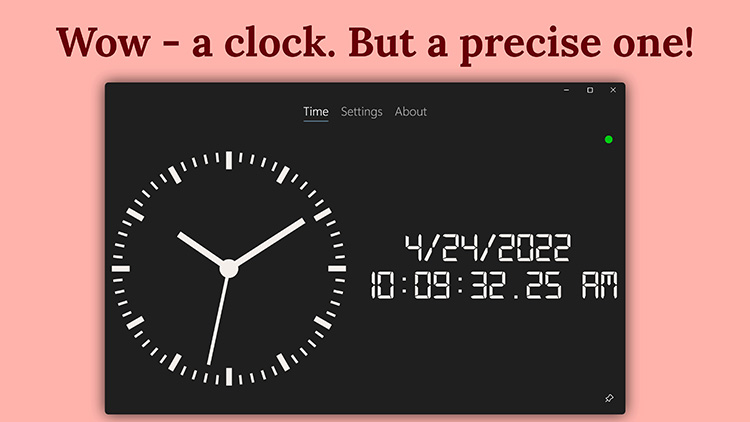
AtomicClock (NTP Time Clock) from the Microsoft Store is a specialized app that delivers ultra-precise time using Network Time Protocol (NTP) servers. It ensures a highly accurate live clock with seconds and offers customization options and multiple clock styles, making it ideal for users with critical timing needs.
Key Features:
Support both analog and digital clock displays with customizable styles and visual preferences.
Offer a selection of any time zone with a flexible picture-in-picture overlay window.
Custom clock faces and hands with acoustic ticking and Greenwich Time Signal (GTS).
Drawbacks:
Users report that sometimes it can not reach the server.
Some advanced features are behind the paywall.
If desktop software installation is not the choice for you, you can go with a web-based tool. Here we have selected the 3 best choices that let you show the exact time on the go!
#1 Time.is - Accurate Live Clock with Seconds
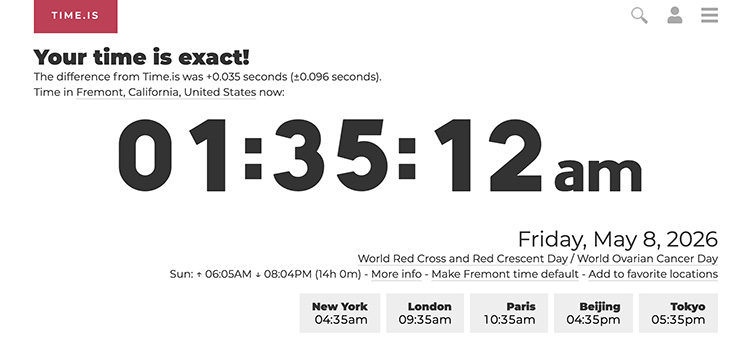
Time.is a website that shows a live clock with seconds for over 7 million locations worldwide in 58 languages. The service is highly accurate and offers a second-by-second clock, time zone conversions, calendars, and countdowns. With a clean interface, the web-based clock is a convenient choice if you need exact global timing with additional information.
Key Features:
Precise time with visible synchronization offset for improved accuracy awareness.
Show sunrise and sunset times, as well as global city time tracking.
Provide codes to help you customize your own clock widget.
Drawbacks:
Need a stable internet connection for accurate time synchronization.
The ads around the clock greatly affect the user experience.
#2 Clock.Zone - Live Clock Seconds & Centiseconds
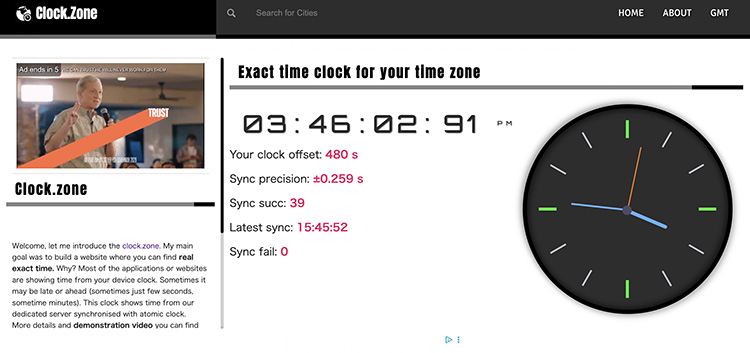
Clock.Zone is another excellent website that shows a live clock with seconds. With an analog and a digital clock available, Clock.Zone offers simple timekeeping. Supporting device offset and synchronization precision, Clock.Zone is great for users who require millisecond accuracy for professional tasks.
Key Features:
A high-resolution display with hours, minutes, seconds, and milliseconds for maximum accuracy.
Show the exact time difference between your local device clock and server time.
Browse and find local times by region, country, or specific city.
Drawbacks:
No customization for style and functions.
Do not support widget integration for browser or desktop.
Annoying ads are showing.
#3 Digital Clock - Customizable Live Clock Seconds
Looking for a versatile live clock with seconds? Digital Clock is a solid choice, which allows users to transform their screens into a digital timepiece. This tool provides real-time accuracy with diverse templates and formats, making it a brilliant choice for users who need exact timing display with personality and styles.
Key Features:
Users can personalize fonts, colors, etc., through various clock templates for unique displays.
Support digital/flip clock, timer for countdown, and world clock for time zone converter.
Full-Screen Mode that can expand the clock to fill the entire monitor.
Drawbacks:
No information for device offset and sync precision.
The clock templates might look similar overall.
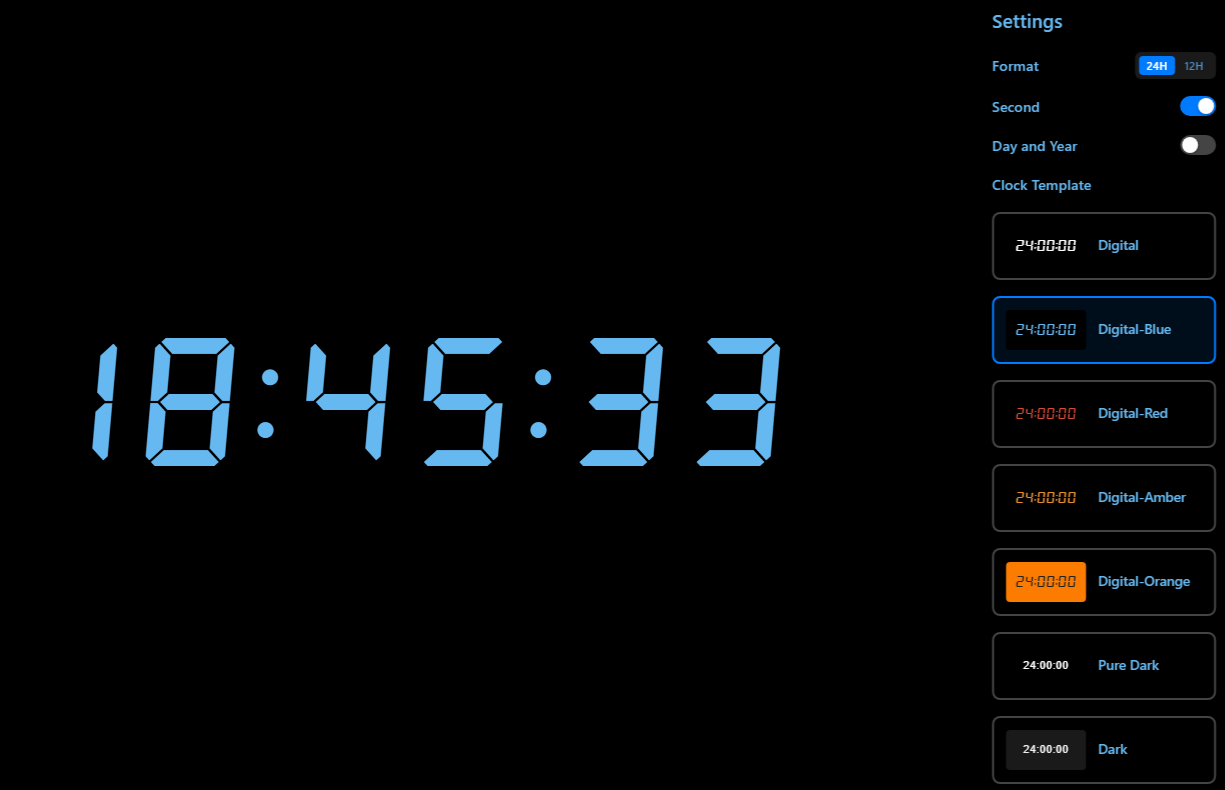
Whether you want to show seconds in the taskbar clock on Windows 10/11 or need a more visually appealing time display, there’s always an option for you! However, iTop Easy Desktop is the best Windows clock with seconds for users who want both accuracy and desktop organizer features. Let’s see how to enable the live clock with seconds using the software.
Step 1: Download the iTop Easy Desktop for simple installation.
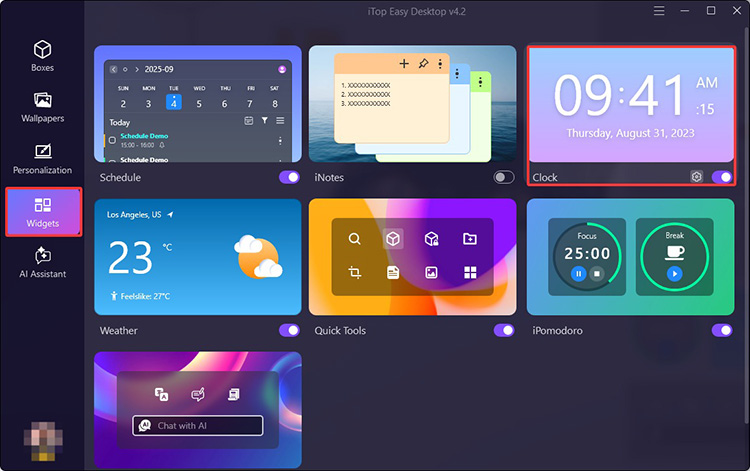
Step 2: Go to Widgets on the left. Toggle on the Clock to enable it on your desktop.
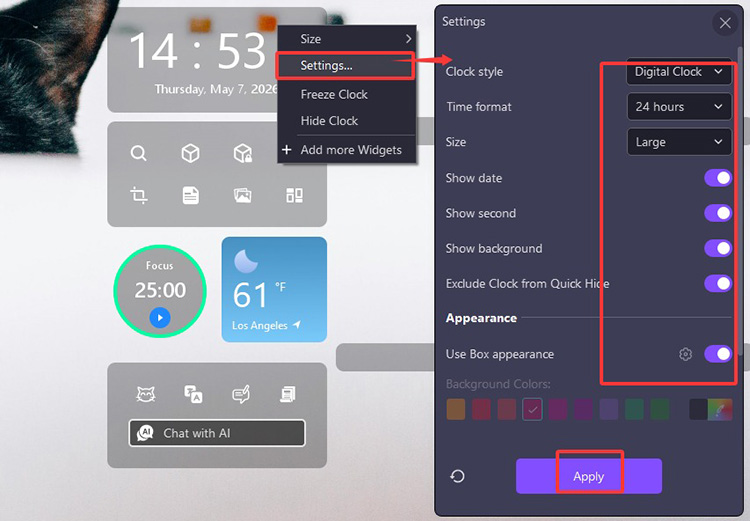
Step 3: Right-click the clock, choose Settings, and then Customize. Here you can personalize the style, format, size, etc. Toggle the “Show seconds” option to enable the feature.
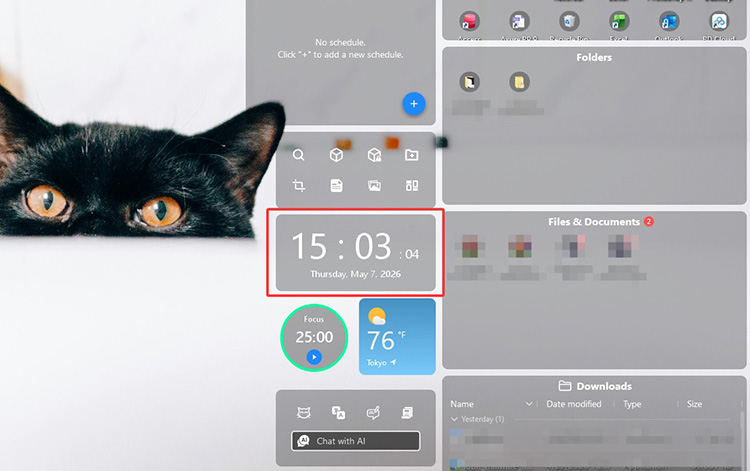
Step 4: Now you have a live clock with seconds on your desktop.
What's more, this desktop organizer for Windows also provides countless wallpapers in different themes, personalization settings, and auto desktop management.
Final Thoughts
A live clock with seconds is more than just a time display; it can be a productivity tool that improves accuracy and a display to enhance aesthetics. Of the 6 options above, iTop Easy Desktop clearly stands out. Perfectly combining precise time tracking with powerful desktop organization, it’s a smart all-in-one solution for everyday users who prefer accuracy and efficiency with a clean workspace. Just try it to stay on track every second from now on!

- iTop Easy Desktop - Make Your Desktop Look Amazing
-
- Control desktop taskbar to better fit your workflow
- Change the look of start menu for your preference
- Choose from themes to make consistent interface
- Enjoy personalized desktop icons and mouse cursors