
iTop VPN offers 3200+ VPN servers in 100+ locations worldwide to help you access various sites privately and safely, along with dedicated IP, dynamic and static IP, and Double VPN.
Check this ultimate whitepages opt-out guide to know how to remove info from whitepages and protect yourself from data leaks!
Whitepages is a website where you can see other people’s phone numbers, addresses, relatives, etc. It collects all public info and now is the largest database of US residents’ contact info. Though it makes it easy to contact others, privacy is a key concern, like the sword of Damocles hanging over users’ heads, thinking: how to remove info from Whitepages?

Don’t be frustrated, we totally can relate to your fear of private info leaking and potential risks, and this article is now to help you solve this issue with a detailed tutorial to get rid of it. Prior to that, let’s figure out some related important information.
How do I remove my info from Whitepages? Why should you remove your data? These questions can be solved better if you know what type of info Whitepages provide.
Full names/Maiden names
Cell phone number
Age
Home addresses history
Email addresses
Relatives
Property details
Financial/Traffic/Criminal records
Though these groups of info are public info, they are more or less sensitive and comprehensive enough. Who can guarantee that there will not be a scam or crisis specifically targeting you after this information is obtained by someone who is interested in it?
The growing fear is calling for actions to protect your info: firstly remove it and then stay protected with the help of security actions. For example, you can use a VPN for Windows or other devices to mask your online activities and information.
First of all, remove your info from Whitepages.
Out of the panic for private data leaks, many users are asking “How can I remove my info from Whitepages”. Rest assured; this section gives a detailed step-by-step guide. Learn how to opt out of Whitepages now.
Firstly, go to Whitepages.com, and then input your name/other info in the search box > click Search.

You will be led to a list that accords with the name and the info you input. Find your profile according to the full name, age, rough region, aliases, address, and relatives.
As you can see, the info they provide is very detailed. If you never chat anonymously online or avoid revealing your personal data online, this public info is easily accessible.
You can easily find and verify your profile with the aforementioned info. Click View Details, and then you will be led to a new page of your profile > copy the URL from the URL box.

TIPS
View Full Report is a feature only accessible to Whitepages Premium users. If you prefer using its free trial, just click View Details.Scroll down to the footer of the page > find Do Not Sell My Personal Information.

And then input your URL to the Opt-out of Whitepages tool > click Next.

Whitepages will ask you to confirm it is your info and decide whether to remove it. Check if the info is yours and then click Remove Me.

After that, Whitepages will invite you to tell them why. Choose a reason > leave a comment > input your cell phone to receive a verification code > provide the code when a robot asks you for it.
With all these steps done, you can successfully remove yourself from Whitepages.
Just struggling to remove info from whitepages.com is not enough if you are tired of being afraid of data leaks online.
From now on, you may still need to stop using your real full name when signing up for accounts/ordering Uber Eats, clear the location info while posting selfies online, prevent apps from accessing your IP address, stay anonymous online, etc.
While staying anonymous online is difficult for the user self, a secure and private VPN is a prudent and correct choice.
iTop VPN will be your online data guard as it is equipped with cutting-edge security features, routing your traffic in an encrypted tunnel and keeping your online activities all anonymous.

✔ Stay Anonymous and Encrypted
Spilt Tunneling, IP Protection, DNS Protection, as well as more advanced security features, will help mask your IP and your online traffic; thus you don’t need to worry about online data leaks and struggle to remove info from Whitepages again and again.
✔ Public WiFi Protection Against Data Leaking
This free VPN with Kill Switch automatically cuts your connection from the public WiFi when the VPN connection is shut down; thus your data will be safe from being tracked under public WiFi.
✔ Free VPN to Guard Your Online Safety
This useful free VPN requires no payment, subscription, or credit card info to provide you with security and other features and services.
✔ Not Only Security But Online Entertainment
Apart from protecting you from being tracked, this VPN also offers routes for free streaming, downloading, gaming, etc., accessing what you like easily and securely.
iTop VPN’s free VPN servers list covers routes all around the world, allowing all US and global users to access online content they cannot visit safely. Try this safe VPN, connect to UAE, Turkey, UK, etc., and start your anonymous online journey.
This VPN is extremely easy to use thanks to its simple and clear UI design. Now follow the steps to guard your private data without continuously worrying about how to remove info from Whitepages.
Step 1. Download and install iTop VPN now to start your safe online life.
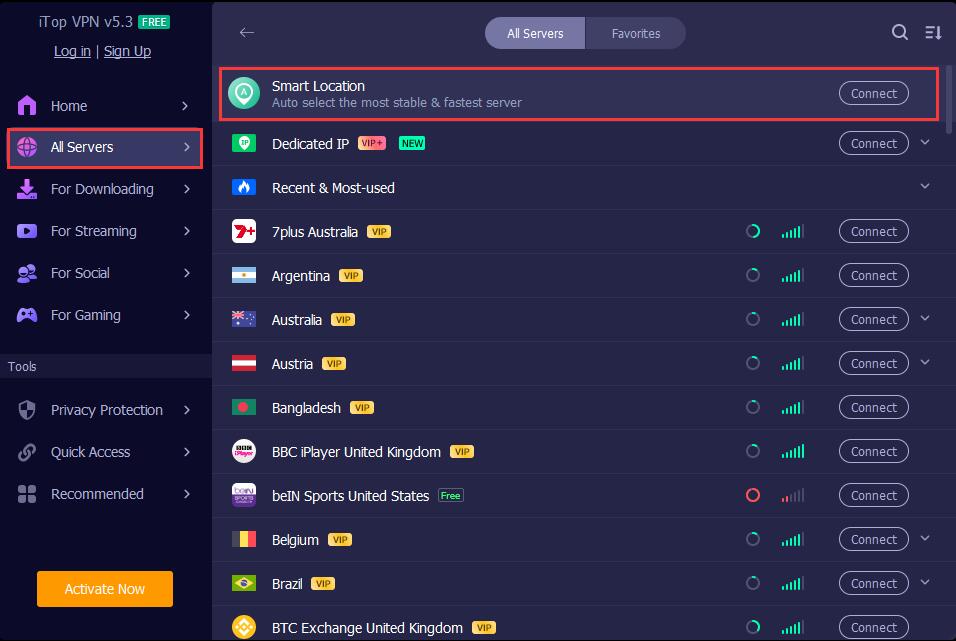
Step 2. Start the app > go to All Servers > find Smart Location > click Connect. It will automatically connect the most suitable, stable, and fastest route for you.
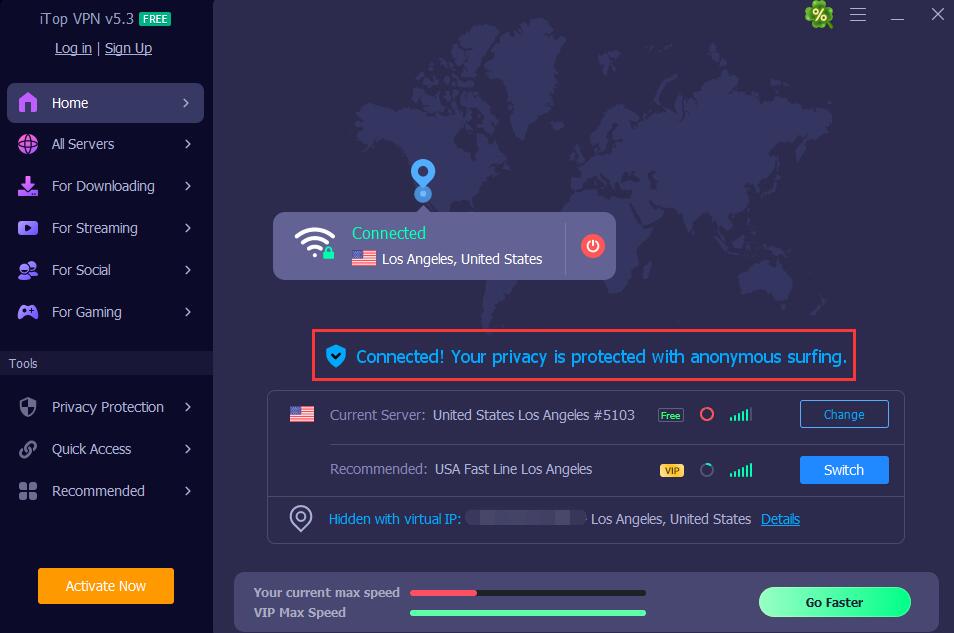
Step 3. Now you are protected. Your IP and your online activities will be invisible to ISPs, third-parties, AD providers, etc.
If you are interested, this VPN can lead you to colorful online entertainment like streaming and TV shows: You Knock on My Door, football matches, etc.
The Bottom Line
Knowing what type of your info is accessible to others on Whitepages, now you know why you should remove info from Whitepages. If you are concerned and worried about privacy leaking, check and follow the step-by-step guide.
Also, protecting private online data is not to be missed. Use iTop VPN - the free VPN to change location to change and mask your IP and hide your online actions.

What’s the Best Untraceable and Anonymous VPN Free to Browse Any Website

How to Run DNS Leak Test On PC? [Dnsleaktest Protection]

What is Reply Attack & How to Prevent it By Enhancing Your Network?

How to Use VPN Super Unlimited Proxy: Full Review & Best Free Alternative

8 Best Indonesia VPN iPhone in 2026 | Safe & Fast

VPN with Free Trial No Credit Card Needed | Lifetime or Less

Buy Cheap TikTok Coins Online & with Free VPN in the Cheapest Country

Is VPN Safe? Get the Safest Free VPN for You in 2026
10+ free servers in US, UK...
3200+ extensive servers
Dedicated IP addresses
Ad blocker and Proxy service
For Windows 11/10/8/7
Subscribe to Our Newsletter
Subscribe to our newsletter to stay updated every moment.



Product
iTop VPN iTop Screen Recorder iTop Data Recovery iTop PDF Editor DualSafe Password Manager iTop Easy Desktop Plans & PricingCompany
About Us Contact Us Press Awards FacebookHelp
Support Uninstall Instructions Refund PolicyPartner
Become iTop Affiliate YouTube Creators Free AI Video Generator
Subscribe to Our Newsletter
Subscribe to our newsletter to stay updated every moment.
© 2026 iTop. All rights reserved.






