
iTop VPN offers 3200+ VPN servers in 100+ locations worldwide to help you access various sites privately and safely, along with dedicated IP, dynamic and static IP, and Double VPN.
How to find IP addresses from locations using IP address geographical location finders? Get the 3 free IP address location finders and a bonus IP hider.
In today's digital age, IP addresses are not only the key to connecting devices to the Internet but also reveal the geographical location of the device. By finding IP address from location, users can accurately understand the physical location of the device. Whether it is to ensure network security, track devices, or for marketing purposes, the use of IP address positioning has become a widely used technology in all walks of life.
 Using an IP address geographical location finder, or more IP address location finder tools, you can easily infer the city, region, or even country where the user is located from the IP address. This type of technology helps companies optimize user experience and also provides strong support for law enforcement agencies and cybersecurity personnel to track malicious activities and protect personal privacy.
IP address geographical location finder is a technology that determines the geographic location of a device through its IP address. Every device connected to the Internet has a unique IP address, which is like the "network house number" of the device. This technology queries the database for geographic information related to the address, such as country, city, time zone, etc., based on the IP address.
Its principle is based on the fact that ISPs assign IP addresses, they usually assign specific IP ranges to specific areas. By finding the range to which this IP address belongs, the approximate location of the device can be inferred. Although this technology cannot be accurate to a specific street or building, it can usually locate a city or region more accurately.
There are many IP address geolocation lookup tools available on the market, which help users quickly and accurately obtain the geographical information corresponding to the IP address through different methods and databases. Next, this article will introduce three common IP address locating tools, namely KeyCDN's IP Location Finder, IPLocation.io's IP Address Lookup, and WhatIsMyIP's IP Address Lookup.
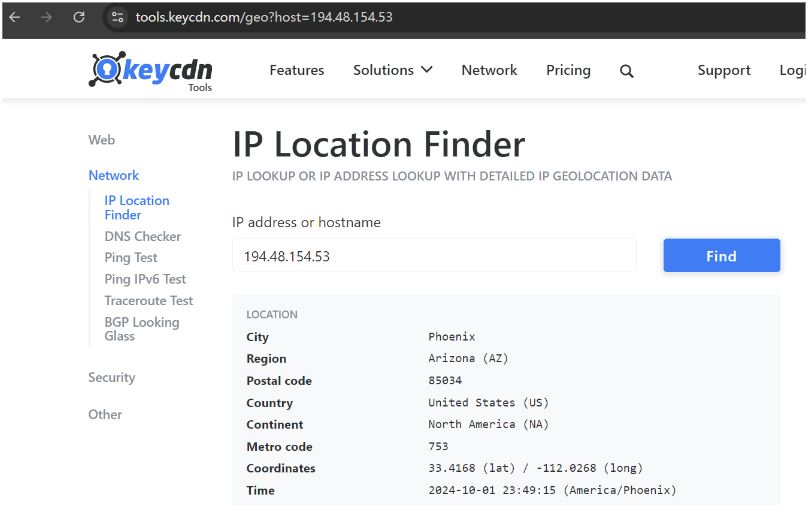
The IP Location Finder tool provided by KeyCDN is a very simple and fast IP address location finder. Users only need to enter an IP address, and the tool will query multiple databases (such as MaxMind and IP2Location) to obtain the geographical location information related to the IP, including country, region, city, postal code, time zone, etc. Its simple interface and efficient query function allow users to quickly obtain results, and it is suitable for those who need to easily query IP addresses.
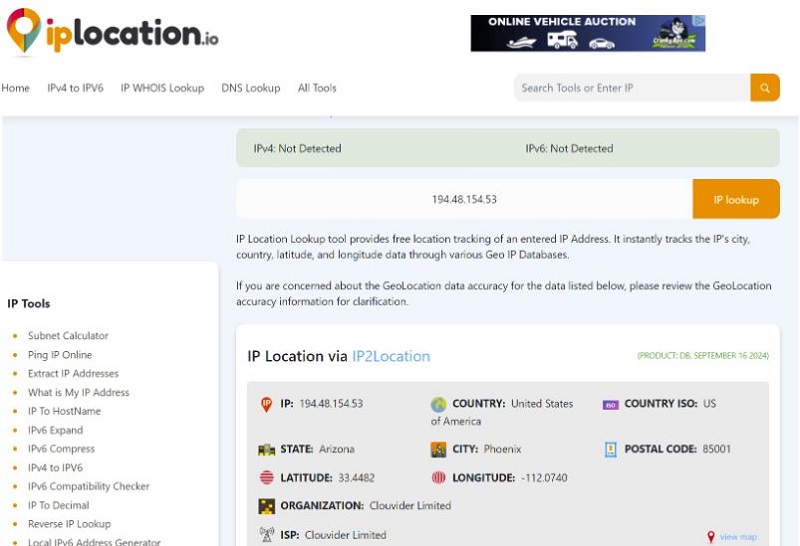
The IP Address Lookup tool provided by IPLocation.io can obtain more detailed geographic information by entering an IP address. It not only displays the geographic location of the IP address but also includes ISP (Internet Service Provider) information and some other network details. This tool integrates results from different data sources and provides a multi-faceted IP information query, which is a good helper for network diagnosis and security analysis.
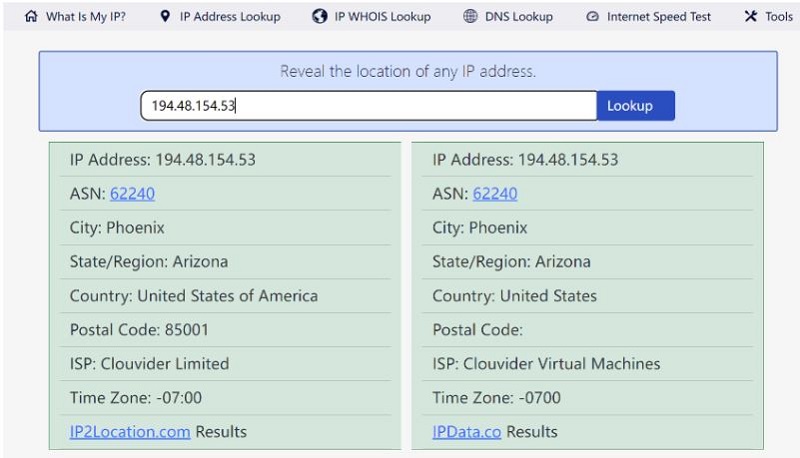
The IP Address Lookup tool provided by WhatIsMyIP is also an easy-to-use tool that allows users to query the geographic location of a device by IP address. In addition to displaying basic geographic information such as the country and city of the device, the tool also provides ISP and host information. This makes it not only suitable for ordinary users to find IP locations but also helps network administrators perform more technical analysis and network troubleshooting. Its operation is simple, but the results are very detailed, and it is a common option in network tools.
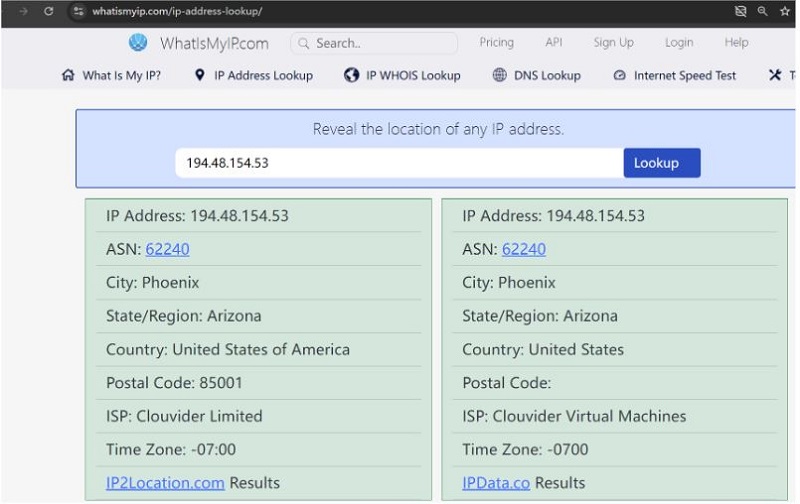
Each of these 3 IP address lookup for free tools has different characteristics. Users can choose the appropriate tool to perform IP address location queries according to their needs. The operation steps of the three tools recommended in this article are consistent. In just two steps, you can get detailed information about an IP. The following takes the third tool WhatIsMyIP's IP Address Lookup as an example:
Step 1. First, prepare the IP you want to query. Whether it is the IP of your current device or the IP of someone else you want to query. Copy it.
Step 2. Open the tool, paste the IP you want to query, and click Lookup.
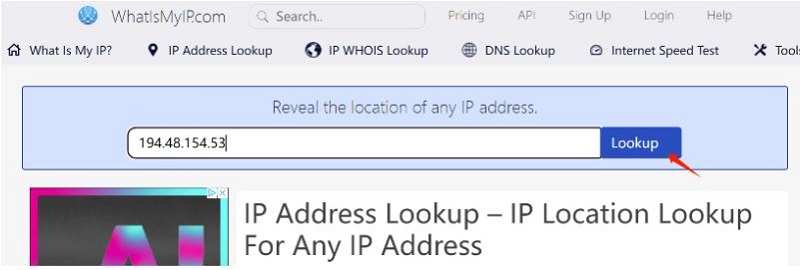
Wait a few seconds and you will get a series of detailed information about the IP, including the city, country, time zone, ISP, etc.
Every device connected to the Internet has a unique IP address, which is like the network "address" of the device. Internet service providers (ISPs) usually assign a specific range of IP addresses to a certain area, so when you connect to the Internet, others can infer your approximate geographical location, such as your country or city, by looking up your IP address.
The 3 most common reasons why others or third parties want to track your IP addresses are:
Businesses track you to collect information about you for advertising
People want to block your access
Law enforcement can subpoena your Internet service provider (ISP) for permission to monitor you
Usually, they will obtain and track your IP through various methods, including but not limited to the following:
Visiting a website: When you visit a website, the website server automatically records the visitor's IP address.
Online advertising and tracking tools: Advertising networks and tracking tools can track users' behavior on different websites through IP addresses, and then display targeted advertisements or analyze users' network habits.
Public Wi-Fi: When using a public Wi-Fi network, network administrators or malicious third parties may monitor the IP addresses of devices connected to the network, and even record more network activity information.
P2P file sharing: When downloading or sharing files on a P2P network (such as BitTorrent), other users connected to the network can see your IP address.
Social media and online services: Some social media platforms or online services may expose or record users' IP addresses when users interact, especially when communicating directly with other users.
Email tracking: Through tracking pixels or links in emails, or using IP address lookup with email, senders can obtain the IP address of the device that opened the email to track the reading location and behavior of the email.
Hacking and malware: Hackers can obtain the IP address of a device through malware or phishing attacks and use this information to conduct further attacks or surveillance on the target device.
Use your device: Simply borrow your computer or smart device, and further to check your current IP
Since your IP address can reveal your approximate location and online activities, using a VPN location changer has become a necessary means to protect your privacy and security. Third parties, websites, advertisers, and even malicious attackers can track your geographic location and online behavior through your IP address. Well, VPN can hide your real IP address, route your network traffic to servers in different regions through an encrypted connection, and assign you a new IP address. Some VPNs offer double VPN functions, which can assign you two IP addresses, adding a double layer of protection to your real IP.
In addition to helping you hide your real IP, a VPN can also help you bypass regional restrictions and access global content. Choosing a reliable VPN is crucial, and iTop VPN is an ideal choice.
Why iTop VPN? This speed VPN for PC and mobile can not only effectively hide your IP address, but also provide you with efficient encryption protection to ensure your online security. By redirecting your network traffic to different VPN servers around the world, iTop VPN can keep your real location untracked and provide multi-level privacy protection.
 The following are the main advantages of iTop VPN in IP protection:
Hide your real IP address: iTop VPN assigns you a virtual IP address through an encrypted tunnel to mask your real geographical location and prevent websites, advertisers, and other third parties from tracking your activities.
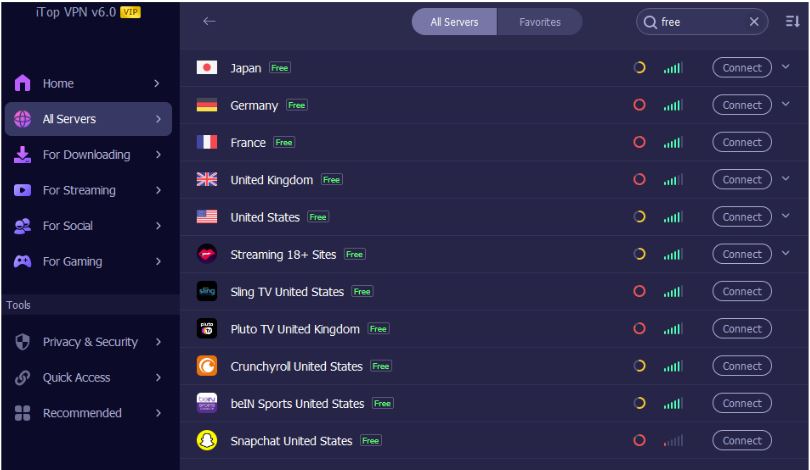
Global server selection: iTop VPN provides a 3200+ server network covering more than 100 countries and regions, from the USA, UK, to India, Canada, UAE, Brazil, Russia, etc., and users can choose IP addresses in different countries or regions according to their needs. Protect your privacy in all aspects and bypass geographical restrictions to access global content.
Powerful encryption technology: iTop VPN uses military-grade encryption technology. AES-256 encryption ensures that your data transmission remains secure when passing through the server, preventing hackers or malicious third parties from monitoring or stealing your information. And check the strict no-day policy.
Prevent DNS leaks: iTop VPN has a built-in DNS protection function to ensure that DNS leaks will not occur when using VPN, further strengthening the privacy protection of IP addresses.
Kill Switch function: When the VPN connection is accidentally disconnected, the Kill Switch function automatically cuts off the Internet connection to prevent the IP address from being exposed in an unprotected state.
Dedicated IP address: iTop VPN provides the function of obtaining a dedicated IP, which means that users can have a unique, fixed IP address. Dedicated IP is ideal for users who need a stable network environment for remote access or account security because it can effectively avoid verification problems caused by frequent IP changes.
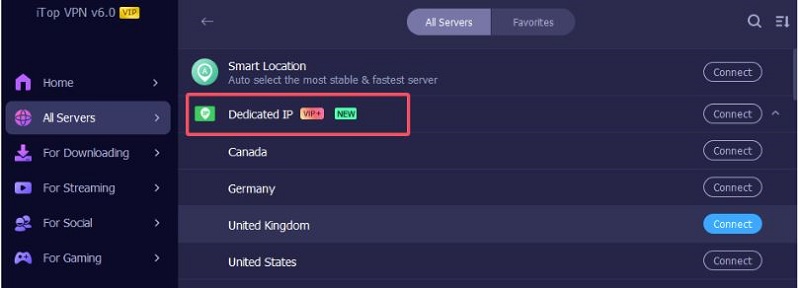
Dynamic IP address: iTop VPN can also provide users with dynamic IP, which means that each time you connect to the VPN, you can get a different IP address. This mechanism makes it more difficult for users to be tracked, effectively enhancing online privacy protection, especially for users who want to hide their Internet traces.
Double VPN: iTop VPN supports a double VPN function, and the user's traffic will be transmitted through two different VPN servers, further enhancing the encryption effect and anonymity. Double VPN provides multiple levels of IP hiding and data protection, which is very suitable for users who have higher requirements for privacy and security.
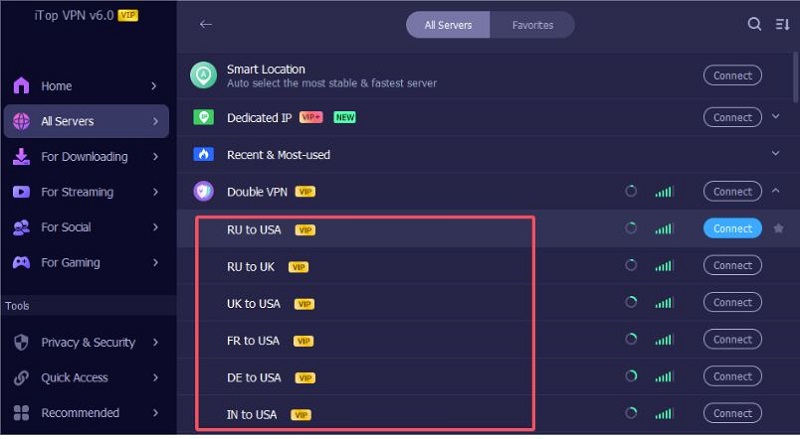
Free version: More importantly, iTop VPN provides a free VPN version, which allows users to enjoy basic IP address hiding and network encryption functions without paying. Although the number of free servers is limited, it is enough for ordinary users to protect privacy and bypass simple geographical restrictions.
The Bottom Line
The application of finding IP address from location query tools in various fields has become more and more common. Whether it is for enterprises to optimize advertising, for individual users to ensure privacy, or for network security personnel to track abnormal traffic, knowing the physical location of IP addresses is a key requirement. I hope the 3 IP address geographical location finders shared in this article can provide you with practical help.
In addition, while querying IP, don't forget to fully protect your IP. iTop VPN is a good IP protection tool suitable for everyone. Give it a try.


How to Hide IP Address - Free VPN to Hide IP Address
Quickly Generate Virtual Identities or Real IP with 5 Free Random IP Generators

The Best Dedicated IP VPN Free: How to Get VPN with Static IP?

Buy Cheap TikTok Coins Online & with Free VPN in the Cheapest Country

How to Mask Your IP without a VPN or with 3 Best Reliable Free VPNs Quickly

2026 Newest: Best Free VPN for Discord Review
How to Change IP Address? Get 8 Ways to Free Change IP Easily

8 Best Free IP Stressers with Layer7 Testing Capabilities
100+ global countries
3200+ worldwide servers
Dedicated IP addresses
Dynamic IP and static IP

Subscribe to Our Newsletter
Subscribe to our newsletter to stay updated every moment.

Subscribe to Our Newsletter
Subscribe to our newsletter to stay updated every moment.
© 2026 iTop. All rights reserved.






