
iTop VPN offers 3200+ VPN servers in 100+ locations worldwide to help you access various sites privately and safely, along with dedicated IP, dynamic and static IP, and Double VPN.
Found ExpressVPN not working with Netflix but don’t know how to fix? Don’t worry; this article offers 4 fixes & 1 feasible ExpressVPN alternative to help you!
The biggest and most incredible nightmare a Netflixer has met is failing to access Netflix anymore before you finish the season or episode. After blindly seeking, you found that the problem came from the VPN you use: ExpressVPN not working on Netflix now.
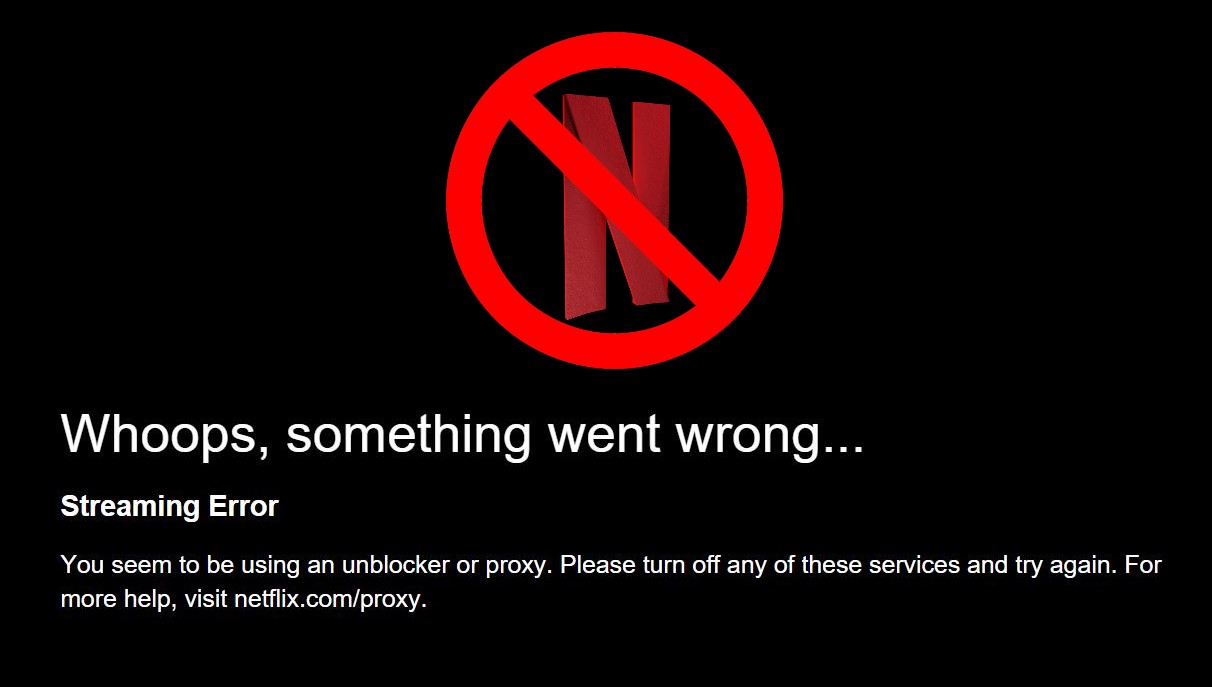
There is the rub: how to fix it? If you are also at a loss and do not know what to do, calm down; in this article you will learn how. And before the troubleshooting tutorials, it is necessary to check why is ExpressVPN not working for Netflix.
The problem won’t come from nowhere. Actually, there are several potential reasons. Checking them first can help you fix the issue better.
ExpressVPN does not have servers in your target country.
Temporary technical system error happened.
The VPN or your network connection is unstable.
Your IP is leaking and Netflix is reading your real IP data and cookies.
Netflix is now trying to block this VPN connection.
These are the possible causes that can prevent you from accessing Netflix via ExpressVPN. Rest assured, corresponding fixes are ready to help you.
Though Netflix takes hard measures to block users out of the service regions from accessing it even with VPNs, and though there are other factors causing problems, there are workarounds. This article has tested multiple solutions and the following 5 can make it.
As mentioned before, if you find ExpressVPN does not work on Netflix, the VPN or network connection might be the case.
>> Check if ExpressVPN has locations in your target country. If it has, and the problem is still there, try changing a location to stream Netflix.
For example, if you are connecting to USA servers, use other locations in the USA instead, like New Jersey, Washington DC, New York, etc.
Changing locations to connect sometimes is a useful fix, as long as you are using a VPN that has multiple locations/servers in one country. For instance, iTop VPN for Windows/Mac/iOS is also a VPN that possesses multiple USA servers and is worth trying.

Sometimes, some unexpected or typical system errors also stop users from accessing the VPN’s service. If you find your local connection is okay and stable, while the VPN connection is malfunctioning, try these steps:
1. Re-sign into your ExpressVPN account.
>> Log out of your ExpressVPN account > restart ExpressVPN > sign back in and see if the ExpressVPN does not work on Netflix issue has been fixed and you can visit and access Netflix now.
2. Re-install the ExpressVPN app.
>> Uninstall ExpressVPN > install the app again > sign in and see if this time you can use ExpressVPN as usual and enjoy your loved episodes like Love Is in the Air Turkish series Netflix.
IP leak is another possible cause. Netflix service checks if your IP address is allowed before letting you in. If your VPN fails to hide your IP successfully, then Netflix will block you out. So as DNS. If the VPN leaks your DNS requests, Netflix can also read your location.
Follow the steps to check if your IP/DNS is leaking.
Step 1. Go to third-party leak test websites or ExpressVPN IP leak test sites and check if your IP, DNS, or WebRTC is leaking.
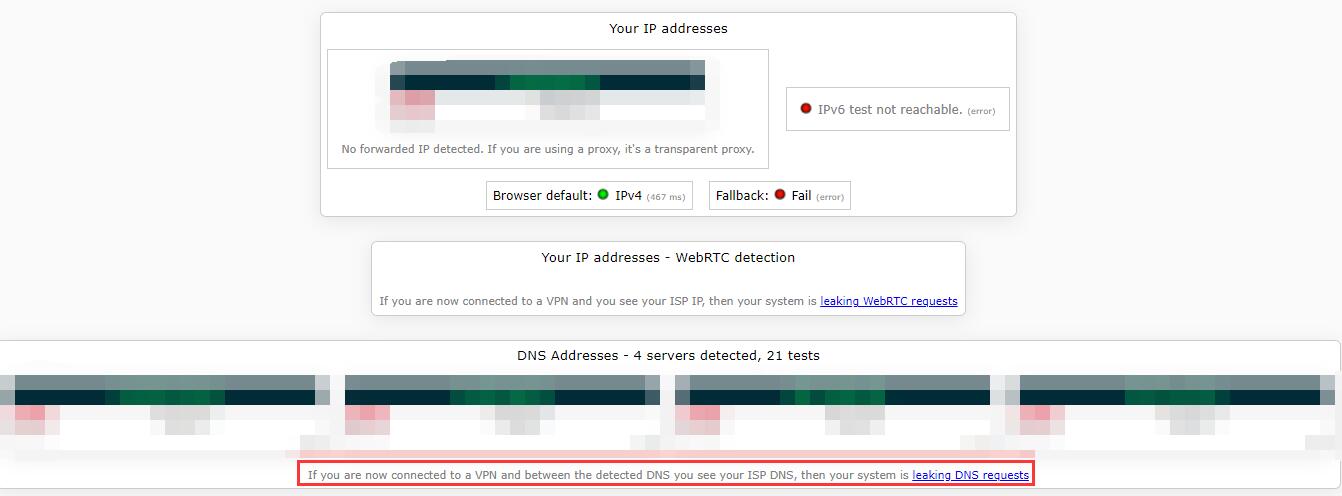
Step 2. If there indeed is, try using another protocol like Lightway to fix the ExpressVPN not working for Netflix issue.
Usually, a VPN encrypts your DNS queries. Without a VPN, you may receive some privacy warnings; e.g., on iOS devices, you will receive the “This network is blocking encrypted DNS traffic” error.
If changing protocols that are more powerful in DNS protection still do no help, you might need to change a VPN. Please move on to #5.
Streaming services will store your info and data to shorten the loading time, and this info called cookies and caches includes your location data. If Netflix finds the stored location info cannot match your IP now, you are very likely to be blocked.
Clearing the browsing data and then Netflix cannot see your cache info to estimate your location. Now taking Google Chrome as an example, follow the steps to clear them.
Step 1. Click the 3-dot Settings button > find Clear browsing data.
Step 2. Set Time Range to All Time > tick the check boxes of Cookies and other site data and Cached images and files > click clear data.
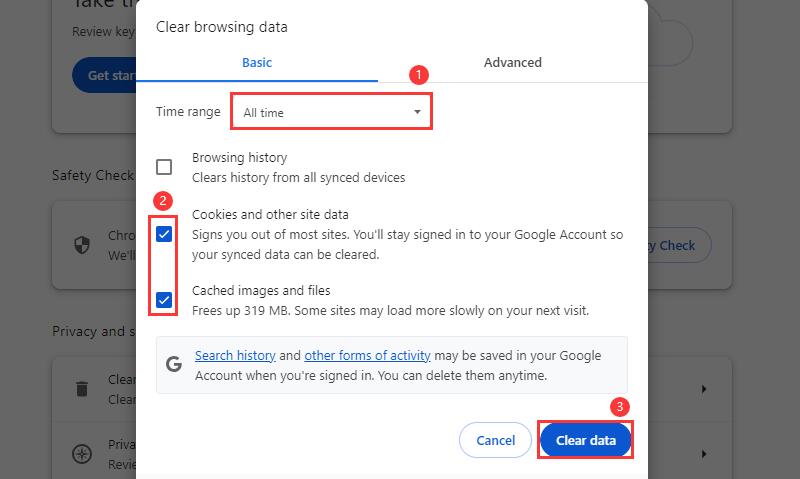
Then reconnect to ExpressVPN and see if the ExpressVPN not working issue is still there.
The above 4 methods are helpful in most of the situations. If you still find ExpressVPN does not work on Netflix and cannot access Netflix as usual, using a great alternative will be the best solution!
>> Find an ExpressVPN free alternative that can unblock Netflix > connect to it > start streaming Netflix happily.
If you have no idea which VPN to choose, don’t worry; in the next section, we will introduce an eligible VPN that can actually help.
Choosing an ExpressVPN alternative that can actually unblock Netflix service will be the best and easiest way to solve this problem.
iTop VPN stands out for its awesome performance in unblocking streaming services and establishing anonymous & encrypted VPN tunnels; thus, using it can help you access Netflix service without any barriers, and you will never worry about the ExpressVPN not working on Netflix issue.



As a well-designed VPN, this VPN app never lets you down in bringing you countless streaming resources with its amazing features.
• Multiple USA and Global servers to Stream Netflix
iTop VPN offers 15+ servers like Chicago, Miami, NY, etc., in the USA to help you access Netflix USA content. Connecting to other countries to access global Netflix content. E.g., if Japanese users find ExpressVPN Japan Netflix not working, they can use Japan servers to watch Netflix Japan.
• Exclusive Routes for Better Streaming Experience
This free VPN for streaming app provides special routes for specific streaming services: Netflix, Disney+, Hulu, HBO, etc. What’s more, it offers tunnels for streaming in different countries: Streaming US, Streaming DE, etc.
• No Bandwidth Limits to Ensure Fast & Stable Streaming Netflix
iTop VPN, the high speed VPN for PC/Mac/iOS, sets no bandwidth limits during your connection, ensuring high speed and a stable connection without lags, frame drops, or buffering in watching Netflix episodes.
• Unbreakable Protection to Hide Your IP and DNS
Keeping anonymous is another essential point in unblocking Netflix service. This free VPN location changer firmly masks your IP and encrypts your DNS traffic and requests, thus Netflix can only assume your location by your new IP assigned by iTop VPN.
Using this free VPN with special care for streaming, you won’t be bothered by the ExpressVPN not working for Netflix issue again. Now check the steps to stream Netflix easily.
Step 1. Download, install, and launch iTop VPN on your device.
Step 2. Click For Steaming on the sidebar > find Netflix United States > click Connect. Then you can stream Netflix as usual.
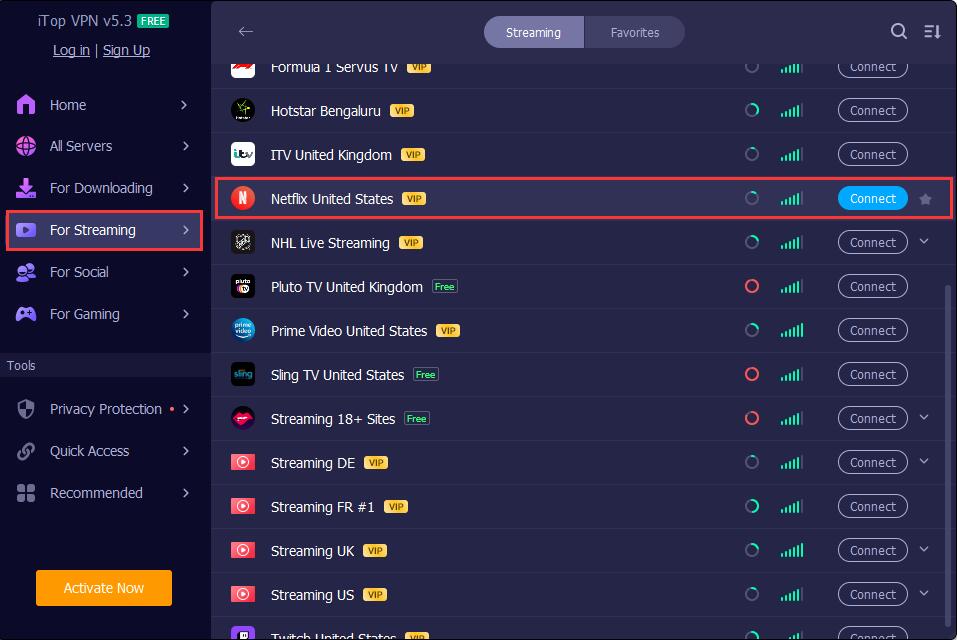
Or, directly connect to United States servers to get a USA IP and then unblock Netflix service.
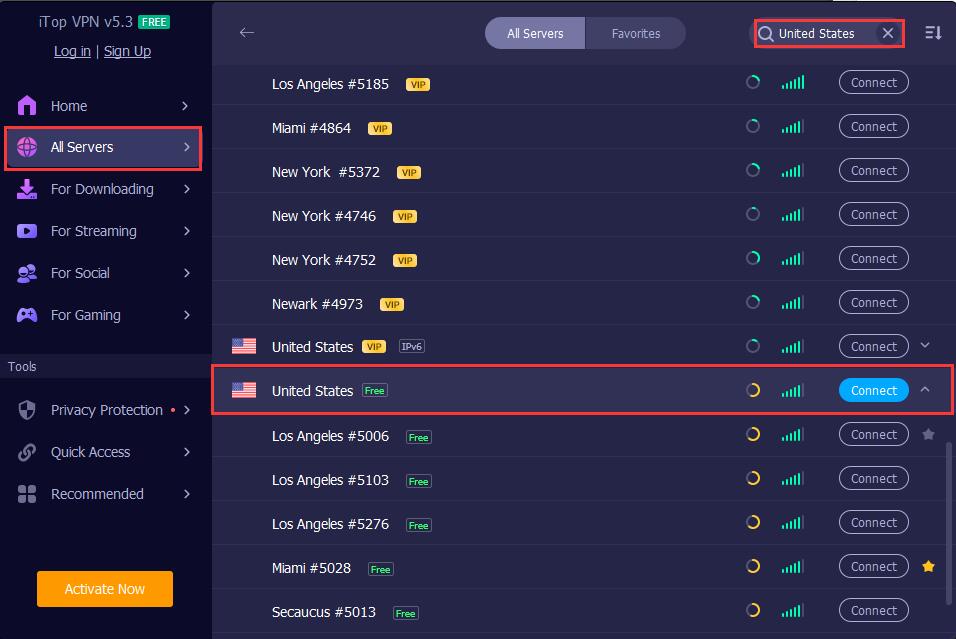
Don’t hesitate to use this free VPN with free USA locations and get a USA IP address for your Netflix!
Final Words
This article has introduced 4 methods and 1 ExpressVPN free alternative to help you solve the “ExpressVPN not working on Netflix” issue.
Generally, you can change locations on ExpressVPN, clear cookies and caches, change protocols, and reinstall to fix this error; if all these fixes are not enough to help you out, you still have one more easier solution: using the great alternative iTop VPN.
This VPN provides special measures for streaming lovers to watch Netflix, Hulu, HBO, etc. In addition, it also works perfectly as a VPN for TikTok and other social media apps. Try iTop VPN now and enjoy countless online entertainment!

COD Warfare Lagging Issue - Why & How to Fix It?

How to Fix Hogwarts Legacy Lag, Stuttering, Low Frame Rate on PC

VPN for CapCut PC: Top 5 Free VPN for CapCut Services to Download CapCut

5 Best TamilYogi VPNs Download Free & Paid: Watch TamilYogi HD Movies Online

10 Best Putlocker Alternative Sites | Watch Movies Online Securely

A Complete Guide on Where to Watch Breaking Bad All Seasons in 2026

How to Unblock 123Movies at School Free | 123Movies Official Website Unblocked Solution

Is There Any Free VPN for Fire Stick with Unlimited Data?
3200+ worldwide servers
20+ dedicated streaming servers
Unblock any streaming sites
Free, fast & anonymous

Subscribe to Our Newsletter
Subscribe to our newsletter to stay updated every moment.



Product
iTop VPN iTop Screen Recorder iTop Data Recovery iTop PDF Editor DualSafe Password Manager iTop Easy Desktop Plans & PricingCompany
About Us Contact Us Press Awards FacebookHelp
Support Uninstall Instructions Refund PolicyPartner
Become iTop Affiliate YouTube Creators Free AI Video Generator
Subscribe to Our Newsletter
Subscribe to our newsletter to stay updated every moment.
© 2026 iTop. All rights reserved.






