
iTop VPN offers 3200+ VPN servers in 100+ locations worldwide to help you access various sites privately and safely, along with dedicated IP, dynamic and static IP, and Double VPN.
Is Yik Yak banned on your campus? Discover why it's blocked and learn how to bypass the restriction with a VPN. Fix Yik Yak not working issues for good.
Yik Yak previously established a lively online environment for students to engage in conversations within their college communities. However, the same anonymity that made it fun also led to controversy, prompting many schools to impose campus-wide bans. So if Yik Yak doesn't load on your Wi-Fi, it's not a glitch — it's likely a deliberate restriction.
This guide explains why Yik Yak got banned, how to get around campus blocks safely, and how to fix common issues so you can keep connecting with your peers.
Yik Yak is a location-based social app that works like a local message board: users post short, anonymous updates (called “Yaks”) visible to people nearby. The app runs on both Android and iOS and became particularly popular on college campuses for quick updates about events, campus news, and social chatter. The original appeal was anonymity combined with a hyperlocal feed — posts rise or fall in visibility depending on upvotes and downvotes from the community.
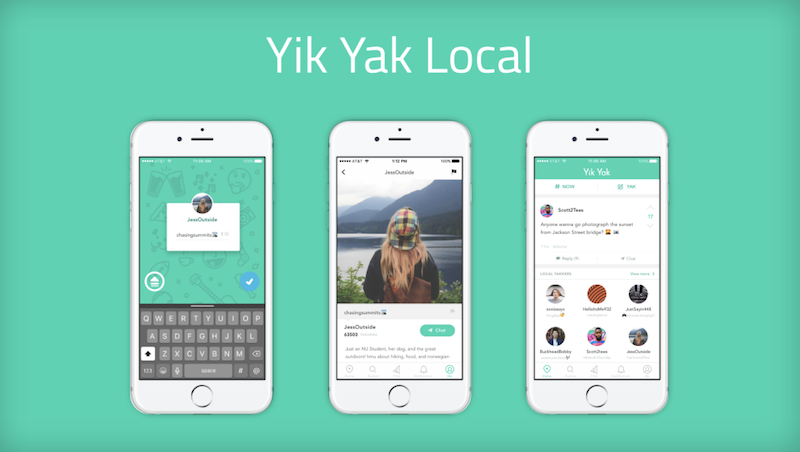
Students used Yik Yak for everything from class notes to event tips and casual banter. That immediacy and local focus made it unique, but it also opened the door for misuse. After shutting down in 2017, Yik Yak relaunched in 2021 with changes like user handles and stronger moderation. Even so, many universities keep Yik Yak banned on their networks due to the app's controversial history.
Yik Yak was first banned after serious problems surfaced, including cyberbullying, harassment, and threats made under the cover of anonymity. Those events pushed many colleges to block the app completely to protect students and limit liability. Even after the 2021 relaunch introduced moderation and account handles, the app's past reputation stuck. Administrators often prefer the safer route: block access on campus Wi-Fi rather than risk renewed problems.
So when you see a “Yik Yak banned” error on campus, remember — it's usually a network policy from your school's IT department, not a problem with the app itself.
This long-standing caution explains why restrictions still exist in 2025, even after Yik Yak's redesign.
If your campus network shows a Yik Yak banned message, a Virtual Private Network (VPN) is the most reliable way to restore access. A VPN encrypts your traffic and routes it through a server elsewhere, so your device appears to be browsing from outside the campus network — effectively bypassing local blocks.
We recommend iTop VPN for iOS and Android because it's straightforward, affordable, and built with social apps in mind.

Here's why it works well for Yik Yak.
Free VPN servers: If you're trying to bypass a campus restriction quickly, the free VPN offers a selection of U.S. servers you can connect to instantly. Simply choose a U.S. server, connect, and you should be able to access Yik Yak without seeing the banned notice.
Static IP option: Location-based apps can behave oddly if your IP keeps changing. It’s static IP allows you to keep a consistent virtual presence, contributing to smoother operation of Yik Yak and preventing the need for frequent re-verification.
Servers optimized for social media: iTop VPN maintains social media servers tuned for social platforms — fewer disconnects, less “Yik Yak not loading” frustration, and generally better throughput for short posts and images.
Privacy features: The service hides your real IP and encrypts your data, protecting you from network monitoring and giving you the anonymity Yik Yak users expect.
Simple setup and cross-device support: iTop VPN works on Android and iOS, and has desktop clients too, so you can use the same settings across phones and laptops.
If a campus firewall is particularly strict, try different iTop VPN servers or switch connection protocols inside the app. For most students, connecting via a nearby U.S. server solves the typical Yik Yak banned problem within seconds.
After choosing a VPN, bypassing the Yik Yak banned block is straightforward. Using iTop VPN’s free U.S. servers as an example:
Step 1. Download and install iTop VPN on your device.
Step 2. Open the app and go to the server list.
Step 3. Pick a free United States server and tap Connect.
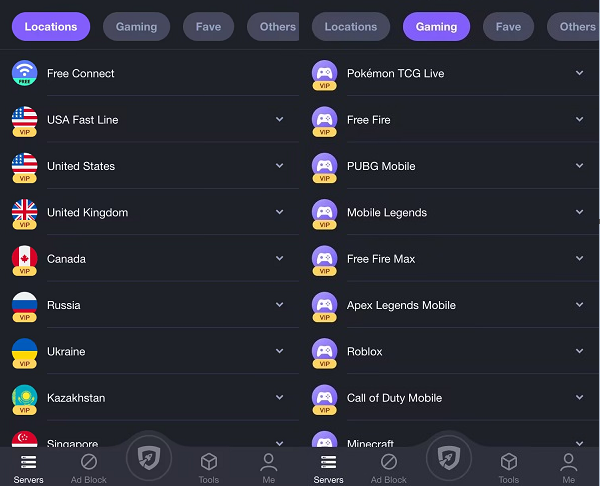
Step 4. Once the VPN shows “Connected,” open Yik Yak. The Yik Yak banned message should disappear, and your local feed will load normally.
This simple setup resolves most campus block cases and usually fixes “Yik Yak not loading” errors related to restricted networks.
Even after connecting through a VPN, you might still run into Yik Yak not working or Yik Yak not loading problems. These are usually technical and solvable — here are the common causes and practical fixes.
Sometimes the VPN server you picked is overloaded or flagged by the app. If posts don't load or the app is slow, disconnect and try another server (preferably in the same country). With iTop VPN you can switch between multiple optimized servers; rotating servers often fixes access problems fast.
Cached data can get corrupted and cause display or login failures. On Android go to Settings → Apps → Yik Yak → Storage → Clear cache (and clear data if needed). On iOS, reinstalling the app often clears problematic cached files. Note: clearing data may require you to log in again.
Yik Yak is location-dependent. If GPS is off or your phone's location permissions are restricted, posts won't appear. Make sure Yik Yak has location permission and that your VPN's virtual location aligns with your GPS (on Android you may need to enable mock locations or allow the VPN to modify location data). If locations mismatch, the app can appear empty or show “no posts”.
Some campus networks block not just the app but VPN protocols. If a typical VPN configuration does not work, consider changing protocols in iTop VPN (for instance, from UDP to TCP) or select an alternative port. If your school blocks all VPNs, consider using mobile data or contacting IT if you have a legitimate need.
Running old app or OS versions can lead to crashes. Keep both Yik Yak and your device updated. Developers routinely release fixes that resolve crashes or compatibility issues that mimic a blocked state.
By systematically checking these areas — VPN servers, cache, location permissions, network rules, and updates — you can usually resolve Yik Yak not working situations and tell the difference between a genuine ban and a fixable technical hiccup.
Is Yik Yak anonymous?
Not completely. Yik Yak no longer operates as fully anonymous as before — each post now links to a random handle, offering some accountability without exposing identity. This update helps reduce abuse and creates a safer space for open discussion, balancing freedom with responsibility for users who enjoy the Yik Yak anonymous experience.
Can I download Yik Yak for Android?
Yes. Since its 2021 comeback, Yik Yak has been available on both the Google Play Store and the iOS App Store. Simply search “Yik Yak,” install, and you're ready to join your local feed.
Are there apps similar to Yik Yak?
Definitely. Apps like Jodel offer a similar local, location-based posting experience. Whisper also focuses on anonymous sharing. For broader conversations, Reddit communities dedicated to specific campuses or cities serve as good Yik Yak-style alternatives.
Conclusion
Handling a Yik Yak ban notice on campus can be annoying, but recognizing the underlying causes and utilizing a reliable VPN such as iTop VPN provides a secure way to regain access. With the right setup and a few troubleshooting steps, you can get Yik Yak working again and join local conversations responsibly.

5 Best Ticketmaster VPNs: Buy Tickets from Anywhere in the World

Buy Cheap TikTok Coins Online & with Free VPN in the Cheapest Country

How to Get Unbanned from Minichat with 5 Best VPNs for Minichat from Anywhere

How to Get Malaysia IP with Free VPN Malaysia

3 Best VPN for Talkatone 2026: Unblock Talkatone on Android & iPhone

Free VPN with Dedicated IP - Get Unique IP Address

9 Best Free Indian VPNs to Get an Indian IP Address Securely

Best Free TikTok VPN Download: Unblock TikTok with VPN for PC & Mobile
10+ dedicated social app servers
Unblock your favorite apps
Encrypt and protect data

Subscribe to Our Newsletter
Subscribe to our newsletter to stay updated every moment.

Subscribe to Our Newsletter
Subscribe to our newsletter to stay updated every moment.
© 2026 iTop. All rights reserved.






