
iTop VPN offers 3200+ VPN servers in 100+ locations worldwide to help you access various sites privately and safely, along with dedicated IP, dynamic and static IP, and Double VPN.
Learn what a VPN negotiation timeout is, why it occurs, and how to fix real cases from Check Point and Shrew VPN. Plus, get a free VPN alternative with ease.
In today's digital era, VPNs are crucial for secure remote access, but connection issues can sometimes arise. One of the most common problems users face is the VPN negotiation timeout, an error that stops the VPN connection from being successfully established.

When a VPN negotiation timeout occurred, it typically means the client and server failed to complete the handshake process in time. This issue can stem from network settings, protocol mismatches, and more. In this guide, you will learn what this error means, common causes, real-world examples, and practical solutions to get you connected again.
VPN negotiation refers to the process of exchanging security parameters and negotiating encryption methods between the client and the server when establishing a VPN connection. Specifically, VPN negotiation includes the following key stages:
1. Authentication
Confirm the identity of the client and the server (such as username/password, certificate, etc.)
2. Key Exchange
Exchange encryption keys using IKE (Internet Key Exchange) or other protocols
3. Encryption Negotiation
Both parties determine which encryption algorithm, hash algorithm, DH group, etc. to use
4. Tunnel Establishment
After successful negotiation, an encrypted channel is established for data transmission
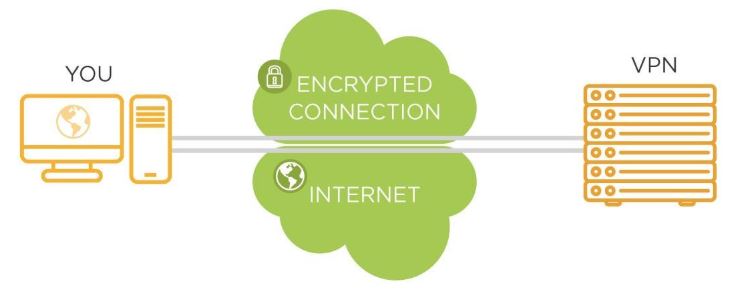
If these steps are not completed within the set time, a VPN negotiation timeout error will be triggered.
So, a VPN negotiation timeout occurs when the VPN client is unable to establish a secure tunnel with the server within a designated time limit. This phase, often part of the IPsec or IKE handshake, is crucial for initiating encryption, authentication, and session setup.
Whether you're dealing with an enterprise VPN or a personal solution, negotiation failure can halt all secure communications. It's often accompanied by errors like VPN negotiation failed or VPN negotiation timeout occurred, which indicate the handshake process was incomplete.
At that time, all VPN-based services will be unavailable. If the user has enabled the "kill switch", the local network connection will also be disconnected to protect privacy.
There are several underlying causes behind negotiation timeouts. Let's look at the most common ones in detail:
●Blocked Ports: Firewalls or NAT devices may block UDP 500 and 4500, which are essential for IPsec/IKE traffic. Without access to these ports, the VPN cannot initiate or complete the handshake.
●Incorrect Authentication: If the shared secret (pre-shared key), username/password, or certificates are incorrect, the server will reject the negotiation attempt.
●Protocol Mismatch: Using IKEv1 when the server expects IKEv2 (or vice versa) can result in a failed negotiation.
●Software Incompatibility: Older VPN clients like Shrew Soft VPN may not support the latest encryption methods or settings required by modern VPN servers.
●Server Configuration Errors: If the VPN server is misconfigured or experiencing downtime, it may not respond to connection attempts in time.
●Network Instability: High latency or packet loss on the user's internet connection can disrupt the negotiation process.
When faced with a VPN negotiation timeout, don’t panic. A number of practical troubleshooting steps can help resolve it:
Solution 1. Check Internet Connectivity: Ensure your device is online and DNS resolution is functioning correctly. Try pinging the VPN server to verify its accessibility.
Solution 2. Verify Gateway and Credentials: Double-check that the remote gateway IP, username, password, and pre-shared keys are correct and match the server settings.
Solution 3. Open Required Ports: On your firewall and router, allow traffic over UDP 500 and UDP 4500, which are essential for IPsec/IKE communication.
Solution 4. Switch VPN Protocols: If available, change from IKEv1 to IKEv2 or try using OpenVPN or WireGuard, which may offer better compatibility.

Solution 5. Update VPN Client Software: Outdated clients are prone to compatibility issues. Make sure you are using the latest version supported by your VPN provider.
Solution 6. Enable NAT Traversal: When behind a NAT device, ensure that NAT-T is enabled to prevent negotiation issues.
Solution 7. Test on Another Network: If possible, connect to a different Wi-Fi or mobile network to determine whether the issue is local.
Solution 8. Adjust Encryption and Authentication Settings: Match your settings (encryption algorithms, DH group, authentication mode) with the VPN server's requirements.
Solution 9. Review VPN Logs: Use client-side log output to pinpoint where in the negotiation process it fails.
Different VPN clients and enterprise systems exhibit different types of negotiation errors. Let’s examine two of the most frequently encountered ones.
If you’re using Check Point software and see the message "negotiation with site failed checkpoint VPN", you’re not alone. This usually indicates that the VPN client couldn't complete the handshake with the security gateway.
The full error message, "check point endpoint security VPN negotiation with site failed", often stems from server-side authentication mismatches, unsupported encryption settings, or incorrect configurations on either end. If DNS fails to resolve the gateway IP, the client might never even reach the server.
Resolving this requires ensuring protocol compatibility, verifying gateway IP and credentials, and confirming that the VPN ports (especially UDP 500 and 4500) are not blocked by firewalls.
The error "shrew VPN negotiation timeout occurred" is commonly seen with the Shrew Soft VPN Client, which is an older IPsec VPN tool for Windows and Linux.
This error typically points to issues like an unreachable VPN server, incorrect remote gateway settings, or blocked ports. Since Shrew VPN uses IKEv1 by default and lacks support for modern encryption methods, compatibility is a big concern.

Solutions include enabling NAT traversal, opening required ports, or even switching to a more modern client. More often than not, outdated software is a primary reason why the VPN negotiation timeout occurred. For smoother compatibility on Windows systems, consider using the latest VPN for Windows.
If repeated attempts to fix the VPN negotiation timeout issue are unsuccessful, it may be time to contact your IT administrator or consider switching to a modern, well-supported VPN provider. One standout option is iTop VPN.

Designed for ease of use and high compatibility, iTop VPN supports modern encryption protocols and delivers a stable, fast connection experience. It's also a reliable alternative for users looking to avoid complex configurations. On top of that, it offers a free VPN plan with rich basic functions, a large number of free servers, and high security. It can meet the basic needs of most users and is free for life without restrictions.
iTop VPN includes access to a large VPN server list, 3200+ servers in over 100 countries, which allows you to connect easily to regions like India, the US, the UK, UAE, France, and more.
For users who want precise control, you can use its dedicated IP feature to maintain session persistence and reduce authentication errors. Moreover, if you're on a PC and value speed, iTop ranks among the top speed VPN for PC solutions available. Compared to legacy clients like Shrew VPN, it offers a far more streamlined and modern experience.
The Bottom Line
After reading, you now realize VPN negotiation timeout is a solvable issue. Whether caused by misconfigurations, outdated clients, or network blocks, the right tools and strategies can get you back online. If needed, switching to a user-friendly VPN like iTop can save time and frustration.
Get Best Internet Speed Tester to Boost Your Connection

qBittorrent VPN: Complete Guide on How to Bind qBittorrent to VPN 2026

Best 7 Day Free Trial VPNs to Try in 2026: Unlimited Free to Use

Buy Cheap TikTok Coins Online & with Free VPN in the Cheapest Country

Best 10 HDToday Alternatives & HDToday Proxy | Watch Movies Online for Free [2026]

How to Get Malaysia IP with Free VPN Malaysia

8 Best Free IP Stressers with Layer7 Testing Capabilities

Free VPN with Dedicated IP - Get Unique IP Address
10+ dedicated social app servers
Unblock your favorite apps
Encrypt and protect data

Subscribe to Our Newsletter
Subscribe to our newsletter to stay updated every moment.

Subscribe to Our Newsletter
Subscribe to our newsletter to stay updated every moment.
© 2026 iTop. All rights reserved.






