
iTop VPN offers 3200+ VPN servers in 100+ locations worldwide to help you access various sites privately and safely, along with dedicated IP, dynamic and static IP, and Double VPN.
Learn how to lower ping in Valorant with 8 proven methods. Discover why ping is high, how to fix ping spikes in Valorant, and a quick tip to improve latency.
How to lower ping in Valorant? Competitive matches in Valorant depend heavily on network stability. A low and stable ping ensures that your shots register instantly, abilities activate on time, and character movement stays synchronized with the game server. When latency becomes unstable, even skilled players may experience delayed shooting, missed hit detection, or sudden deaths during important fights.
Because of this, many players encounter high ping and always ask, "Why is my ping so high in Valorant?", while some struggle with sudden latency jumps and look for guides on how to fix ping spikes in Valorant. These issues are common in online shooters. Follow this guide to see the causes behind high latency and learn 8 practical solutions that can help improve connection quality and gameplay consistency.

Before learning how to lower ping in Valorant, let's first understand what ping means and why it affects gameplay performance.
Ping refers to the time it takes for your device to send data to the game server and receive a response. This delay is measured in milliseconds (ms). The lower the number, the faster the communication between your device and the server.
In Valorant, ping values generally fall into 3 categories:
0–30 ms: Excellent latency, ideal for competitive play
30–60 ms: Stable and acceptable for most matches
80 ms or higher: Noticeable delay that may impact gameplay
High ping affects how the game processes your actions. If latency is too high, your shots may register late, abilities might activate with a delay, and enemies may appear to kill you before you see them. Players may also experience rubber banding, where the character briefly moves backward due to delayed server synchronization.
These problems explain why players often search for how to get lower ping in Valorant or complain that "my ping in Valorant is high" during competitive matches.
If you are also wondering, "Why is my ping so high in Valorant?", you are coming to the right place. The problem often comes from network conditions rather than the game itself.
Valorant is developed by Riot Games and runs on regional servers across different continents. When your connection is routed to a distant server, the physical distance increases latency.
More common causes include:
Connecting to the wrong server region
Limited internet bandwidth
Weak or unstable WiFi signals
Background applications are consuming network resources
ISP routing inefficiencies or long network paths
Internet congestion during peak hours
Outdated routers or network drivers
Because of these factors, many players search for solutions on how to fix high ping in Valorant. Fortunately, several practical methods can significantly fix "how to reduce high ping in Valorant" and improve connection quality.
For those who are searching for how to lower ping in Valorant, there are several proven techniques that can help reduce latency and stabilize your connection. Some fixes are simple adjustments to your network setup, while others involve optimizing routing paths. Let's dive in.
1. Choose the Correct Server Region
Selecting the correct server region is one of the easiest ways to how to get lower ping in Valorant. Inside the game client, you can view the latency for each available server and choose the one with the lowest response time.
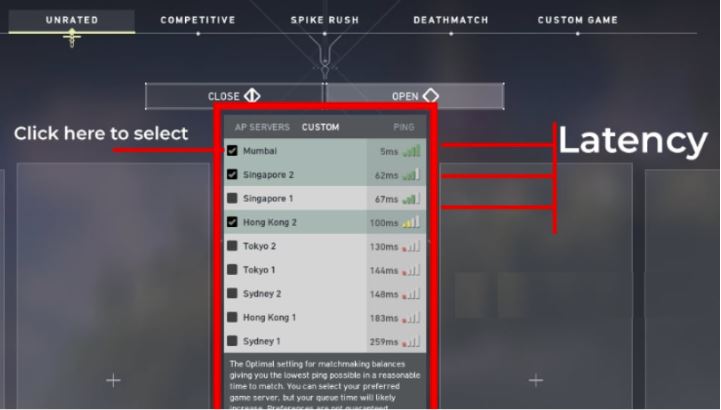
Always select the server with the lowest ping whenever possible. For example, players located in India may experience better performance when connecting to nearby regional servers instead of distant ones, like from the Brazil. Connecting to a faraway region forces your data to travel longer network routes, increasing response time and causing noticeable delay during matches.
2. Use Wired Ethernet Instead of WiFi
Wireless connections are convenient but often less stable than wired ones. Walls, interference, and other devices can disrupt WiFi signals.
So, try to use an Ethernet cable to create a direct connection between your computer and the router. This reduces packet loss and improves network stability, making it easier to reduce ping in Valorant.
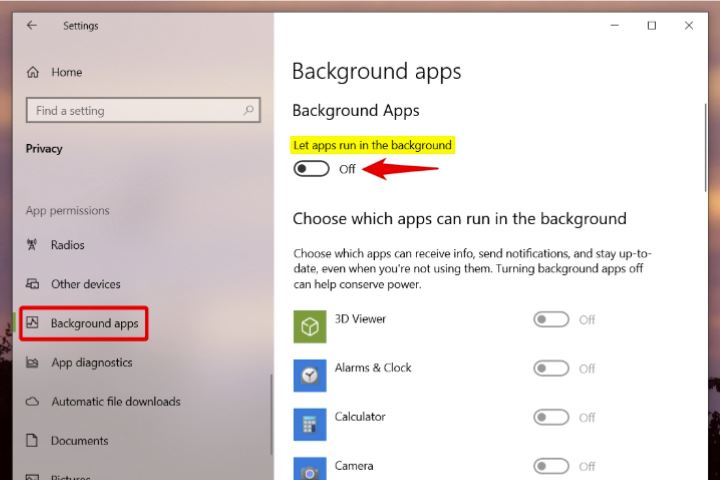
3. Close Background Applications
You may not know that background programs can consume significant bandwidth without you noticing.
Examples include game downloads, cloud synchronization, video streaming, and software updates. Closing unnecessary programs ensures your internet connection prioritizes game traffic, which can help players who feel "my ping in Valorant is high" during matches.
4. Restart Router and Modem
Routers and modems may accumulate temporary errors or routing cache after long periods of operation.
Restarting your network equipment refreshes the connection and forces your internet provider to rebuild the routing path. This simple step can sometimes improve latency and connection stability.
5. Update Network Drivers
Outdated network drivers may cause unstable connections, compatibility issues, or inefficient data transmission, which can lead to higher latency during online games. Keeping your network adapter drivers updated helps ensure your system runs with the latest optimizations and stability improvements.
You can update your network drivers with the following steps:
Step 1. Open Device Manager. Right-click the Start menu and select Device Manager.
Step 2. Find Network Adapters and expand the Network Adapters category.
Step 3. Right-click your Ethernet or WiFi adapter and choose Update driver.
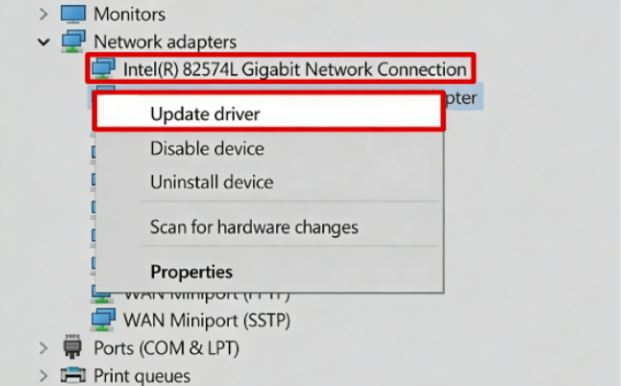
Step 4. Click Search automatically for drivers.
Step 5. Restart your computer after the update is installed.
6. Optimize Router Settings (QoS)
Quality of Service (QoS) allows your router to prioritize specific types of traffic. By prioritizing gaming traffic, you ensure Valorant receives sufficient bandwidth even when other devices are connected to the same network.
You can optimize QoS settings with these simple steps:
Step 1. Log in to your router. Open a browser and enter your router’s IP address (such as 192.168.1.1).
Step 2. Locate the QoS or Traffic Management section in the router dashboard.
Step 3. Turn on QoS and set your gaming PC or console to High Priority.
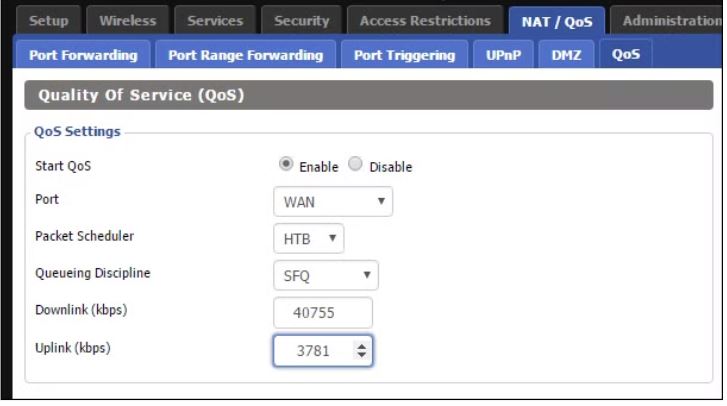
Step 4. Apply the changes and restart the router if necessary.
7. Play During Off-Peak Hours
Internet congestion often increases during evening hours when many users are online.
Playing earlier in the day or late at night can reduce network congestion and improve connection stability for players searching how to lower ping in Valorant. However, you may also want to play the game at that specific time. So, if you often need to play games during peak hours, you can try other methods.
8. Use a VPN for Reduce Ping in Valorant
In some situations, latency problems occur because your internet service provider routes traffic through inefficient pathways. When this happens, a VPN may help reduce ping in Valorant by providing an optimized route to the game server.
Instead of relying on congested ISP pathways, VPN networks can redirect traffic through faster nodes.
VPN routing can help by:
Providing a more direct connection path to servers
Avoiding network congestion points
Stabilizing international connections
Reducing ISP throttling

If you want to test whether rerouting traffic improves latency, trying a reliable free VPN can help determine whether optimized routing reduces delay in your location.
When exploring advanced solutions for how to lower ping in Valorant, some players find that optimized routing can significantly improve network stability. In such cases, using a reliable VPN service may help improve the connection path between the player and the game server. One option many gamers try is iTop VPN.
This speed VPN for Windows, Mac, and mobile, which provides global server coverage, 3200+ fast servers in over 100 countries, is designed to optimize connection routes and help players avoid congested network paths. It offers about 100 free servers for unlimited use, and an extensive VPN server list that allows you to quickly switch between different connection points.
More features that can benefit Valorant players include:
Gaming-optimized servers designed to reduce latency and improve routing efficiency
Smart routing technology to avoid congested ISP routes
Stable high-speed connections for smoother online gameplay
Optional dedicated IP support for more consistent server connections
Strong encryption and security protection to safeguard online sessions
Low-latency gaming nodes optimized for competitive online games
Reduced packet loss and jitter for more stable matches
Since most Valorant players play on PC, using a VPN for Windows is the most convenient way to test improved routing. Here are the steps.
Step 1. Install iTop VPN software on your PC.
Step 2. Launch it and select the nearest gaming server or select Smart connect.
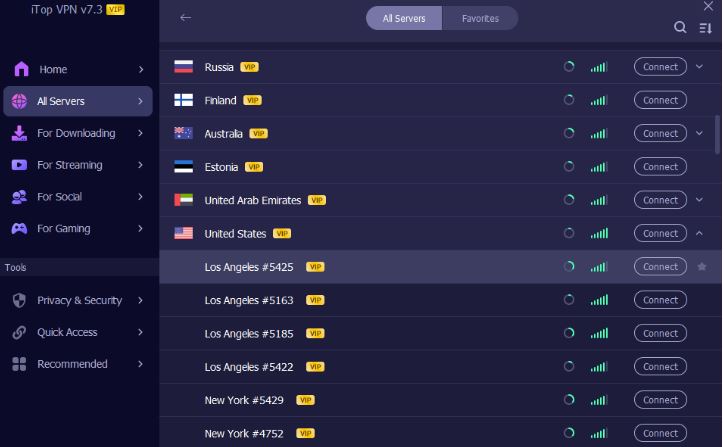
Step 3. When connected, check your real-time IP.
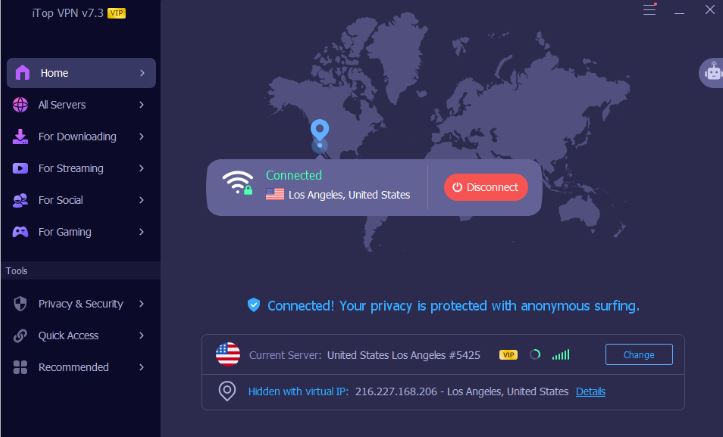
Step 4. Start Valorant and check your new ping.
You can test multiple servers to determine which server is the best to improve latency in your region.
Constant high latency is frustrating, but sudden spikes can be even more disruptive. Many players are searching how to fix ping spikes in Valorant experience situations where latency suddenly jumps during important fights. Unlike consistently high ping, spikes are usually caused by unstable network conditions rather than slow internet speeds.
Several tips that help stabilize your connection:
Check packet loss using in-game network statistics
Disable background downloads and automatic updates
Reset network settings using system commands
Change DNS servers to options like 8.8.8.8
Ensure your router is not overheating
Contact your ISP if connection jitter continues
Stable network performance is essential for competitive shooters. By understanding the causes of latency and applying practical optimizations, players can significantly improve gameplay quality. From selecting the correct server to optimizing local networks and routing paths, several methods can help those searching how to lower ping in Valorant achieve smoother matches and more consistent performance. Try now.

Steam Age Verification: How to Verify & Fix UK Verification Not Working
Stop Blocking Crazy Games: How to Play Crazy Games Unblocked Anywhere Anytime

Best VPN for BGMI: How to Play BGMI Outside India for Free

Premier Free Fire VPN 2026: Best Anti-Lag VPN for Games [Free]
Naruto Slugfest VPN Guide: Unlock, Download, and Play Naruto Mobile Anywhere

How to Fix Hogwarts Legacy Lag, Stuttering, Low Frame Rate on PC

3 Best Free VPN for Valorant in 2026 - Play Valorant Anywhere Safely with Low Ping

Cheap TikTok Coins: 3 Methods to Buy TikTok Coins Cheap Safely
10+ free servers in US, UK...
3200+ extensive servers
Dedicated IP addresses
Ad blocker and Proxy service
For Windows 11/10/8/7
Subscribe to Our Newsletter
Subscribe to our newsletter to stay updated every moment.

Subscribe to Our Newsletter
Subscribe to our newsletter to stay updated every moment.
© 2026 iTop. All rights reserved.






