
iTop VPN offers 3200+ VPN servers in 100+ locations worldwide to help you access various sites privately and safely, along with dedicated IP, dynamic and static IP, and Double VPN.
How to get lower ping in Fortnite? Learn why your ping is high, how to show ping in Fortnite, and how to use a free ping reducer for Fortnite. Get 8 ways.
Online battles in Fortnite depend heavily on network performance. Even a small delay can affect building speed, shooting accuracy, and reaction time. Many players constantly search for how to get lower ping in Fortnite because smoother gameplay provides a real competitive advantage.
When your connection is stable and fast, actions register instantly, allowing you to react faster than opponents. However, many players still wonder, "Why is my ping so high in Fortnite?", especially when their internet connection seems normal. Do you have this question too? Keep reading to see reasons and get methods on how to get lower ping in Fortnite.
Before learning how to lower ping in Fortnite, it’s important to understand what ping actually means. Ping refers to the time it takes for your device to send a data packet to the game server and receive a response. It is measured in milliseconds (ms). The lower the number, the faster the communication between your computer and the Fortnite server.
In competitive online games like Fortnite, ping directly affects gameplay performance. When your ping is low, your actions, such as building, editing structures, or firing weapons, register almost instantly.

Generally, a ping of 0–30 ms is considered excellent and provides the best Fortnite low ping experience. A ping between 30–60 ms is still acceptable and usually playable without noticeable lag. However, once ping reaches 100 ms or higher, delays become obvious. Players may experience delayed building, inaccurate hit registration, or sudden character movement. This is why competitive players constantly look for ways to reduce ping Fortnite and maintain stable latency during matches.
Before attempting to reduce ping on Fortnite, you first need to monitor your connection inside the game. Many players ask how to show ping in Fortnite or how to check ping in Fortnite, because without seeing the latency number, it is difficult to identify network problems.
Fortunately, Fortnite includes a built-in feature that allows players to display real-time network statistics during gameplay. Once enabled, you can instantly see your ping level and determine whether network lag is affecting your performance.
Step 1. Launch Fortnite and open the Settings menu.
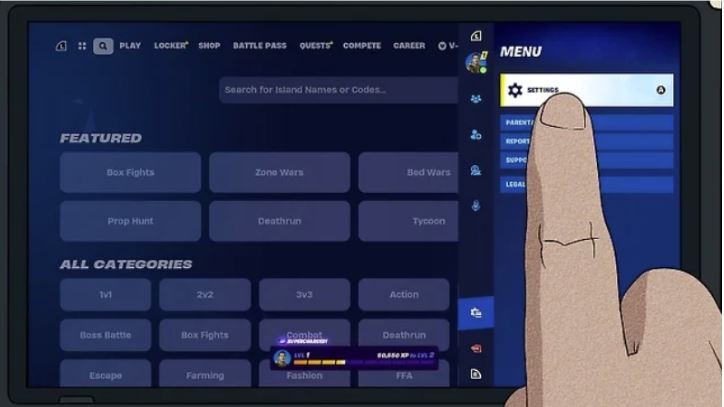
Step 2. Navigate to the HUD options tab.
Step 3. Enable “Net Debug Stats.” Then, when you join in a game, you'll see ping information on the top of your screen.
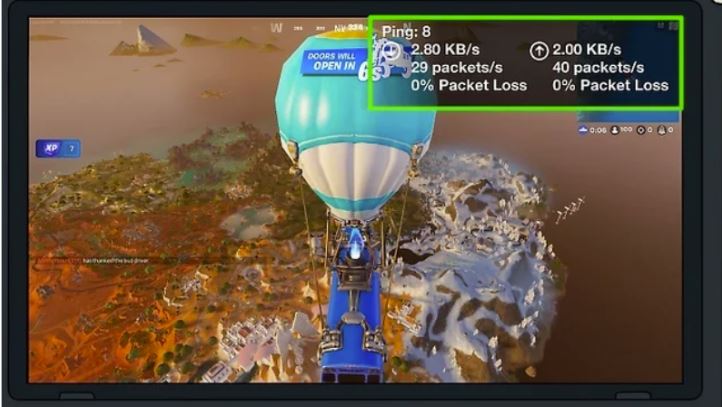
After activating this feature, your ping value will appear on the screen during matches. This makes it easier to fix how to see ping in Fortnite, analyze spikes in latency, and understand how to check ping in Fortnite before trying different optimization methods.
Once you know how to check ping in Fortnite, the next step is identifying what causes the issue. Many players searching for why their ping is so high in Fortnite are actually facing common network problems that can be fixed with simple adjustments.
Below are several common causes of high latency:
Incorrect server region – Connecting to a distant server greatly increases the time required for data transmission.
Bandwidth usage from other applications – Background downloads, cloud syncing, or streaming videos can consume bandwidth and raise ping.
Unstable Wi-Fi signal – Wireless interference and weak signals often cause packet delay and inconsistent latency.
Poor ISP routing – Sometimes internet providers use inefficient routing paths that slow communication with Fortnite servers.
Network congestion during peak hours – Internet traffic spikes in the evening can increase latency significantly.
Slow DNS resolution – Delayed domain lookup can slow server connection and increase overall network response time.
Identifying which factor affects your network will help you choose the best solution to reduce ping on Fortnite. Knowing how to get lower ping in Fortnite is a huge help because even small improvements in network performance can significantly enhance gameplay.
Now that you understand the causes of high latency, it’s time to focus on practical solutions. Below are eight proven methods that help reduce ping Fortnite and maintain a smoother connection during matches.
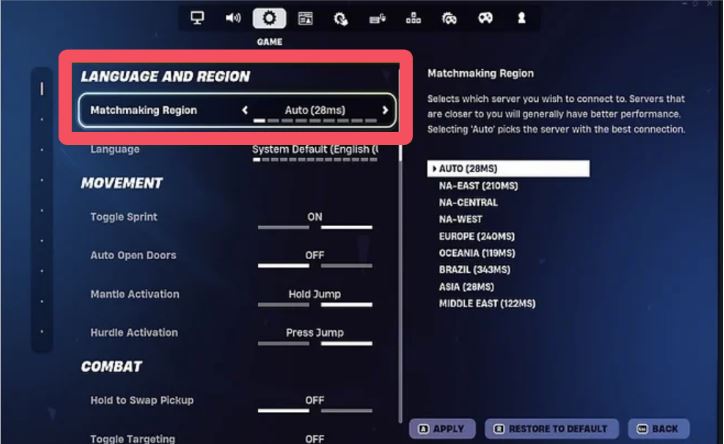
Fortnite automatically selects a server region based on your location, but the automatic choice is not always the most optimal. Manually selecting the closest server in the settings can often help reduce latency.
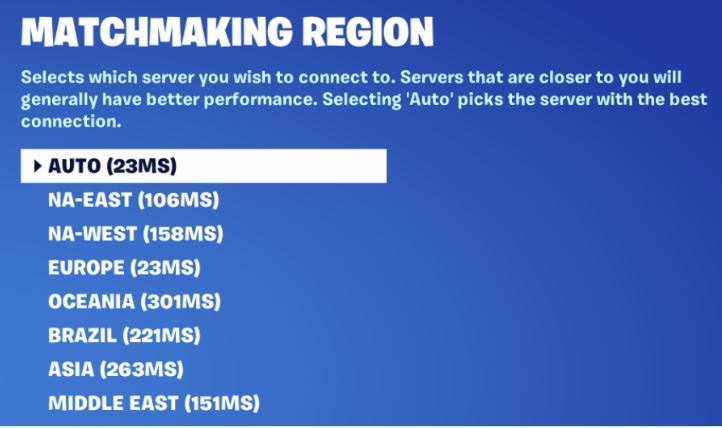
For example, players in the US usually get the best performance on NA servers, while in regions like Malaysia, selecting the nearest Asian server can significantly shorten the distance between your device and the game server, leading to faster communication and more stable Fortnite low ping.
Wi-Fi connections are convenient but often unstable for competitive gaming. Wireless signals can be interrupted by walls, other devices, or signal interference. Switching to a wired Ethernet connection provides a direct and stable link between your computer and router, which is one of the simplest ways to reduce ping on Fortnite.
Over time, routers accumulate temporary data and network errors that may slow down your connection. Restarting your router and modem clears cached data, refreshes your IP address, and reconnects to your internet provider.
Many applications run silently in the background and consume bandwidth. Closing unused programs frees network resources and helps achieve smoother gameplay.
If multiple devices share the same network, limited bandwidth can easily cause lag during online gaming. Upgrading to a faster internet plan increases both bandwidth and network stability. While this solution requires additional cost, it is often necessary for households with heavy internet usage.
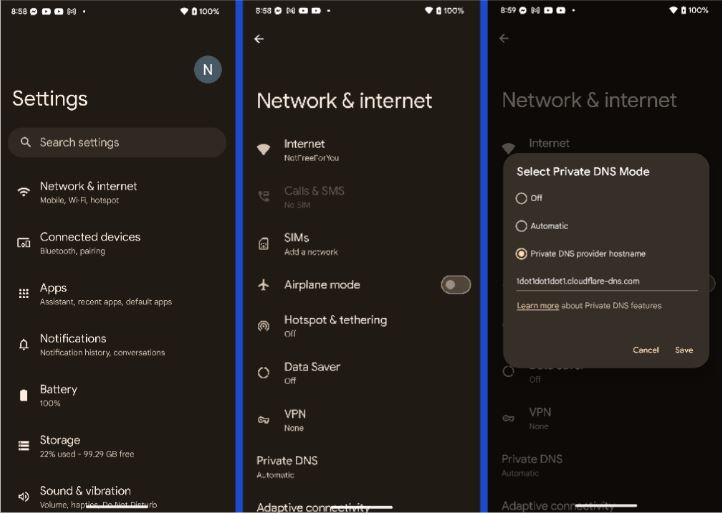
DNS servers translate domain names into IP addresses. Slow DNS resolution can delay connections to Fortnite servers.
Switching to public DNS services such as Google DNS or Cloudflare DNS may improve response time and help reduce ping Fortnite during server communication.
Quality of Service (QoS) is a router feature that prioritizes important internet traffic. By enabling QoS and giving Fortnite higher priority, your router can allocate more bandwidth to the game. This helps keep latency stable and prevents other devices on the network from causing lag during matches.
Log in to your router’s admin panel in a browser, open the QoS or Traffic Control settings, enable it, and set your gaming device as high priority. Save the changes to apply the settings.
Another effective solution for how to get lower ping in Fortnite is using a free ping reducer for Fortnite such as a reliable free VPN. While VPNs are often associated with privacy, they can also optimize network routes between your device and game servers.
Internet service providers do not always use the most efficient routing paths. In some cases, data packets travel through congested nodes before reaching the Fortnite servers. A gaming-optimized VPN can redirect traffic through faster routes and bypass network congestion.
This method is particularly useful in several situations:
Playing on servers outside your region
Experiencing ISP routing issues
Facing network congestion during peak hours
When it comes to improving network stability, many players consider using iTop VPN as a free ping reducer for Fortnite. Unlike traditional VPNs like ExpressVPN, this gaming-friendly VPN service can help optimize the data path between players and game servers.



A gaming VPN works by routing your internet traffic through optimized network nodes. This can reduce unnecessary detours created by ISP routing and improve the efficiency of data transmission. iTop VPN offers 3200+ fast VPN servers to quickly match a closest server for you.
Additionally, VPN features like dedicated IP can provide a more stable and consistent connection, especially during peak gaming hours. Besides, you can enjoy more benefits include:
Bypassing congested ISP pathways
More stable connections to international servers
Reduced packet loss during matches
Improved connection stability during peak hours
Additional privacy protection while gaming
Quick Setup (Most Fortnite Players Choose Windows PC):
Step 1. Download and install iTop VPN on your PC.
Step 2. Launch the app and choose a nearby optimized server.
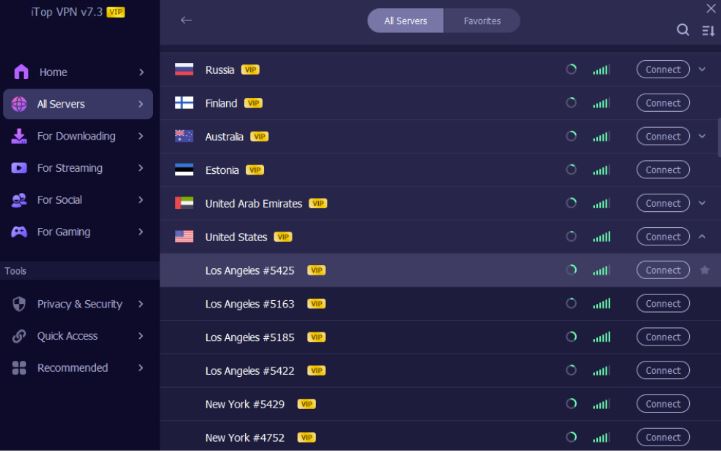
Step 3. Connect to the server before starting Fortnite.
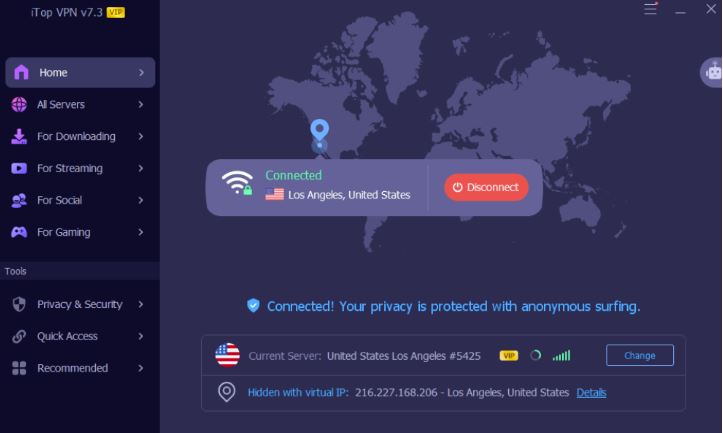
Step 4. Launch the game and check the latency indicator.
Although Fortnite has servers in several regions, network quality and routing efficiency vary greatly from country to country. In some areas, players experience unstable connections, higher latency, or limited server access, which increases the demand for VPN tools that can optimize routing and stabilize gameplay.
In general, the countries with the highest demand for VPN when playing Fortnite include:
The Bottom Line
That's all about how to get lower ping in Fortnite. By understanding the causes of high latency and applying network optimizations, you can significantly improve connection stability, reduce lag, and enjoy smoother, more responsive gameplay in every match. Optimize your device and enjoy fast and precise shooting now.

Steam Age Verification: How to Verify & Fix UK Verification Not Working

Buy Cheap TikTok Coins Online & with Free VPN in the Cheapest Country
Stop Blocking Crazy Games: How to Play Crazy Games Unblocked Anywhere Anytime

Best VPN for BGMI: How to Play BGMI Outside India for Free

Premier Free Fire VPN 2026: Best Anti-Lag VPN for Games [Free]

Naruto Slugfest VPN Guide: Unlock, Download, and Play Naruto Mobile Anywhere

How to Fix Hogwarts Legacy Lag, Stuttering, Low Frame Rate on PC

3 Best Free VPN for Valorant in 2026 - Play Valorant Anywhere Safely with Low Ping
10+ free servers in US, UK...
3200+ extensive servers
Dedicated IP addresses
Ad blocker and Proxy service
For Windows 11/10/8/7
Subscribe to Our Newsletter
Subscribe to our newsletter to stay updated every moment.

Subscribe to Our Newsletter
Subscribe to our newsletter to stay updated every moment.
© 2026 iTop. All rights reserved.






