iTop VPN offers 3200+ VPN servers in 100+ locations worldwide to help you access various sites privately and safely, along with dedicated IP, dynamic and static IP, and Double VPN.
Why does app store age verification appear? No matter Texas app store age verification or Utah or other repeated prompts, see what you can do. Check now.
If you’ve ever opened your device only to see app store age verification pop up unexpectedly, you’re not alone. Many users report that their App Store keep asking for verification even after they’ve already provided their birthdate and other details. This can be especially common in parts of the United States where new regulations are emerging, including situations involving Texas App Store age verification requirements.
With digital laws evolving and platforms aiming to ensure age‑appropriate content, Apple’s verification systems have become stricter. Understanding why you’re seeing App Store age verification prompts and how the system determines when to show them can help you manage and reduce the frequency of age checks while keeping your Apple ID safe and compliant.
App Store age verification is a system Apple uses to confirm a user’s age before granting access to certain content or downloads. It exists to protect minors from inappropriate content and to comply with regional regulations that require age verification for digital services.
Apple may request age details when creating an Apple ID or when downloading apps with age‑restricted ratings. This mechanism also helps enforce parental controls and limits on in‑app purchases. As privacy and digital protection laws tighten globally, platforms like the App Store are implementing stricter checks to align with legal requirements and protect users.
This understanding lays the foundation for why specific regions, such as Texas and Utah, are gaining attention with specialized age verification laws.
In recent years, Texas app store age verification has garnered attention due to the introduction of the App Store Accountability Act of Texas, which imposes specific obligations on digital platforms to verify age.
As a result, users in Texas might find themselves prompted for additional information more frequently when accessing age‑restricted apps. This shift connects to similar developments in other states, including Utah, where legislation also addresses App Store age checks.
The Utah App Store age verification legislation represents another state‑level approach to digital age protection. Utah’s laws focus on ensuring platforms assess user age before providing access to certain content, mirroring national concerns about online safety.
These developments in Utah, alongside other state efforts, are part of a broader push for clearer digital protection standards. Users in these regions should be aware that such age verification requests are tied not just to Apple’s internal policies, but to imposed legal frameworks.
Understanding these regional variations is key before exploring technical aspects like location detection and VPN usage.
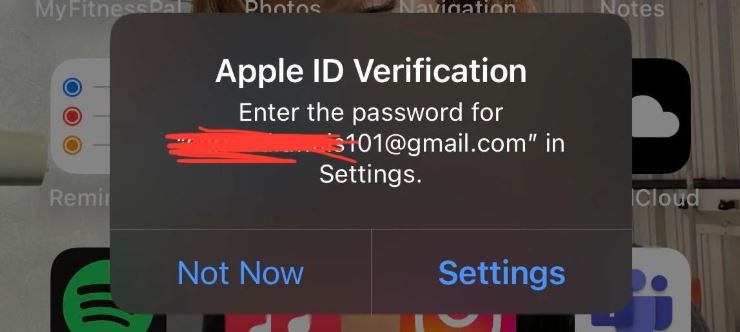
Users often feel frustrated when the App Store keep asking for verification even after submitting all required information. This behavior is not random - it reflects Apple’s multi-layered approach to ensure account security and compliance with regional digital laws. Factors such as changes in your account, device, or network environment can all trigger repeated verification requests. Understanding these triggers helps users anticipate prompts and manage their accounts more effectively.
Key reasons why repeated verification may occur include:
Changes to Apple ID – Modifying your email, password, or registered country can trigger a new check.
New device or device reset – Using a different device or restoring from backup may require re-verification.
Network or location changes – Signing in from a new IP address, Wi-Fi network, or mobile carrier can cause Apple to prompt for verification.
System updates – iOS or App Store updates may reset cached verification data.
Billing and payment inconsistencies – Differences between your Apple ID billing information and your detected location can lead to repeated prompts.
Impact on users:
Interruptions when downloading apps or making in-app purchases.
Confusion or frustration despite providing correct information.
Increased frequency of verification prompts in regions with stricter age verification laws.
This structured understanding allows users to take proactive steps to reduce unnecessary requests.
As discussions around digital safety and minor protection continue to expand across the United States, state-level regulations are increasingly shaping how platforms implement app store age verification systems. Rather than a single nationwide rule, the U.S. landscape is evolving through individual state legislation, each introducing its own compliance expectations. This fragmented regulatory environment explains why users in certain regions experience stricter or more frequent verification prompts than others.
States with and without App Store Age Verification:
While the legal framework remains dynamic and subject to updates, several states have already introduced or advanced laws that directly influence platform-level Apple ID age verification practices, including:
Texas
Utah
Louisiana
Arkansas
Mississippi
Virginia
States Without App Store Age Verification:
Some states without current app store age verification laws include:
California
New York
Florida
Ohio
Pennsylvania
Illinois
Georgia
Michigan
North Carolina
Washington
Massachusetts
Colorado
Tennessee
Arizona
Apple’s age verification process is not driven by a single factor; it relies on several inputs that collectively determine when a verification prompt is necessary. Before listing these factors, it’s important to understand that Apple combines account information, device data, and network signals to ensure the user’s age is accurate and consistent with local laws. These multiple layers explain why some users experience repeated prompts despite entering correct details.
The main factors influencing App Store age verification include:
Apple ID information – Birthdate, country, and billing address.
Device and regional settings – Language, time zone, and region settings configured on your device.
Location detection – IP address, SIM card country, and network information.
Account activity – New device logins, frequent network changes, or unusual purchase patterns.
Content ratings – Apps with age restrictions automatically trigger verification.
How Location Detection Affects App Store Age Verification:
Apple compares your current IP and device location with your registered Apple ID. Any mismatch may prompt repeated checks, such as:
Logging in from a different state or country.
Using public or shared networks.
Switching VPN servers frequently.
When these elements align, the App Store experience tends to be more predictable. However, mismatches between them can trigger repeated verification requests.
This explains why users sometimes experience unexpected app store age verification prompts after traveling, switching networks, or changing system settings. The system is not randomly requesting verification - it is responding to perceived inconsistencies in the account’s regional context.
Many users use VPNs to try and bypass age verification. A VPN can hide your IP address, give you a new IP, and encrypt your data, thus protecting your privacy on public networks. However, simply changing your IP address often isn't enough to prevent the system from requiring confirmation during age verification. Switching to a region without age verification and registering and logging into a completely new account is generally considered the best way to bypass age verification.
Using a trusted VPN service like iTop VPN, especially one that offers servers in regions without age verification, such as California, New York, and Florida, can help maintain a stable connection, avoid triggering age verification, and protect your online data.

Remember, Apple's verification logic still considers your Apple ID's country/region, billing region, and device settings. Therefore, using a reliable VPN along with registering a new account with completely new information is often an effective way to legally circumvent age verification. You can try a reliable and stable free VPN first; the free version of iTop VPN is a good option.
In addition, iTop VPN can help protect your credentials and prevent unauthorized access if you are connecting to public Wi-Fi or traveling. For users concerned about cybersecurity when accessing age-restricted content or downloading, choosing a reputable VPN service with a list of high-quality VPN servers featuring dedicated nodes in countries like India, the US, Japan, and France adds an extra layer of protection.
Another crucial point is that a stable connection reduces the risk of sudden network changes and triggering duplicate verification requests from Apple's system. Therefore, choosing a service that provides a dedicated IP feature helps maintain a stable digital identity.
So, for users who want to try changing their region to bypass the App Store age verification prompt, how can they use a VPN to do so? You can follow the steps below.
Step 1. Download and install a trusted VPN service like iTop VPN.
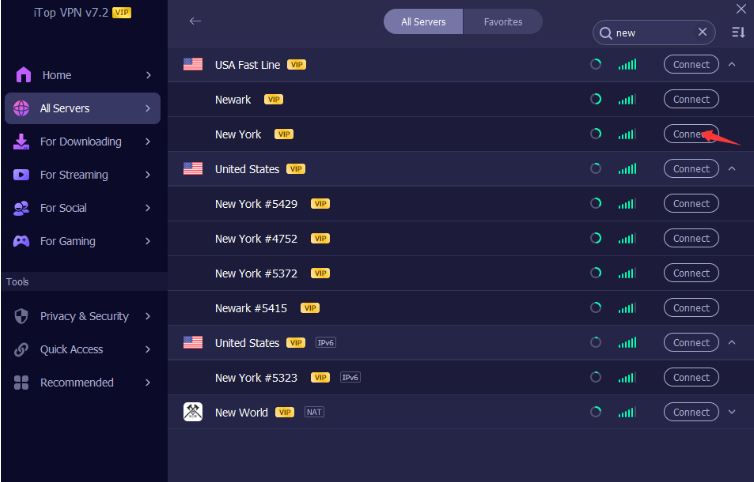
Step 2. Connect to a stable server that has no age verification, like a server in New York.
Step 3. Confirm if your current IP has changed successfully.
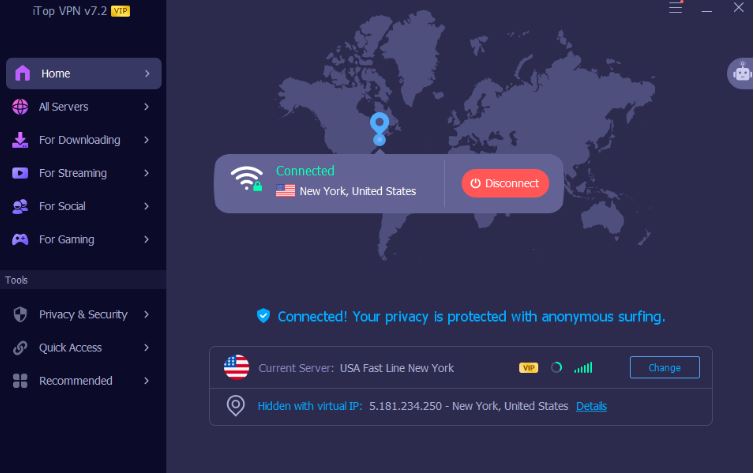
Step 4. Keep the same server location for consistency. And then open the App Store, create a new Apple ID, and continue usage normally.
VPNs, as a possible method to eliminate age checks, bring users more privacy benefits and give control over how their device appears online, making them useful tools in their digital toolkit. Combined with thoughtful account management, they contribute to a more predictable and secure experience. You can also use it to bypass Spankbang age verification, bypass YouTube age restrictions, etc. Besides, VPNs also support safe digital transactions, like buying TikTok coins cheaply, getting HBO Max cheaply, and more.
The Bottom Line
App store age verification exists to protect users and align with evolving digital safety laws, but it can sometimes lead to frustratingly frequent prompts. While regional factors like Texas app store age verification play a role, understanding the verification system and using tools like secure VPNs, such as iTop VPN, can help enhance privacy without violating terms of service.
10+ dedicated social app servers
Unblock your favorite apps
Encrypt and protect data

Subscribe to Our Newsletter
Subscribe to our newsletter to stay updated every moment.

Subscribe to Our Newsletter
Subscribe to our newsletter to stay updated every moment.
© 2026 iTop. All rights reserved.