iTop VPN offers 3200+ VPN servers in 100+ locations worldwide to help you access various sites privately and safely, along with dedicated IP, dynamic and static IP, and Double VPN.
Looking for the best VPN ARM Windows solution? Learn how a Windows ARM VPN works, key benefits, and how to choose the right option. Secure your device now
Users on Reddit often seek advice about choosing a VPN ARM Windows service that works properly on Surface devices. A recent post on r/Surface titled “cheap VPN recommendation on ARM?” reflects the confusion many Windows ARM users face for a long time. These devices look sleek, run efficiently, yet often struggle with compatibility, especially with VPN apps.

To help solve this problem, this article explains what a Windows ARM VPN really is, how it works, and why selecting the right VPN for Windows on ARM matters. By the end, you’ll know which VPNs provide ARM64 support, what features to consider, and how to set up a VPN work with ARM.
Before stepping into knowing how to choose the right VPN ARM Windows solution, you first need to know what ARM is.
ARM is a processor architecture designed for efficiency and low power consumption. It's widely used in smartphones and is now increasingly powering lightweight laptops.
Windows ARM refers to the ARM-optimized version of Windows 10/11. It runs ARM64 apps natively while emulating x86 apps. This mixed environment is why not all VPNs work perfectly on ARM laptops, making compatibility essential.
A VPN ARM Windows service is a VPN application designed to run smoothly on ARM-based Windows devices. Unlike standard x86 VPN apps, it uses ARM64-friendly protocols, supports native networking drivers, and ensures secure, encrypted tunnels without relying on emulation. These native tools make a VPN for Windows ARM far more efficient and reliable.
Then, should you use a VPN for ARM 64 on Windows? Using a Windows ARM VPN unlocks a broader level of performance, privacy, and accessibility that standard configurations can’t offer. It will improve how your ARM-powered device connects, protects, and interacts with apps, networks, and online services.
Stronger privacy protection by hiding your IP address and encrypting all traffic.
Better online security against tracking, data leaks, and public Wi-Fi risks.
Optimized ARM performance through lightweight protocols tailored for the ARM architecture.
Access to geo-restricted content across streaming, apps, and websites.
Improved stability on networks with censorship or throttling.
Faster gaming and streaming with latency-optimized servers.
Secure remote access for work, cloud services, and cross-platform sync.
For many remote workers, students, and travelers, a VPN for ARM 64 ensures stable, secure access anywhere.
Not all VPNs work correctly on ARM systems. Some can run under emulation, but lack full functionality, such as a kill switch, optimized servers, or supported protocols.
What's worse, VPN drivers may fail to load, resulting in slow or unstable connections. Therefore, choosing a vpn windows arm client with official ARM64 support ensures proper security, performance, and compatibility.
As ARM laptops become mainstream, users increasingly need reliable VPN ARM Windows tools. Below are three top options, each optimized for Windows ARM and offering different advantages. They also provide routing flexibility across regions, including servers in locations like India, the USA, the UK, the UAE, and more.
iTop VPN offers one of the most seamless VPN for ARM, thanks to strong ARM64 compatibility. It delivers fast speed, multiple stable protocols, and privacy features like kill switch, double VPN, dedicated IP, ad-blocker, DNS protection, etc., while keeping resource usage low.
With access to a global VPN server list, 3200+ fast servers across 100+ regions, it offers users a wide range of options to protect their ARM devices when they are working, traveling, or on the go. AES-256 encryption ensures users to use it with confidence in any location or with any public WiFi, absolute security, and anonymity.

Pricing is friendly and flexible. iTop VPN includes a free VPN plan and affordable premium tiers. It integrates smoothly into Windows ARM systems, unlike older emulated VPN apps. Users can download the app directly from iTop VPN to enjoy consistent performance. Whether you're commuting, studying, or traveling, this VPN ARM Windows is a good choice.
ExpressVPN is one of the few premium VPNs for Windows that delivers consistently high performance on Windows ARM devices, thanks to its lightweight protocol Lightway, which was engineered for speed, stability, and low resource consumption. This makes it exceptionally suitable for gamers, streamers, and users relying on fast real-time connections.

With a network of 3,000+ servers in 105 countries, ExpressVPN offers low latency, rapid server switching, and UHD-ready bandwidth.
Because ExpressVPN’s architecture runs natively and efficiently on ARM-based Windows laptops, users avoid performance bottlenecks or emulation slowdowns. Its capabilities, such as Threat Manager, split tunneling, private DNS, and strong AES-256 encryption, combine to provide both security and smooth performance. If you are very focused on speed and have no budget worries, it is your best choice.
NordVPN is known for advanced privacy protection and stable IP options, making it ideal for business users, remote workers, and creators who rely on secure, consistent connections on Windows ARM devices.
With 7400+ servers across 118 countries, it uses RAM-only servers, a strict no-log policy, and industry-leading encryption to safeguard sensitive tasks such as managing accounts, transferring files, or accessing region-locked platforms.
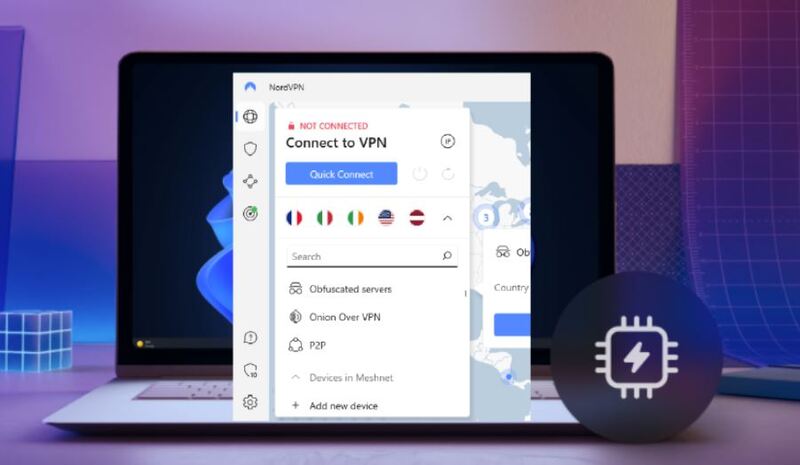
Its NordLynx protocol, built on an optimized WireGuard framework, performs smoothly on ARM chips - delivering fast speeds with minimal battery impact. NordVPN also offers dedicated IP, double VPN, onion-over-VPN, and dark web monitor, giving users stability and privacy beyond typical VPN apps. For travelers who route traffic through areas like Malaysia, Africa, and Japan, it performs reliably and securely.
If you’re new to VPN ARM Windows services, starting with a free VPN is a great option. The iTop VPN Windows ARM client supports ARM64 devices and takes less than a minute to set up:
Step 1. Install iTop VPN for Windows ARM.
Step 2. Open the app and select a free server. Click “Connect” to start encryption.

Step 3. When connected, check if your IP has changed. Then, browse securely across any website or app.

Choosing the right VPN for Windows on ARM requires understanding performance, security, and compatibility. Remember, select one that fits your needs best.
Here are the most important considerations:
Native ARM64 support to avoid emulation slowdowns.
Supported protocols such as WireGuard, IKEv2, or ARM-ready OpenVPN.
Server coverage, ensuring stable global routing.
Strong privacy tools, including kill switch and leak prevention.
Reasonable pricing and flexible long-term plans.
Compatibility with modern apps, including the Cisco VPN client for Windows 11 ARM.
Extra features like split tunneling, multi-hop, or traffic obfuscation.
The Bottom Line
Selecting the right VPN ARM Windows ensures your ARM laptop performs securely and efficiently across all networks. With proper encryption, native compatibility, and optimized servers, Windows ARM devices can deliver stable, private, and fast connections. To work, entertainment, and travel across any region, select one based on your needs and budget, and enjoy now.


10+ free servers in US, UK...
3200+ extensive servers
Dedicated IP addresses
Ad blocker and Proxy service
For Windows 11/10/8/7
Subscribe to Our Newsletter
Subscribe to our newsletter to stay updated every moment.

Subscribe to Our Newsletter
Subscribe to our newsletter to stay updated every moment.
© 2026 iTop. All rights reserved.