iTop VPN offers 3200+ VPN servers in 100+ locations worldwide to help you access various sites privately and safely, along with dedicated IP, dynamic and static IP, and Double VPN.
How to setup Bitdefender VPN manually Windows 11? How to use Bitdefender VPN on Windows 11? Bitdefender VPN download for Windows 11 and free alternatives.
Bitdefender VPN is a secure virtual private network service bundled with Bitdefender Security products, designed to encrypt traffic and protect your online privacy. For Windows users who prioritize data protection and flexible configuration, performing a setup Bitdefender VPN manually Windows process ensures better control and smoother operation. Manual installation is especially helpful when you're optimizing system performance or troubleshooting a corrupted network adapter.
In this guide, you'll learn everything from completing a Bitdefender VPN download for Windows 11 to mastering how to use Bitdefender VPN on Windows effectively. You’ll also discover when switching to stronger alternatives makes sense and which VPNs deliver better speed, coverage, and pricing.
Before you begin the setup Bitdefender VPN manually Windows process, ensure that your Windows 11 PC has the latest updates installed. Bitdefender Premium VPN relies on several system-level components, so a fresh environment prevents driver errors and ensures stable, encrypted connections. If you're upgrading from an older version, uninstall the older client first, then proceed with a clean Bitdefender VPN download for Windows 11.
Below are the complete steps to Set Up Bitdefender VPN manually:
Step 1: Download the Installer
Visit the Bitdefender VPN download page and save the installer file to your computer.
Step 2: Run the Installer
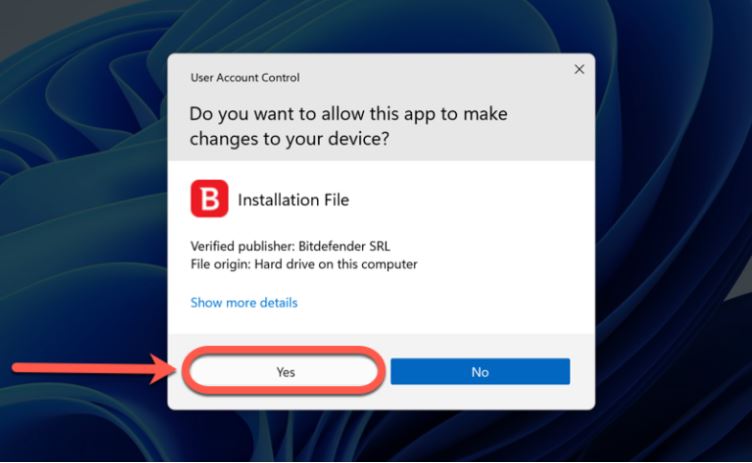
Double-click the downloaded file to start the setup and select Yes if Windows shows a User Account Control prompt.
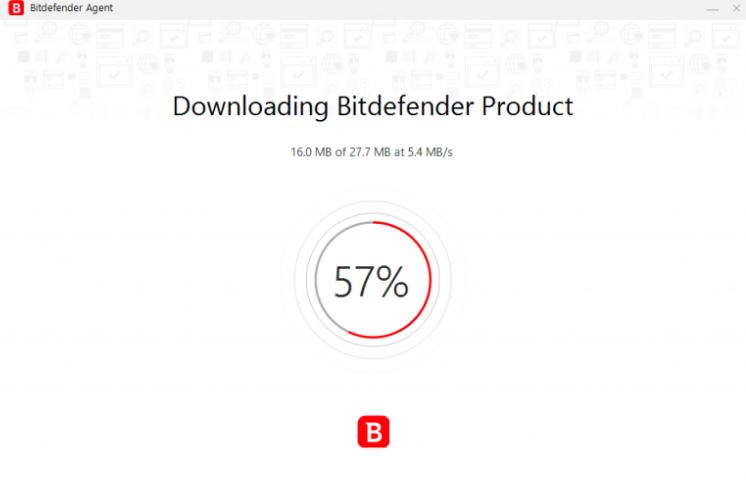
Step 3: Let the Required Files Download
Allow the installer to download all necessary components automatically.
Step 4: Choose Your Language
Use the drop-down menu to pick your preferred language.
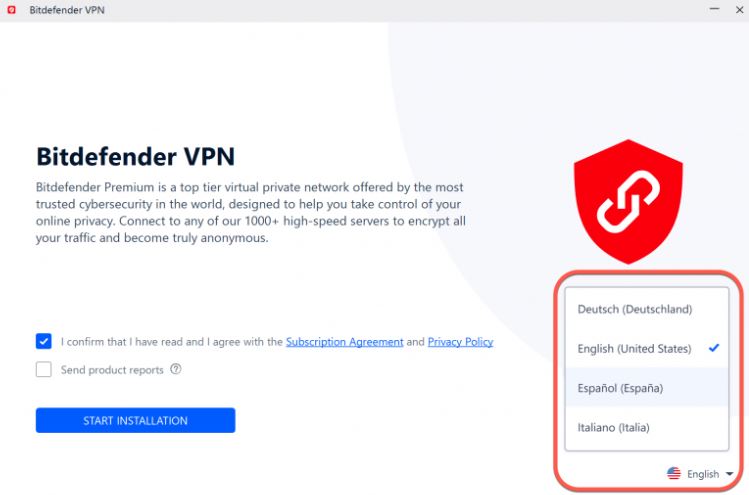
Step 5: Accept the Agreement & Start Installation
Read the Subscription Agreement, tick the box to accept it, and click Start Installation.
Step 6: Wait for the installation to finish.
Step 7: When finished, sign in with your Bitdefender Central account to activate the VPN.
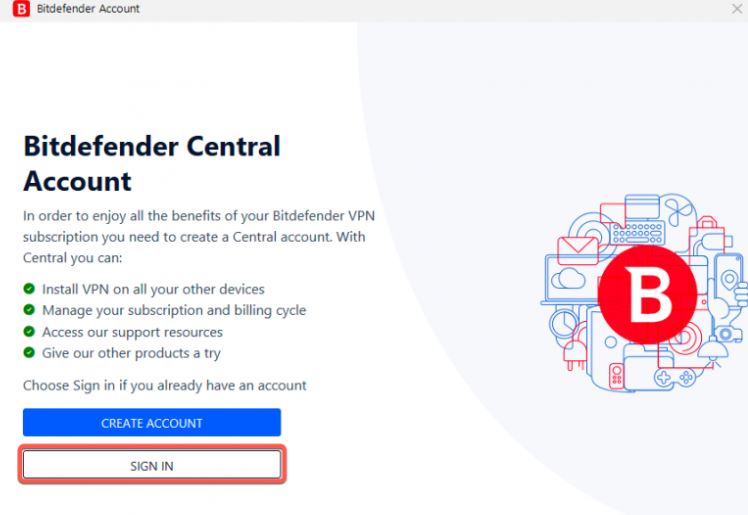
Now that your installation is complete, it's time to master how to use Bitdefender VPN on Windows efficiently. Bitdefender’s interface is straightforward, but optimal usage requires exploring features like auto-connect rules, Wi-Fi protections, split tunneling, and traffic routing. Once your setup Bitdefender VPN manually Windows configuration is finalized, you can begin using the VPN for streaming, privacy, or bypassing local restrictions. Whether you're traveling, connecting to unsecured hotspots, or protecting personal data, proper usage is key to maximizing security.
Steps to Use Bitdefender VPN on Windows
Follow the steps below to use Bitdefender VPN effectively:
Step 1. 3 ways to open Bitdefender VPN on your Windows
- Launch Bitdefender VPN from the Start Menu or the Taskbar
- Double-click the shortcut on your desktop.
- Launch Bitdefender Total Security, Internet Security, or Antivirus Plus, navigate to Privacy → VPN Panel
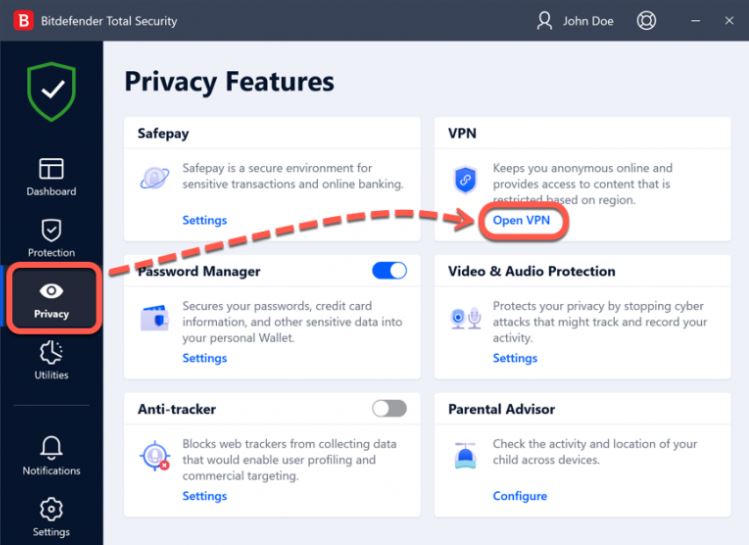
Step 2. Connect to the VPN
Pick a server location. Select nearby regions for speed, or distant regions for content access. Click Connect.
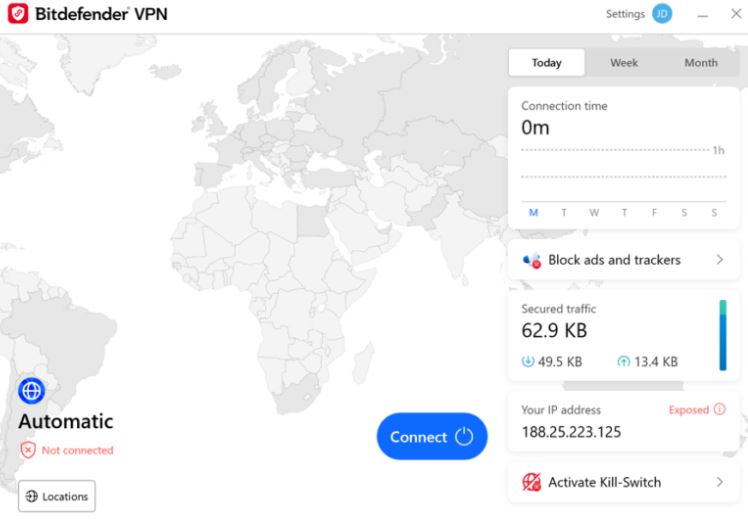
Step 3. Verify Connection Status
Check the taskbar icon to confirm you're protected.
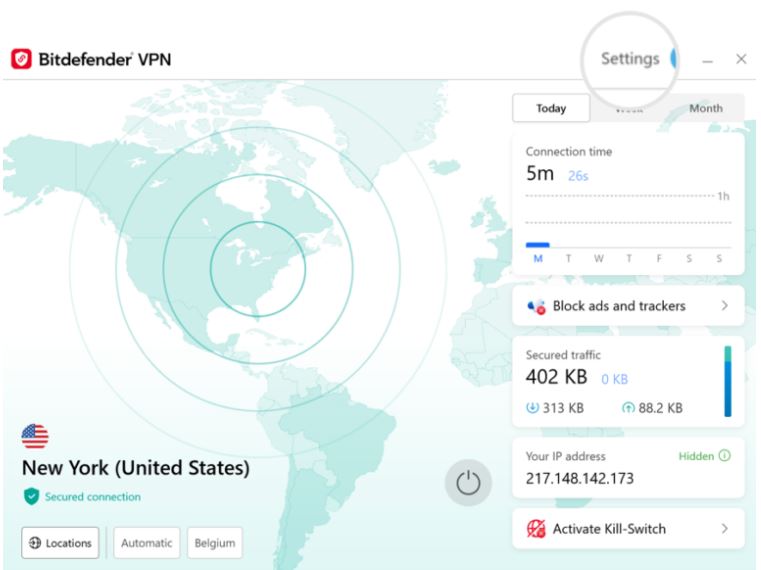
Although Bitdefender VPN works well for standard browsing, there are situations where users consider switching. After following setup Bitdefender VPN manually Windows instructions, some users find the service lacking certain advanced features or a wider geographic reach.
Before moving to alternatives, consider whether you:
●need more server locations and more extensive global coverage.
●desire for streaming-optimized performance across multiple platforms.
●need for a free VPN option with more free server locations, 3 offered by Bitdefender VPN
●interest in advanced tools such as kill switch settings, protocol selection, dedicated IP, double VPN, and more
●need for VPNs compatible in countries like India, Turkey, Malaysia, etc.
●limitations with P2P, online gaming, or remote work connections
Is Bitdefender VPN good? Most users think it is. However, if you’ve exhausted the setup Bitdefender VPN manually Windows options and still feel limited, exploring alternatives can help you find better speed, compatibility, and security. Different VPNs excel in different areas - some offer stronger global access, others provide top-tier encryption or specialized server types. Below are three of the best alternatives, each compared with Bitdefender VPN in a practical way. These options are all suitable as a VPN for Windows.
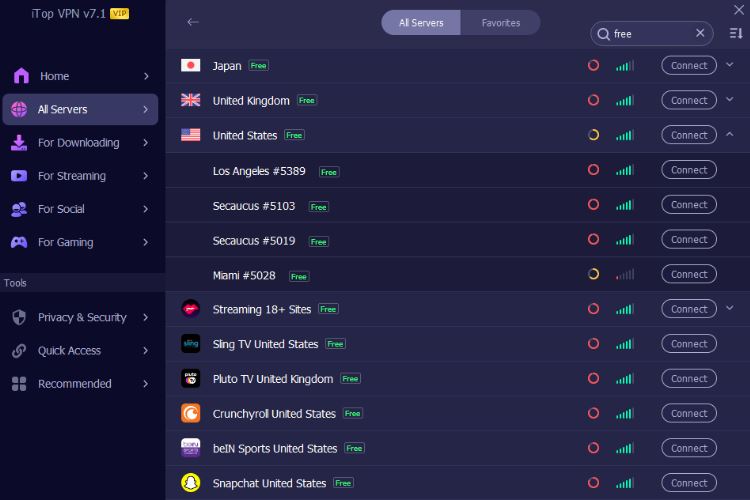
iTop VPN offers much richer free VPN servers, about 100 free servers, compared to Bitdefender VPN, 3 free servers or fewer, especially for users who want fast global streaming or privacy features.
iTop VPN provides 3200+ VPN servers across 100+ locations and updates its network frequently. This helps users who previously relied on setup Bitdefender VPN manually Windows but still encountered connection or speed issues. iTop VPN also includes tailored servers for streaming, social platforms, and latency-sensitive gaming. Bitdefender's simplicity also cannot match iTop’s.
In terms of pricing and plans, Bitdefender Premium VPN is included in some security bundles, but iTop VPN offers both a generous free plan and flexible premium tiers. Users searching for Bitdefender VPN download alternatives can choose iTop VPN, which is a balanced and accessible alternative for users who want stronger control and faster speeds.
When comparing Bitdefender VPN vs NordVPN, the biggest differences lie in privacy features and server quality. NordVPN has one of the world’s largest encrypted networks and integrates advanced features like Double VPN, Onion-over-VPN, and threat protection layers.

Users who complete setup Bitdefender VPN manually Windows often realize that Bitdefender lacks the protocol customization and high-security modes NordVPN provides. Till this December in 2025, it updated its servers to 8700+ servers in 170+ locations, NordVPN greatly exceeds the Bitdefender VPN extension and core service in global performance.
NordVPN also stands out for consistent speeds and excellent unlocking capabilities for international content - something Bitdefender struggles with. Although Bitdefender Premium VPN is easy to use, NordVPN is better for professionals, travelers, and privacy-focused users.
ExpressVPN is another strong competitor, known for premium performance, top-tier privacy, and ultra-fast servers. Compared with Bitdefender VPN, ExpressVPN offers better optimized routes and more consistent high-speed connections.
Users who go through setup Bitdefender VPN manually Windows but still face network limitations may find ExpressVPN smoother for streaming and international browsing. ExpressVPN also supports its own Lightway protocol, providing superior stability over Bitdefender’s simplified engine.

Bitdefender VPN is suitable for casual browsing, but ExpressVPN caters to users who demand robust features like split tunneling, high-quality encryption, and dedicated apps for gaming consoles and routers. Though more expensive, ExpressVPN offers unmatched performance for users who prioritize reliability, speed, and fully audited privacy.
Whether you want to setup Bitdefender VPN manually Windows or explore stronger VPN alternatives, understanding your security needs is the key to choosing the right solution. Bitdefender VPN works well for basic protection, but other services may offer broader features, better speeds, and global access. Evaluate your workflow, region, and privacy needs before deciding which VPN fits best.
10+ free servers in US, UK...
3200+ extensive servers
Dedicated IP addresses
Ad blocker and Proxy service
For Windows 11/10/8/7
Subscribe to Our Newsletter
Subscribe to our newsletter to stay updated every moment.



Product
iTop VPN iTop Screen Recorder iTop Data Recovery iTop PDF Editor DualSafe Password Manager iTop Easy Desktop Plans & PricingCompany
About Us Contact Us Press Awards FacebookHelp
Support Uninstall Instructions Refund PolicyPartner
Become iTop Affiliate YouTube Creators Free AI Video Generator
Subscribe to Our Newsletter
Subscribe to our newsletter to stay updated every moment.
© 2026 iTop. All rights reserved.