iTop VPN offers 3200+ VPN servers in 100+ locations worldwide to help you access various sites privately and safely, along with dedicated IP, dynamic and static IP, and Double VPN.
Cross-site tracking: what is it? How to prevent cross-site tracking iPhone? Learn everything about it and check how to prevent cross-site tracking iPhone or disable it.
With features like "prevent cross site tracking iPhone" intended to restrict how websites and marketers track user behavior, Apple has made privacy a fundamental component of the iOS ecosystem. Third-party trackers may try to monitor your online activities while using Safari in order to create comprehensive profiles without your express permission. By stopping this, unwanted data collection and annoying advertisements will be decreased.
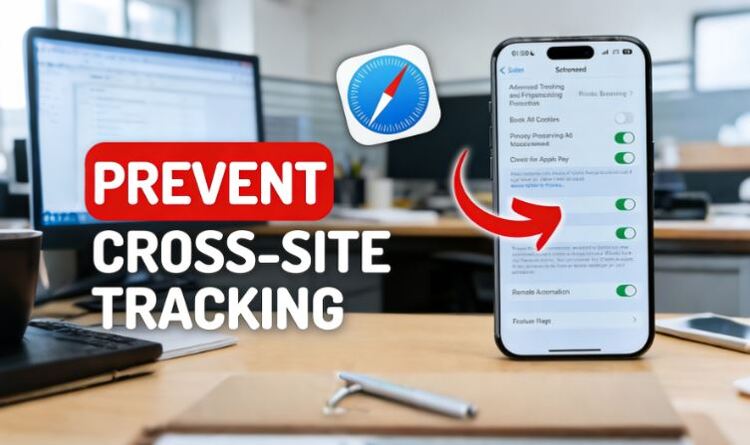
Simultaneously, a lot of users are curious about how to prevent cross site tracking, when to change the option, and if they should ever turn off cross-site tracking in Safari for improved website compatibility. iPhone users can achieve a balance between privacy, usability, and performance by properly managing this function.
What is cross-site tracking on iPhone? Generally, cross-site tracking refers to the use of third-party cookies, scripts, and identifiers that follow users across multiple websites. On iPhone, this typically occurs within Safari or in-app browsers, enabling advertisers to link browsing behavior across domains and create targeted advertising profiles.
Many users choose to enable prevent cross site tracking iphone after noticing ads that seem to “follow” them from site to site. Others become more privacy-conscious when using public Wi-Fi or browsing sensitive content. Apple’s Safari makes it easy to activate this protection without installing additional software.
Step 1. On your iPhone, go to Settings > Safari.
Step 2. Tap Privacy & Security to access Safari’s privacy controls.
Step 3. Toggle on Prevent Cross-Site Tracking.
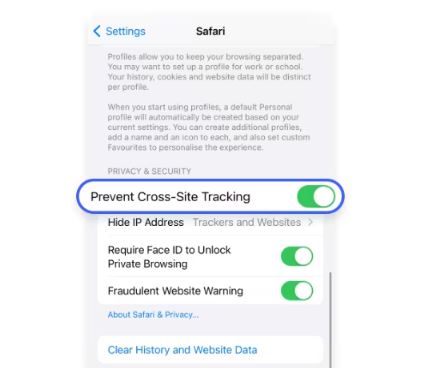
Once enabled, Safari automatically limits third-party cookies and blocks known tracking technologies. This setting applies across all Safari browsing sessions and is one of the most effective built-in ways to prevent cross-site tracking on Safari on iPhone.
Despite its benefits, some users decide to disable prevent cross site tracking Safari when encountering broken website features or login issues. Certain web platforms rely on cross-site elements for authentication, embedded tools, or region-specific services, which may not function properly when tracking is blocked. To disable prevent cross site tracking Safari, you can:
Step 1. Go to Settings and open Safari.
Step 2. Navigate to Privacy & Security.
Step 3. Toggle off Prevent Cross-Site Tracking.
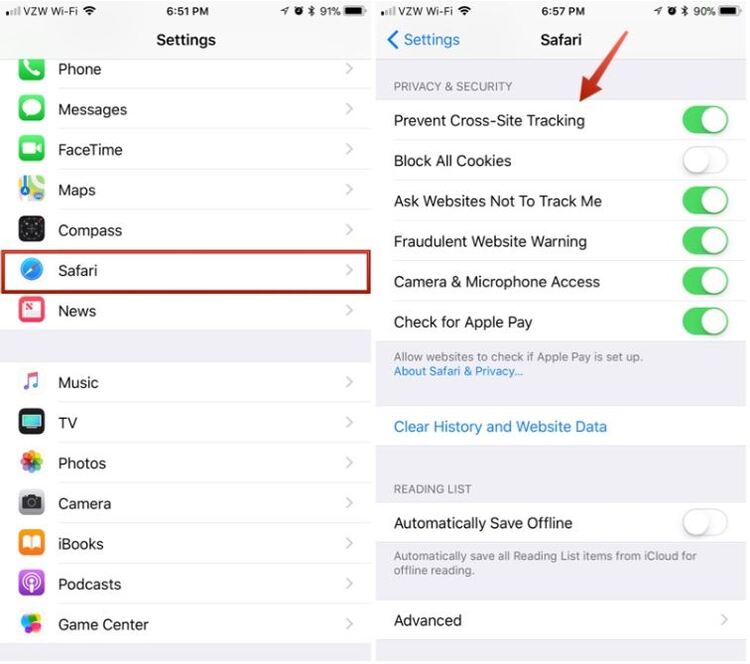
This process explains how to disable "prevent cross-site tracking" on iPhone safely. If you turn it off temporarily, it is recommended to re-enable it once the task is complete to minimize exposure to cross-site tracking.
Safari settings focus on browser behavior, but many privacy risks exist beyond the browser itself. A VPN adds an additional layer of protection that works system-wide, not just within Safari. A VPN for iPhone enables:
Encrypted Internet Traffic
A VPN encrypts all data leaving your iPhone, not just Safari traffic. This means apps, background processes, and system services are protected alongside browsing activity.
IP Address Masking
Unlike Safari settings, a VPN hides your real IP address at the network level. This protection applies across all apps and networks, creating a consistent privacy shield beyond the browser.
App-Level Privacy Protection
Many forms of tracking happen inside mobile apps rather than websites. A VPN prevents these apps from exposing real network identifiers, extending protection beyond prevent cross site tracking in Safari.
Cross-Device and Multi-Platform Coverage
VPN protection is not limited to one browser or one device. The same VPN can secure your iPhones, iPads, computers, and other electronics, providing unified privacy across a user’s entire digital environment.
Safer Public Wi-Fi Usage
When connected to cafes, airports, or hotels, a VPN prevents interception of browsing data. Using a trusted free VPN can significantly extend iPhone privacy.
Once users enable prevent cross site tracking iPhone, many look for additional tools to strengthen privacy at the network level. The following VPNs complement Safari’s settings while addressing different user needs.
iTop VPN is well-suited for users who want flexibility without complexity. It offers a 3200+ selection of servers across 100+ countries, clearly presented in its public VPN server list. Its iOS app integrates smoothly with Safari and does not interfere with prevent cross site tracking Safari.
In addition to strong encryption and stable performance, iTop VPN offers upgrade paths such as a dedicated IP, which is useful for services that block shared IPs. More security features like a kill switch, double VPN, ad blocker, add more protection to your iPhone use. Its free VPN version is enough for light daily use, while the paid plans start at an affordable level.

NordVPN provides one of the largest server networks in the industry, 7400+ servers spanning over 118 countries. This broad coverage makes it suitable for users accessing region-specific content or traveling frequently, including locations like India, Singapore, the UAE, the USA, the UK, Canada, etc.
Its iOS app includes advanced features such as Threat Protection and Double VPN, which enhance security beyond basic encryption. While pricing is higher than that of entry-level VPNs, long-term subscriptions reduce costs and appeal to users seeking premium privacy tools.
Surfshark focuses on simplicity and value. It allows unlimited device connections, making it ideal for families or users with multiple Apple devices. Its server network covers many popular regions, including Southeast Asia, with strong performance in areas like Malaysia.
The iOS app is lightweight and intuitive. Surfshark’s CleanWeb feature blocks ads and trackers at the DNS level, complementing prevent cross site tracking iPhone by stopping tracking before it reaches the browser. Its low-cost plans and intuitive interface make it a strong option for budget-conscious users.
Pro Tip: Boost your privacy and speed by using iTop AI Cleaner to regularly clear tracking cache and unwanted system clutter.
Change this setting or not, you should understand both sides of the decision.
Pros:
Reduces behavioral profiling and targeted advertising
Limits third-party data sharing across websites
Enhances overall privacy when browsing with Safari
Works seamlessly without affecting system performance
Cons:
May cause repeated logins on certain websites
Can break embedded content or payment verification tools
Some regional services may not function correctly
Disabling may be required temporarily for compatibility
For most users, keeping “prevent cross-site tracking iPhone” enabled offers stronger long-term privacy benefits.
While Safari’s protection is valuable, it does not cover every aspect of online tracking. Users often overestimate what browser-based tools can achieve on their own.
Your IP address is still visible to websites.
Internet service providers can still see browsing activity
Tracking may continue outside Safari, such as in apps
Network-level data can still reveal location patterns
Because of these limitations, prevent cross site tracking Safari works best when combined with broader privacy tools, like using a VPN for iOS.
The Bottom Line
"Prevent cross site tracking iPhone" is a powerful Safari feature, but it only addresses part of the privacy equation. Now you know it limits browser-based tracking, but it cannot protect network traffic or app activity. Pairing Safari’s settings with a reliable VPN creates a more complete and resilient privacy strategy for iPhone users navigating today’s tracking-heavy internet.
10+ dedicated social app servers
Unblock your favorite apps
Encrypt and protect data

Subscribe to Our Newsletter
Subscribe to our newsletter to stay updated every moment.

Subscribe to Our Newsletter
Subscribe to our newsletter to stay updated every moment.
© 2026 iTop. All rights reserved.