iTop VPN offers 3200+ VPN servers in 100+ locations worldwide to help you access various sites privately and safely, along with dedicated IP, dynamic and static IP, and Double VPN.
How to hide your IP on Discord, bypass IP bans, and hide Spotify activity? 4 methods are here. Do now to protect your privacy and enjoy Discord securely.
An IP address can reveal approximate location, internet provider, and sometimes even more personal information. So, how to hide IP on Discord is always the first consideration for Discord users who want to keep their activities secure and private. Whether you want to manage multiple communities or chat casually with friends, understanding how to hide your IP on Discord is crucial to prevent unwanted tracking and data leaks.
 In addition, Discord users often want to protect their listening habits as well. Many wonder in Discord how to hide Spotify activity to keep their personal preferences or emotional states private. No matter what your target is, you will find the answers and specific steps in this article.
Before exploring protection methods, it’s essential to know how your IP might be exposed while using Discord. Although Discord routes all voice traffic through its secure servers, some activities can still lead to IP leaks.
Common reasons include:
Clicking on suspicious links or malicious invitations.
Using third-party bots or unofficial integrations that access your data.
Direct file transfers or voice calls via external tools.
Weak or unsecured Wi-Fi networks expose your real IP.
Using outdated apps or browser versions without HTTPS protection.

Understanding these scenarios helps you take proper preventive measures before your IP gets revealed.
Now that you know the causes, let’s explore practical solutions. If you’ve ever seen errors like “NordVPN couldn’t load IP and ISP info,” you might already understand the importance of using the right tools and methods. Here are four effective ways to protect your online identity and learn how to hide IP on Discord completely.
The most reliable and secure method to hide your IP on Discord is using a VPN. A VPN encrypts your traffic and routes it through a remote server, masking your real IP address and location. A VPN also helps when you are looking for a guide on how to bypass IP ban Discord server by assigning a new IP through a different region.
Steps:
Step 1. Download a trusted VPN for Windows or mobile app.
Notice: NordVPN is actually a well-established and popular VPN, but given the issues many users have reported, it's recommended that you choose another trustworthy VPN, such as iTop VPN.
Step 2. Launch the VPN and connect to a secure server.
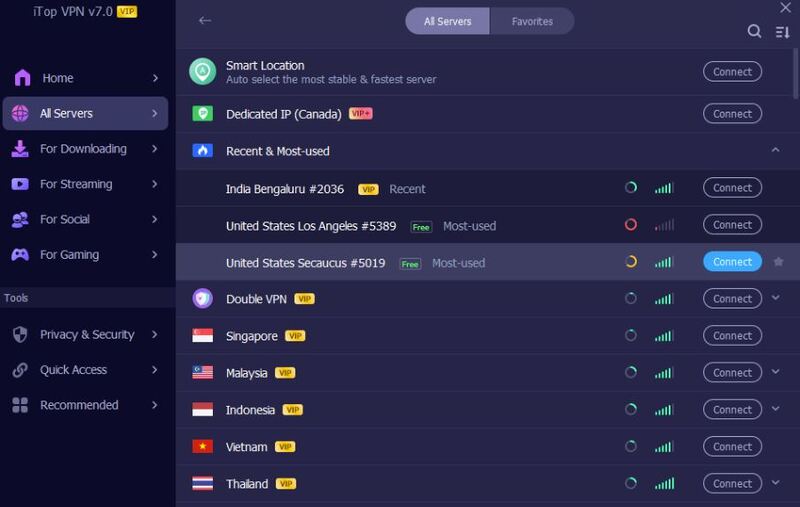 Step 3. When connected, check if your current IP has changed.
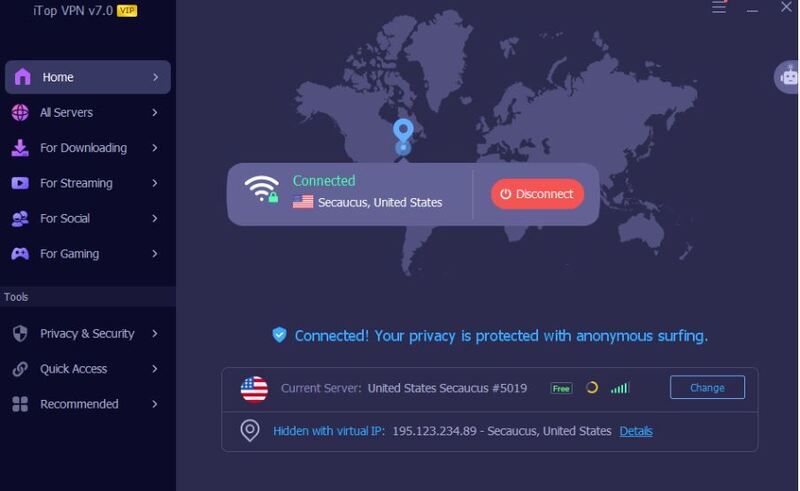
Step 4. Open Discord. Your IP is now hidden with the new IP.
Tor routes your data through multiple encrypted relays, making it almost impossible to trace. While slower than a VPN, it’s a great backup for privacy-focused users. Simply download the Tor browser, log into Discord through its web app, and your real IP will be hidden behind multiple layers of encryption.
A proxy server can also mask your IP address, but it’s less secure compared to a VPN since it doesn’t encrypt your traffic. You can manually configure a proxy in your operating system settings or browser. However, many proxies can leak data, so this method is best for low-risk activities rather than full protection.
If you want a quick, free workaround, switch to a different network. For example, use mobile data or a public Wi-Fi connection. This method temporarily changes your IP address, but it’s not ideal for long-term protection.
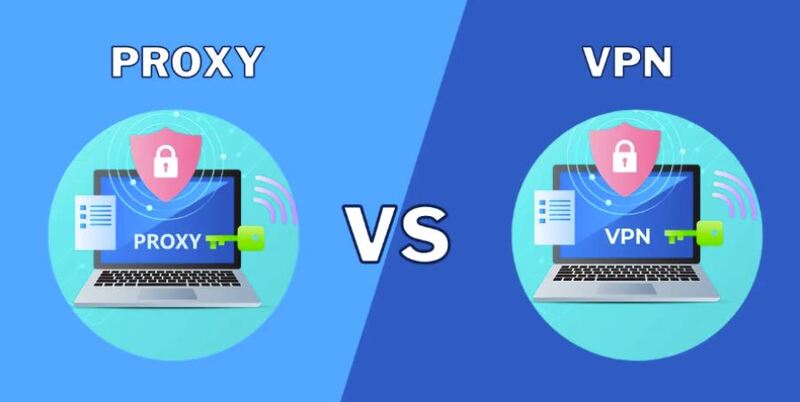
Although both tools can mask your IP, VPNs are far more secure and versatile. A VPN encrypts all traffic, preventing leaks even if you click unsafe links, while proxies only reroute limited data. For privacy, stability, and bypassing bans, always go with a VPN for Discord instead of a proxy.
If you want to secure your Discord account, hide your IP, and bypass regional restrictions, this part helps you choose the right VPN. A good VPN not only protects your identity but also ensures smooth voice and video calls without lag. When selecting a VPN for Discord, you should focus on security, speed, server coverage, privacy policies, and multi-device compatibility, and on top of that, price.
Key Features for a Discord VPN Suggest Consider:
Strong Encryption: Look for AES-256 or higher encryption to protect your messages and voice chats from hackers.
No-Logs Policy: A strict zero-logs policy ensures that none of your activity is recorded or monitored.
High-Speed Servers: Low-latency, high-bandwidth servers are critical for smooth voice communication and streaming.
Kill Switch: Automatically blocks internet access if the VPN disconnects to prevent accidental IP leaks.
Wide Server Network: Select a VPN with global servers in different regions, such as servers in the U.S., India, Japan, France, Italy, Malaysia, and more.
Multi-Device Compatibility: Supports Windows, Mac, iOS, and Android, so you can protect all your devices.
Affordable Pricing: Flexible plans or free VPN options provide value for both casual and frequent users.
A VPN with the above features ensures not only privacy but also reliability. One of the most reliable choices is iTop VPN.
iTop VPN is a good combination of security, speed, and ease of use. It offers AES-256 military-grade encryption, a zero-logs policy, and optimized servers for low-latency voice communication. With over 3200 VPN servers in more than 100 countries, iTop VPN allows you to bypass regional restrictions and prevent IP leaks.

Besides, its dedicated IP feature ensures you can keep a consistent, private identity without random IP changes. Smart Location and Split Tunneling features let you use Discord safely while other apps stay on local connections. Both free and premium options are available. Overall, iTop VPN is a reliable and versatile choice for anyone looking to enhance their Discord privacy and security.
Step 1. Install iTop VPN on your mobile device or desktop.
Step 2. Connect to a low-latency server near your region.
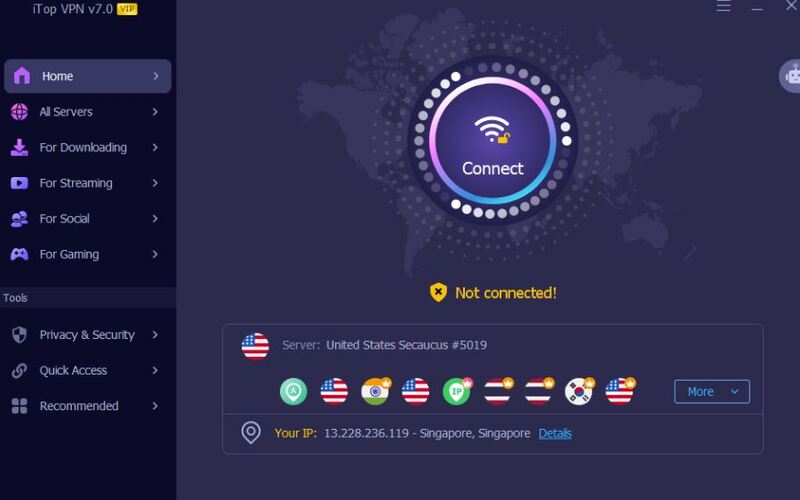
Step 3. Open Discord, your IP address is now hidden.
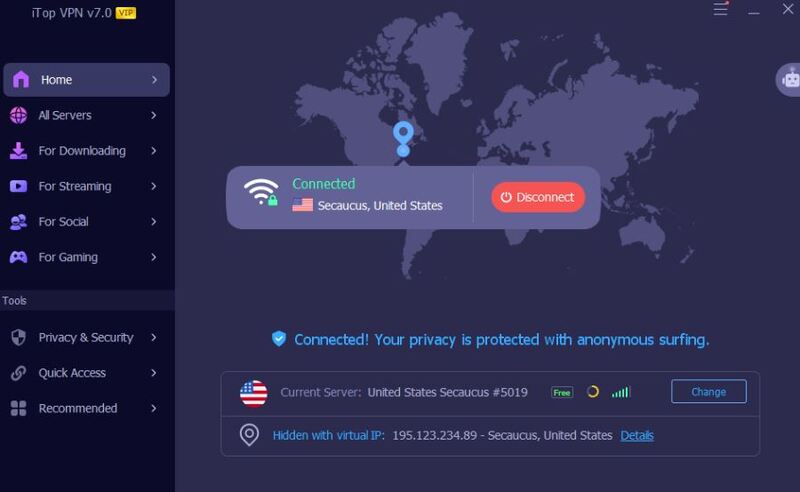
iTop VPN is a good VPN that not only protects your IP but also enables secure access to other online platforms, such as buy TikTok coins pages, streaming services, or regional Discord communities.
After securing your IP, now it's time to learn how to hide Spotify activity to stop friends from seeing what they’re listening to. Here’s how to keep your listening habits private.
Open Discord and click on User Settings (gear icon).
Go to Connections → Spotify.
Toggle off Display Spotify as your status.
This prevents your music activity from appearing under your profile.
Tap your profile icon → Connections.
Find Spotify, and turn off “Display on profile.”
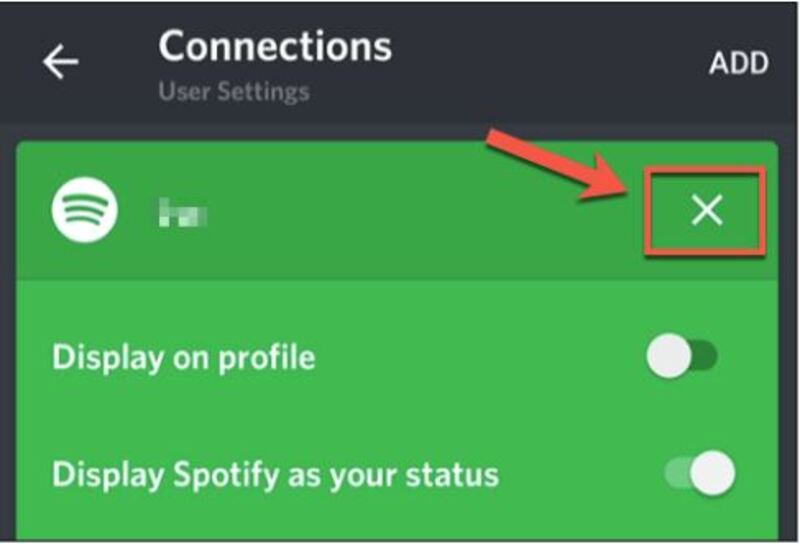
Now your Spotify activity will stay hidden while using Discord on mobile.
If you don’t want to disconnect Spotify entirely, you can:
Enable “Private Session” directly in Spotify.
Create a secondary account for Discord connection.
Avoid using shared servers when listening to personal playlists.
By following these, you can fully control Discord how to hide Spotify activity without giving up your favorite integration features.
The Bottom Line
How to hide IP on Discord is not hard for protecting your identity and avoiding unwanted exposure. Whether you use a VPN for Discord, Tor, or a proxy, prioritizing your privacy is a must. Combine IP protection with hidden Spotify activity settings, and your Discord experience will stay both secure and personal. Just take action now.
Subscribe to Our Newsletter
Subscribe to our newsletter to stay updated every moment.

Subscribe to Our Newsletter
Subscribe to our newsletter to stay updated every moment.
© 2026 iTop. All rights reserved.